error loading picture.. please try later
Answers
-
I am sorry for you guys, because these image collections are golden. Hopefully it will go away for you soon.
1 -
Whoa.... So we all are hackers? Yup! 🤪
But creating another account (and later another more) 😆 would We able to continuing Our previous work? It's like to renewing ID card every month...
0 -
I have also experienced this error. It is completely independent of specifics: after viewing about 30 images (whether consecutively, using the arrows, or jumping around, using the thumbnails), it needs a "rest period" in order to show you any more images. While it's resting, nothing you do -- reload, forward/back, typing in a number -- results in anything other than an error message and blank or fuzzy screen.

The way it usually manifests, if I'm stepping through using the arrows, is that clicking the arrow changes the number, but not the image. For example, in the above screenshot, I'd only actually gotten to image 31, but clicked twice before I realized that it hadn't done anything. Then I zoomed out to the thumbnails and tried to zoom back in to the image, and got the "Error loading image" message.
1 -
Dear Szent-gyorgyi!
Are You hungarian?
Thank You very much for sharing Your experience!
That picture I posted didn't created by swiftness. When I clicked at Mr. Gail's link the first page came up already in that same "artistic quality". Then I slowly went forward from one page to the next until I got to 4th without any success. Finally I randomly clicked at the eight one that's that which quality You noticed here. The picture came up quickly but then didn't began to turning into a sharp normal photo. Certainly a technical error.
0 -
Dear Gail!
In my opinion to creating another account wouldn't to be a good idea - maybe for one time - but that only in such case if the problem not solvable within a short time ca. max. for a week maybe (?)
But without technical "surgery" the number of new accounts probably would to be too much for the servers of FamilySearch.
Tomorrow I will have family day, so I'm curious what would to be happen first?
0 -
Kedves @AgnesSzanyi2! Igen, magyar vagyok.
Mint írtam, a hibának semmi köze a részletekhez: a rendszer egy időre "lefolytja" a képeket bizonyos szám után. Gondolom, hogy az új fiók nyitása azért működött anna a hozzászólónak, mert újraállította a számlálót. Lehet, hogy az előzmények (sütik stb.) törlése hasonló eredményre vezetne, de én nem szeretek velük játszadozni, mert nem szeretem, amikor a böngésző kiiratkozik valahonnan. (Utálom az egész feliratkozás/bejelentkezés/jelszó kalamajkát.)
@Gail Swihart Watson, I think the reason @Dan Mackin's hack worked for him is that the new account reset the counter, so he didn't need to wait out the "rest period".
I have not had the patience to figure out the duration of said rest period. I also think that it's not always enforced, or not on every server: it's probably traffic-based. That is, if you live in an area with good bandwidth and are using FS during off hours, then you will likely not experience this error. It's if you're using FS at the same time as every other user in your country is also doing so that you hit this particular snag.
0 -
From comment of Szentgyörgyi I forgot to mention that clearing the cache (either Chrome or Mozilla) causes signing out. Every time signing in and being signing out quite trying.
Her idea about waiting out the "rest-period" is a very exact expression. There is any option how any individual could to learn when are they near to the limit or long away from it?
I already wrote about my opinion about new accounts.
I think We thought enough to understanding, and collected enough "evidence" for technical error.
I hope from my whole heart that this thing would be to reparable!
Thank You for every comment! 👏
0 -
@Gail Swihart Watson - thanks so much for checking the links and posting images, maybe it is just my account.
0 -
I don’t think that it has anything to do with the amount of use. I’ve been reading records online since they were available at least 3-4 times a week for several hours at a time.
I tried all of the suggestions and a few of my own. I worked on it for 3 hours…so frustrating.
I sent an email to support. Hopefully they will get back to me.
0 -
Coming into this conversation late... sorry.
I recall this same issue with a user from last year - and yes, in my opinion it dealt with exceeding a query/access threshold - these settings are stored FamilySearch server side for your account (I believe) - so there really isn't much you can do but try getting ahold of FamilySearch technical support (you can always try joining this group). That user last year was in contact with FamilySearch support about the issue - I do not know the results. I also do not know whether this could be an issue localized to some FamilySearch content server/service (stored in cookies/cache) - again best thing would be for a FamilySearch representative with technical access to diagnose your account/Internet connection. I have not experienced this issue over years of searching images ... but I have not done a whole bunch of queries/access recently.
@guy_przytula Can you clarify what you mean by access table? Do you mean Microsoft Access database table - or just a table in a spreadsheet? I wonder if the type of table you are creating creates a persistent connection - something FamilySearch might not like... and yes, might exceed an access threshold or be something they might block...
1 -
I'm getting this error message a bunch tonight. Film # 008263724, for one.
0 -
i have been in contact with UK support (living in europe) and they could not resolve the problem either..
just try to live with it...
0 -
AgnesSzanyi2 I didn't suggest creating a second account, and I don't think I would ever suggest that!
I am very curious if anyone on the tech team would be able to chime in and communicate what the issue is and why some are not experiencing it - like me. I had a short term issue that search results would jump around and make it very difficult to click a link. That lasted about 4 or 5 days and then - magically - it stopped. Hopefully there is something going on behind the scenes which is temporarily causing this, and then you all will be magically fixed, like I was.
If not, it is incredibly short-sided to think that someone would never spend several hours in a row clicking through image groups. I think all of us in this thread are serious researchers and know that kind of dedication is the way to bust through brick walls or, in my case, be successful assisting others with lineage research. So many image groups are not indexed and must be directly investigated, not searched. The back end servers - if that is what the problem is - must anticipate this usage.
2 -
Hello Gail!
Yes, there we are serious researchers, and we spending long times - if not a whole day - on FamilySearch either as indexers or family tree researchers.
After our last conversation at 7 Oct, before signing out I made a try with opening a picture, and as a miracle there was no problem! Today at 9th looks like as if this trouble went away. It's a mystery really.... 🤨
1 -
Ah, same issue for me with 429 status code for records with images. I go through records quickly looking for surnames that interest me. After browsing through ~80/90 pages, I start getting that error. Absolutely frustrating..
Not sure what is the regular process for reporting bugs for this website :(
0 -
"Error loading image. Please try again later."
I've been getting this error since last evening. At first I noticed it was happening intermittently. But it's just been down ever since.
Yes, a lot of records are really messy and all over the place so you need to hop around to even find the right parish
0 -
I am having the same problem others have described. Extremely frustrating.
0 -
I have been locked out of viewing any images on FamilySearch for about 24 hours now. "Error Loading Image. Please Try Again Later." Tried clearing cache and signing out and back in again. Nothing fixes it. Tried the workaround. Got the !429 Error Message. Tried using a different browser. What is going on ? Tech support, please fix this.
0 -
I am in Australia and had the "Error loading image please try again later” message for the last eighteen hours.
The thumbnail is not displayed and when I click on “view original document” I get a black screen or the aforementioned error.
This has happened to me before but it usually resolves itself within an hour or two.
Does anyone have any recommendations please?
I’m not sure how to contact technical support.
I have already tried using different browsers.
Strange the same message appears on my iPad, mobile phone and desktop. Does this mean the problem is with my account?
Thanking you kindly for any advice.
0 -
Hello All,
Without realizing that others have had this problem, I clicked "Ask a Question" mid afternoon yesterday, the 10th, about this same problem. Here is the link:
As I wrote earlier, this issue has never lasted this long, but as of now, it still doesn't allow me to access any database images, even through the profile's in the Family Tree.
Please "tech support", find out what's going on.
Thanks to all who have reported this here.... as they say, "squeaky wheel gets the grease."
Steven
0 -
There seems to be no rhyme or reason on how or when this issue gets corrected. I signed in today to find my ability to view images has returned. No more "Error Loading Image" message. I would guess that one needs to wait at least 24 hours for the issue to "clear." However, I believe someone previously said they had been experiencing the problem for 3 days. So who knows? The problem seems to occur mostly when attempting to view multiple images sequentially, one right after the other. I've been experimenting with jumping around, and skipping a few images here and there. This is only possible when I am looking for a specific group of images by date. It's possible to skip from 1850 all the way to 1870. Other times, this method of skipping around would interfere with conducting a thorough search of the records. So far, so good. Still wish we could get some kind of explanation from FS. I contacted support. Still waiting for a response.
0 -
Having the same problem with California County Naturalizations. Was scrolling through images without any trouble and then suddenly, for no reason, error loading images. Signed out, cleared out cookies, signed back in, same trouble.
0 -
Having the same problem for over two days now. Tried everything, clearing cookies, Firefox, Google Chrome. Same problem on my Ipad.
0 -
Thank you for this latest bug report regarding the image viewer. We have forwarded this to the correct department to see if they can determine the extent of the problem and fix it. You may be contacted through direct messaging (envelope next to your profile picture) for more details.
0 -
My ability to view images seemed to have corrected itself, but it was short lived. After viewing less than 100 images today, the error message returned. I should mention I heard from support and was informed that engineers are aware of the issue and are working on it. Support stated that "some of our guests have had some success after clearing their system and browser cache and rebooting their computers." I had previously tried clearing my cache, which did no good, so I did try totally shutting off my computer, and turning it back on again. Needless to say, shutting off your computer every time you get this error message is completely unworkable. But it did work for me that one time. However, I was only able to view about 73 more images before I was back to square one with the error message again. Hardly worth the trouble. Very frustrating. I suggest that everyone who has this problem contact support so it remains on their radar. It seems to have been first reported in Aug 2022, and people are still getting this message in October, so it is not fixed.
0 -
Hello again,
I'm with L.S.C., if you're having this problem, please post a note to keep this issue on the radar. "Squeaky wheel, gets the grease". This has been going on since late July or early August, & seems to be getting worse.
I too contacted customer support, & they sent the same email to me, "This is an issue our engineers are aware of and are working on a solution...." & "....some of our guests have had some success after clearing their system and browser cache and rebooting their computers." These things didn't help in my case, but this morning I was able to scroll through a number of images in a database without an index. However, after maybe 50 or 60 images, the same issue came back.
May a solution be found soon.
Steven
0 -
Having not browsed through a digitised film recently I decided to see what would happen to me. I only got as far as image 51 (of 603) before the image locked. Refreshing the page led to either a blank screen or the "Error loading..." message.
Let's hope the engineers will be able to fix asap, as this problem must be seriously hindering users' research - especially those who are searching image-only collections for missing (non-indexed) events.
Update - took a few minutes to write the above and, on return to the film, found I was able to click-through to image 81 before again being stopped by that image locking. Will try to carry on later.
Final update! Twenty minute break, then got up to image 117 before locking / blank screen / quick flash of "Error loading" message.
0 -
Three days now. I was at least able to scroll thru 50 or 60 image of Quebec notary records before I was again blocked with the error message. I didn't bother trying to get around this issue, as that is a waste of time.
During the 5 minutes to get to this page & type the above, something changed & I was able to scroll thru another 30 or so pages, before again, the error message appeared.
May a solution be found soon.
Steven.
0 -
Please, everyone, try using the viewer found in Search - Images to view your films. See Sam Sulser's instructions.
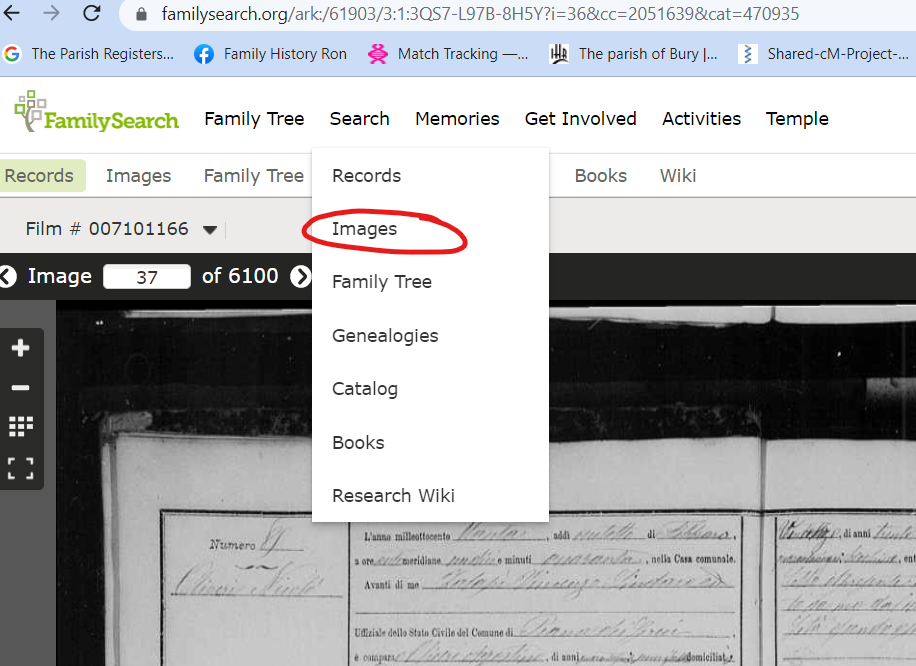 0
0 -
@AgnesSzanyi2, @Julia Szent-Györgyi, @LaLa8246, @Natasha65, @TTaylor_2, @L. S. C., @Paul W, @StevenMartin61
I understand that you are having difficulty viewing images: the system may freeze up for long periods of time preventing you from seeing the next image; you see an error message, "Error Loading Image;" or you may see some other error, such as Error 429 - and with all these, you are unable to view the image.
We really need your help, as these problems are not always able to be reproduced. Therefore, we ask that you provide as much information as possible: (1) what film are you viewing, (2) how are you trying to view the images, e.g., are you viewing image-by-image or did you try to go to a single, known image number; (3) after how many images did you see the problem; (4) please provide a screen-shot of the specific error message that you see. The more information that we have, the sooner we will be able to fix the problem.
We understand that this problem is causing a lot of frustration and we apologize for it. With your help, we hope to be able to resolve it.
1