Unable to find my post after July 2021 in Community

I have 8 posts in Community. When I click "My Posts", or "My Discussions" from the Quick Link area, I am only able to see 4 posts from 2021. How can I access the other 4 posts? I believe they were all asking for help translating German documents. Thank you.
Roberta Egelston
Answers
-
@Roberta Egelston
From your profile https://community.familysearch.org/en/profile/discussions/Roberta%20Egelston
I see 9 posts, including this one.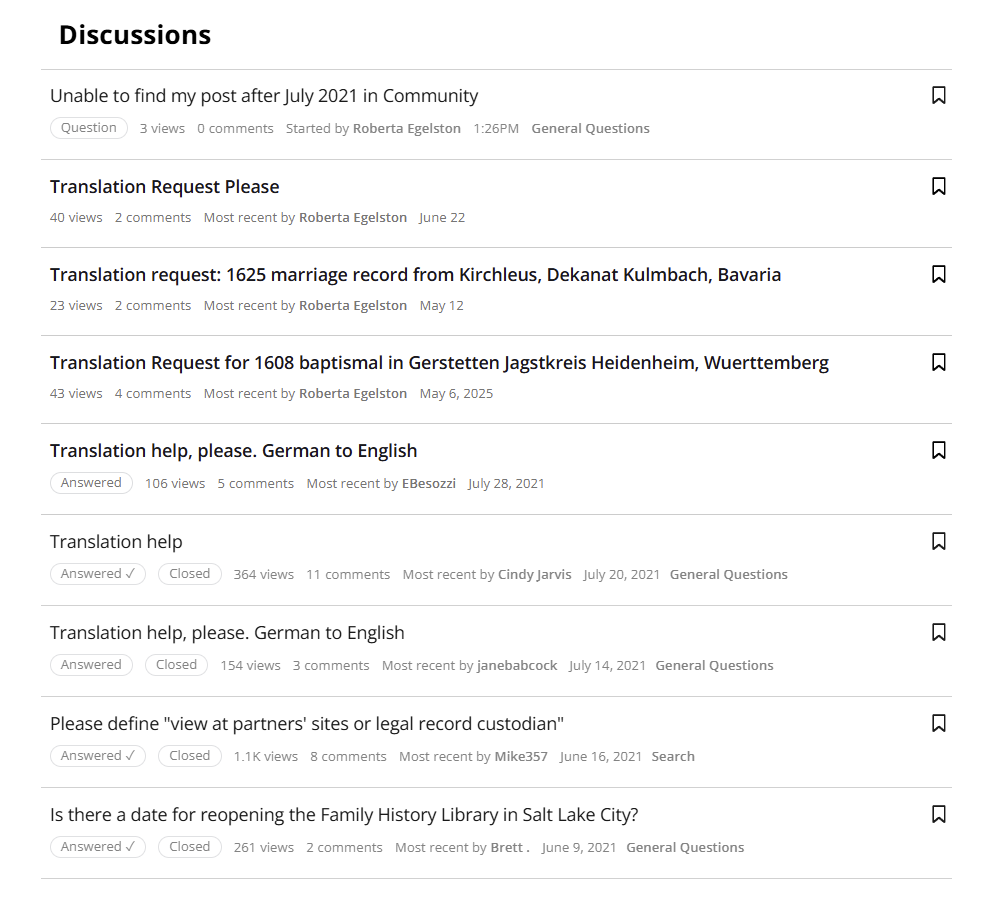 1
1 -
You may be missing posts for several reasons. A post can be removed if it violates the Community Code of Conduct. This may include issues related to copyright, changes to rules governing the sharing of content, photographs, or PDFs, or other policy updates.
It is also possible that one or more of your discussions were merged into another discussion. When this happens, your original post no longer appears as a standalone thread because it becomes part of the larger merged conversation. In those cases, your post is still preserved, but it will not show up separately in your list of discussions.
0 -
@sc woz Nothing is missing.
@Roberta Egelston Posts made within groups, such as the ones you made in the Germany Research Group, are not findable by an ordinary search. The easiest way to find everything is from your profile, as in the link I posted above.
4 -
I wonder if several databases are being maintained, to try to keep the size down for manageability. There are ways to have separate databases searchable, but I don't know the ins and outs of the connections and how to keep the traffic between them from becoming a problem in and of itself.
However, it might be worth the time for the dev teams to look into it, as there is a frustration issue created by not being able to find useful conversations made, simply because of where in the community the conversation was written.
3 -
@David Alan Webber I know I have answered questions similar to this one multiple times. Agree, there is a level of frustration for users who don't use the platform frequently.
3 -
Thank you for your answers. I have used the link you sent me Aine.ni.Donnghalle and am able to see all my posts. However, after I sign-in to the Community, when I click my name and go into my profile and either click "My Discussion" or "My posts", I do not get all my posts. I am not a frequent user and appreciate any internal fixes that would make the Community easier to navigate. I would find it especially helpful if a message notification was posted to the email account associated with the Research Group sign-in. Thank you all for helping me.
0 -
FamilySearch does not maintain multiple public Community databases, but the platform does use a distributed architecture behind the scenes. Different parts of FamilySearch—such as Community, Family Tree, Records, and Indexing—operate on separate data systems for performance and stability. Searches only access the specific system they’re designed for, which helps keep traffic manageable.
During the 2021 Community migration, older discussions were archived or removed, and not all content was transferred into the new database structure. This is why some pre‑migration posts no longer appear in user histories. The current system reflects only the content retained after the transition.
At this time, the FamilySearch Community does not send email notifications for every post or reply made within Research Groups. Notifications are limited to the options available in your Community profile settings, and those settings currently do not include automatic email alerts for all group activity.
Your feedback is appreciated because many users would find additional notification options helpful. I will forward your suggestion to the appropriate team so it can be considered for future improvements to the Community platform.
In the meantime, you may want to check your Notification Preferences in your Community profile to ensure you’re receiving all available alerts.
Thank you again for your thoughtful input and for being part of the FamilySearch Community.
1 -
@Roberta Egelston
You can set your notifications to receive email alerts. I don't because I don't want the extra emails.
In your profile, account & privacy settings
https://community.familysearch.org/en/profile/account-privacy
Then Notifcation Preferences on the right side.
A checkmark under the bell means you're notified here, in the Community.
A checkmark under the inbox icon means you'll get an email.
For example, in Groups: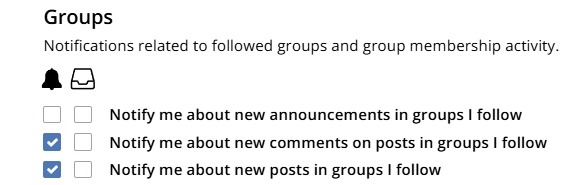 2
2 -
Thank you for your informative answers. I understand the need to operate separate data systems. What still confuses me is that the posts that do not appear when I am signed into Community and click my profile, then click posts where 9 are listed, but only 5 are visible to me were posts from 2025 and 2026. I made these posts through Community because I was requesting translation help from the Germany Research Community. The posts from 2021 are there, so it appears they migrated with the new system.
I have still been unable to access the list of all the 9 posts that Áine.ní.Donnghaile sent in an earlier email. I am also unable to open them up to see what was actually written at the time. Is there some way to do that? Thank you for your continuing help.
0 -
To: sc woz and
Success. I have finally been able to access and open all my posts. Here is the path I took. Maybe this will help others.
- Sign into Family Search on homepage
- Click ? in circle; Click Community. Sign in.
- Go to My Groups. Click the Group where the posts were directed.
- Click my profile on top right corner of page
- Click "Account and Privacy Settings"
- Click box "Back to Profile"
- On right side of page under the word Activity, Click Posts.
Thanks.
0 -
@Roberta Egelston Do you mean to say that you cannot access the list of your posts from the link I provided?
When I click through that link https://community.familysearch.org/en/profile/discussions/Roberta%20Egelston
I see 9 posts you have started: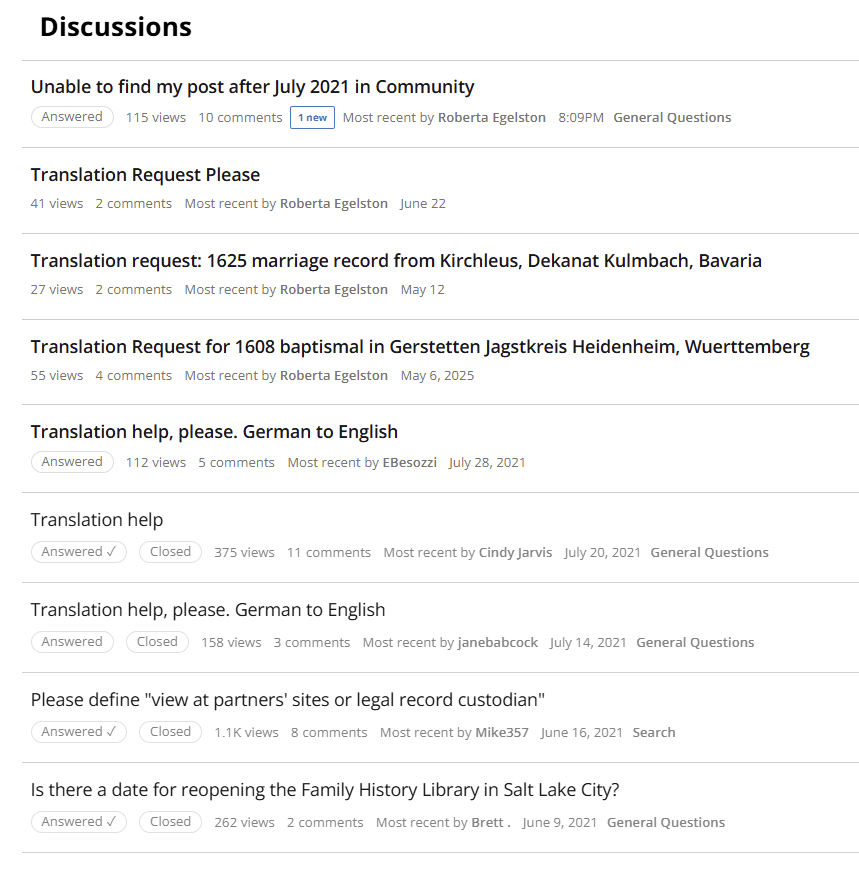 1
1 -
Yes, I can access them from the link you provided. However, I did not want to have to go back to your link in notices to see my posts, so when I try to recreate your path: Sign in to Family search, then sign in to Community and click my profile and then click Posts under discussions, I am only able to see 5 posts. This is also what happens when I click Discussions in the Quick Links section. The steps I posted yesterday are the only way I have been able to view all 9 posts I have made since 2021.
Thanks.
0


