Linked names are again causing major frustration in Indexing Review

@dancingintherain I thought the Linking problem had been fixed as I haven't had a problem until today. See the example:
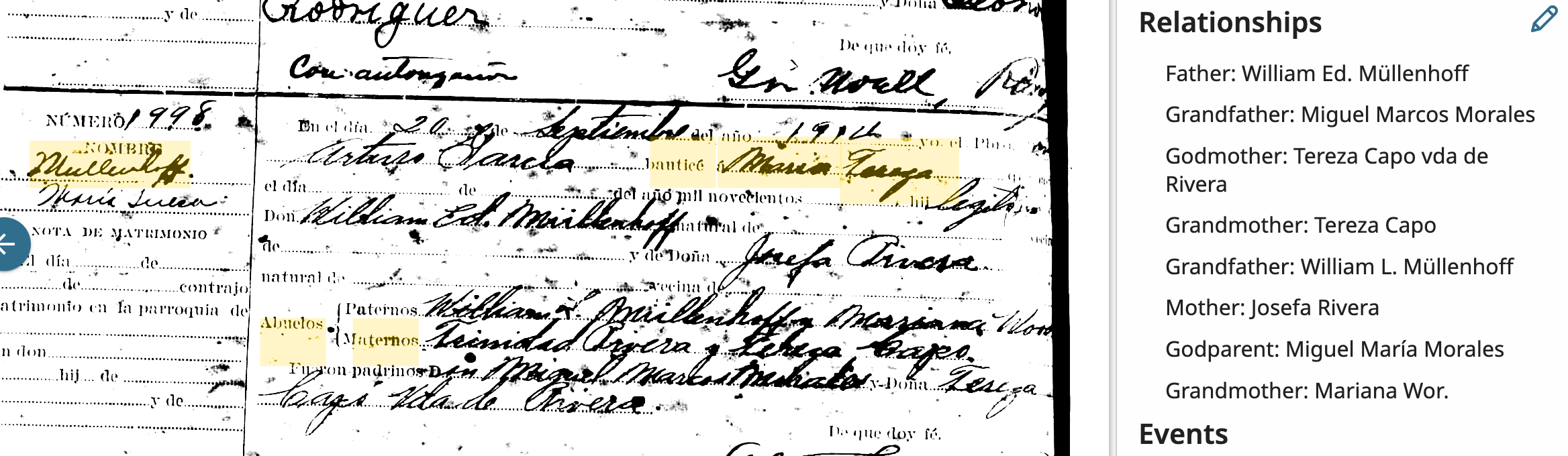
The program kept Linking a gfa Trinidad Rivera with both the Godfather Miguel Marcos Morales' given and surnames. I tried repeatedly to unlink the names from every angle of which I could think. If I could get some insight I'd appreciate it. I was so excited to see a German name in Puerto Rico in 1814!
Answers
-
@Mary Rice I see the problem, and it is odd that you couldn't unlink the names. When you unlink, did you detach the highlights and then attach new highlights? Did this record have a "Record Detail" you could click on to compare the transcribed record with the original record? The only thing I can think of is to try to ignore the highlights and fill in the Family Review Edit Tool (the edit tool that pops up on the right side of the record) with all the correct relationships. Then try to submit. Not sure if that will work, but it might be worth a try. Let me know. I think we ought to get it checked for a bug as well.
2 -
I think there is a bug. I am noticing it in Census records and School District records. There are incorrect relationships which link names, i.e. a sibling is listed as a child, that type of thing. When I try to correct the relationship, it will not let me unlink. It will create another correct link, but I cannot delete the incorrect link. After Update, I hit SAVE and it will never stop spinning.
0 -
@dancingintherain Yes, I always pull up the Record Details of each family I review to see if my changes are being changed on the Record Details. Mostly they are except when there are Linked Names like the one above that stubbornly won't change. After I sent this Question I tried one more time to correct the names by Hitting the Edit Button to correct the names and was FINALLY able to change them. On Ada Luque Nelson's Webinar to which you had referred me, which she made in October 2025, she stated at that time that she found it easier and more efficient to make Name Changes on the Edit page than on the original Page with those Tools. So I try that if I'm not having any luck Unlinking the names, or any name won't change to the correct name and SOMETIMES it works.
Here's my next question—On her Webinar for Indexing Review (previously called Family Indexing Review) she advised clicking the Feedback button on the far left edge of the Indexing Review page. I had never considered what that was but she claims our feedback regarding AI problems can be sent directly to the AI engineers for consideration. Is that true? If so, why have we been asking some of you to send our questions/problems to the Engineers? I'm really confused now.
0 -
@Mary Rice In regards to your question about using the feedback tool instead of questions in the community. Often questions are such that someone will be able to answer and we all learn but occasionally the problem is a bug and could go directly to those monitoring feedback. Thanks for all youor input. Keep up your work.
1 -
@Mary Rice It looks like you are doing everything right. We have turned this in as a possible bug. This information might help in determining whether or not to use the “Feedback Button” or the “Community” for help.
You would want to use the “Feedback Button” when:
Something on the site is broken or confusing. You find a bug, typo, missing image, bad link, or technical issue. Use it if you want to suggest a feature improvement. This is what happens if you use the ”Feedback Button” - Your message goes internally to FamilySearch teams. It may be routed to engineers, product managers, support, or content teams. You usually do not get a public discussion or collaborative troubleshooting thread.
Use the community when: You want help from other users, volunteers, or researchers. You have FamilySearch questions, or research problems. You want discussion and shared experience.
What happens if you use Community? - It is public and conversational. Other users, moderators and sometimes staff respond. Good for troubleshooting, explanations, and “how do I..” questions.
1 -
@Mary Rice I found a part II to Ada Luque Nelson’s Webinar if you are interested. I found more helpful information. Here is the link :
1 -
Has the system changed?
We had understood from mods that feature requests should be shared via the Suggest an Idea form, and bugs via the relevant flagging option here in Community.
The Feedback form is a one-way thing and:
does not make anyone aware that a particular bug has already been reported, or indeed when a reported bug has been resolved;
can't cope with things the engineers can't solve, e.g. browser issues;
does not permit other Community members with greater experience to help with the issue itself or to help optimise the information provided in any necessary bug report;
does not allow the engineers to work collaboratively with bug reporters.
I would point you, as a counterexample, at @SerraNola's extremely successful and productive two-way approach to bridging the gap between reporters, other Community members, and engineers in relation to Search issues.
The other proven mechanism, in this case re feature development, is the 'Lab Community Group', permitting direct collaboration between users and engineers. I would suggest that would have really helped re Get Involved.
If the quoted instruction is a change and not a misunderstanding, this is definitely a major backwards step imo.
1 -
As FamilySearch continues to improve behind the scenes, we encourage increased use of the Feedback button which is intentionally placed directly on the FamilySearch web page for easy access, and Suggest an Idea tool in The Community.
Using the Feedback button allows issues to be reported immediately and directly to the appropriate teams, rather than relying on community posts to surface and relay those concerns. This helps ensure that problems are reviewed, tracked, and addressed more efficiently.
If you have ideas for improvements, we warmly invite you to use the Suggest an Idea feature. Your suggestions are submitted through a structured process and are routed to the right teams for consideration, helping shape future enhancements to FamilySearch.
The Community, on the other hand, is best used as a space for discussion, collaboration, and support—where users can learn from one another and receive help with research. Keeping development-related issues within the proper feedback channels allows the Community to remain focused, effective, and helpful for everyone.
1 -
@Mary Rice In using the AI-assisted Search in the “Family Search Labs” I typed in “How do I unlink a name in Family Name Review?” This is the answer I got?
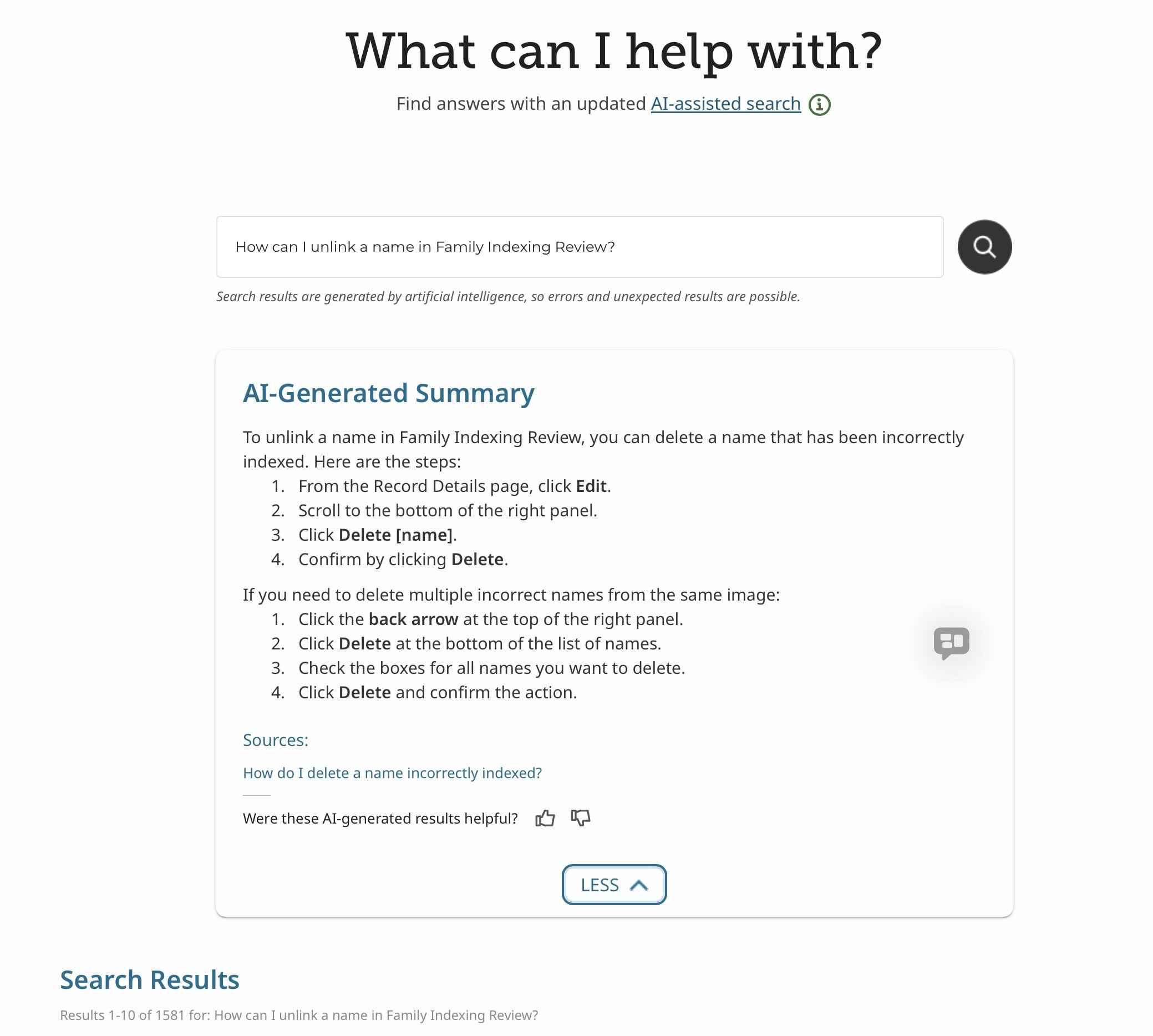
Using the Family Search Labs can be helpful in solving problems.
 1
1 -
@Tomlinsonkl thanks for responding but I do personally find this decision disappointing, for all the reasons I gave on my post above. Suggest an Idea ceased to be a collaborative process some time ago, and it seems that issue reporting will lose its collaborative element (specifically, assistance from more experienced users) also, unless you are just talking about Get Involved (I'm not clear on this point).
0 -
@dancingintherain Thank you for both, the link to Part II of Ada Luque Nelson's AI Indexing for Latinos, and Family Search Labs for Questions specific AI Indexing problems. I guess I wasn't familiar with FSL and did not know it was another place to ask questions regarding my FIR problems. I especially liked its suggestion on Deleting incorrect names on Record Details.
Something new I discovered about Linked and also stubborn incorrect names on Record Details, and I should have recognized this earlier, but often the inability to correct those two issues is because there already Other Records Shown to the right top of the page using those Incorrect Names. One issue was a Primary Person that had previously been inputed with the Incorrect surname which was actually part of his Given name. I was able to go into these records also and correct the name. It took a while but hopefully I did the right thing, being very sure that my interpretation was correct.
It seems from some of the above comments that there is disagreement about if and when to use the Feedback Button. or ask the Community. I'm confused at this point but am more inclined to go to the Community first with my FIR questions because as stated the Community members usually have the answers or will send the bug to the correct team. I have learned to be patient regarding AI Engineering changes. If I wait long enough they make positive changes, in some cases.
0 -
@dancingintherain and others, An interesting change has just happened. When I opened FIR up popped New Instructions for Reviewing and Editing. Instead of using the Reviewing Tools on the right panel for making name changes, corrections, deletions, etc. we are to use the Edit Button on Record Details for making all of these changes. Voilà. It's definitely a learning curve but I persevered in some cases and reverted to the Review Tools in others as some are more complicated as 'Other Records' related to the Primary Person have wrong names and relationships that seem to carry over to my current Indexing Record. I was directed to one long page of Instructions using the Editing Tool that completely overwhelmed me as it covered many different scenarios among the possible changes to be made. I decided to make a comprehensive study of that when I was freshly awake. I am encouraged by the New Instructions for Reviewing these families though—patience wins sometimes.
0 -
@Mary Rice Oh great, I am going to look for those instructions as well.
0