Home› Ask a Question› Get Involved

what is the keyboard shortcut for auto entering the entry form the previous record?

Dolly M
Dolly M ✭
June 18, 2021 edited August 25, 2024 in Get Involved

what is the keyboard shortcut for auto entering the entry form the previous record?  It seems like there is one but I couldn't find it on the keyboard shortcut list. (I did look!) thanks

0

Best Answers

  • Dolly M
    Dolly M ✭
    June 18, 2021 Answer ✓

    control D, I figured it out. Thanks

    1
  • Vincent T
    Vincent T ✭✭
    June 18, 2021 Answer ✓

    Hi @Dolly M the article below will help you know additional keyboard shortcuts when indexing records.

    https://www.familysearch.org/help/helpcenter/article/what-are-the-keyboard-shortcuts-for-indexing


    0

Answers

  • John Empoliti
    John Empoliti ✭✭✭✭✭
    June 18, 2021 edited June 18, 2021

    Additionally, for your consideration, here are two JPG files (Page 1 and Page 2) of the same shortcuts, organized somewhat differently and more compactly that will print nicely and that you can keep handy for quick reference.

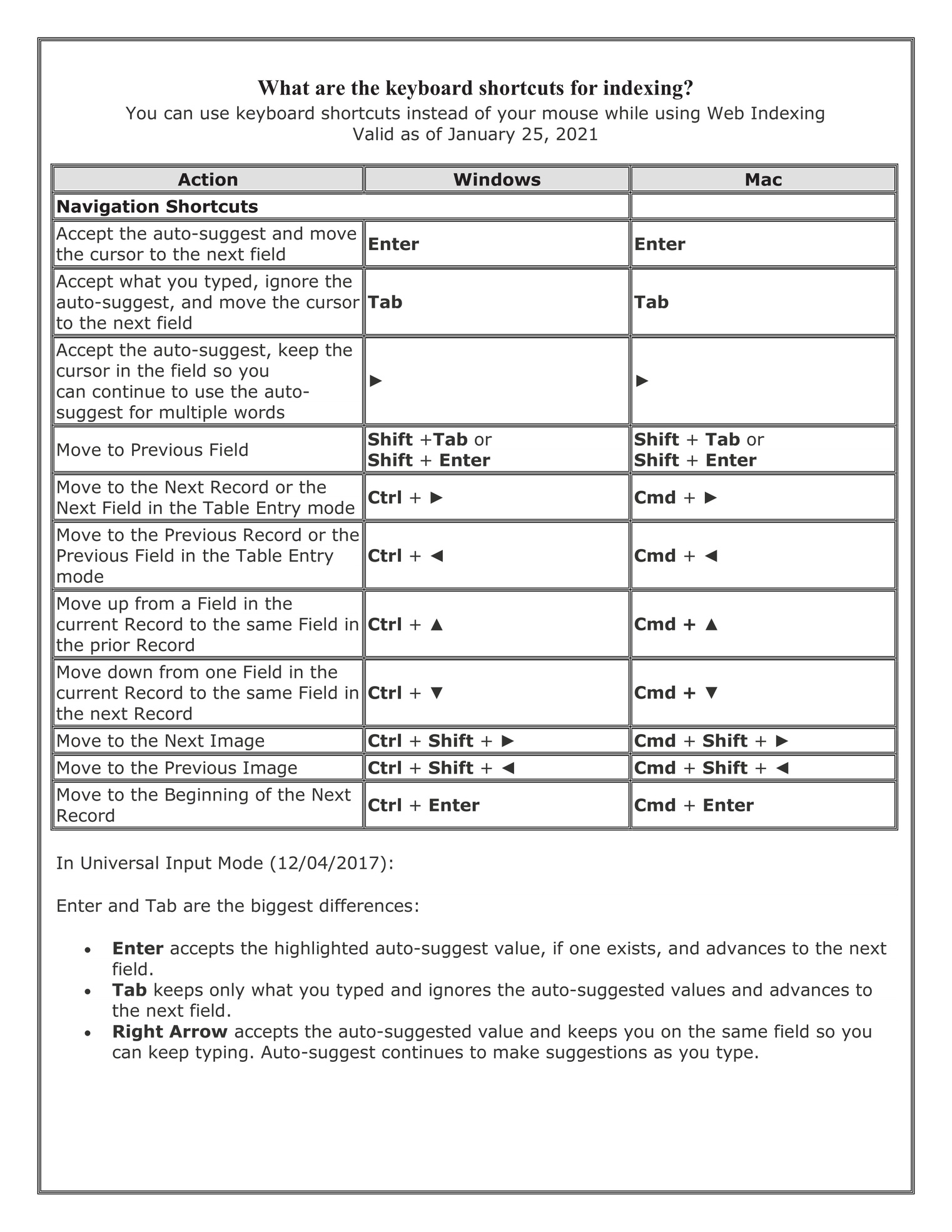
    Web Indexing Keyboard Shortcuts - Jan-25-2021 - Page 1.jpg Web Indexing Keyboard Shortcuts - Jan-25-2021 - Page 2.jpg


    0
  • John Empoliti
    John Empoliti ✭✭✭✭✭
    June 18, 2021
    https://community.familysearch.org/en/discussion/86742/what-is-the-keyboard-shortcut-for-auto-entering-the-entry-form-the-previous-record

    Hi Dolly.

    And note that if you want to Ditto the entire previous Entry (all Fields) into the current Entry (all Fields), the keyboard command is Ctrl+Shift+D (or Cmd+Shift+D on a Mac.

    Ctrl+D (or Cmd+D on a Mac) just Dittos to the Field your cursor is in the value from the same Field in the previous Entry.

    0

This discussion has been closed.
Clear
No Groups Found

Categories

  • All Categories
  • 44.8K Ask a Question
  • 3.6K General Questions
  • 599 FamilySearch Center
  • 6.9K Get Involved
  • 678 FamilySearch Account
  • 7K Family Tree
  • 5.5K Search
  • 1.1K Memories
  • 505 Other Languages
  • 66 Community News
  • Groups