
Add Memories UI change no longer allows uploading existing audio files

Some time in the last two weeks the UI has changed for uploading memories. Gone is the following:
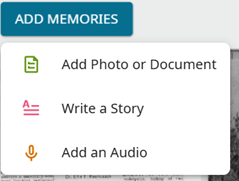
to be replaced by:

While this is cleaner, the Upload menu pick still only works with the document and photo types that the former "Add Photo of Document" did. Gone is the ability to upload an existing audio file from your PC drive. "Add an Audio" had the ability to record a new audio or add one from your "device".
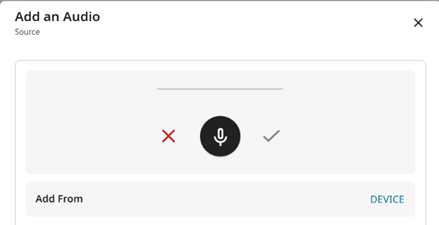
The new "Record" option does not offer the "Add From DEVICE", which I admit is consistent with the title "Record".
Was this omission intentional? You can still add existing audio files using the iPhone Family Tree app.
I admit to liking the cleaner menu, so a good fix, in my mind, would be to just support uploading audio files from the "Upload" menu pick.
I work in a FamilySearch center where patrons bring in (among other things) old reel-to-reel or cassette tapes of relatives speaking, and I help them transcribe them into mp3 files. Hitherto, they have been able to easily upload them as memories.
項留言
-
@RasmussenDavidE1 you may like to look at the VB-CABLE Virtual Audio Device software product I mentioned on this thread:
I have successfully used it to 'record' from an mp3 file into FS without loss of audio quality.
0 -
Update:
The new Upload menu can be made to work for audio files with the following workaround:
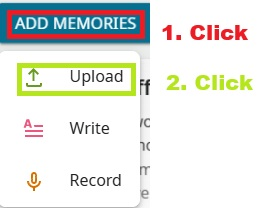
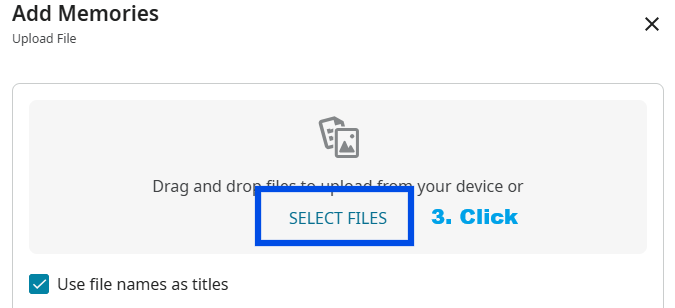
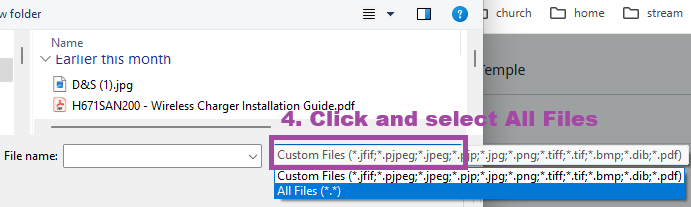
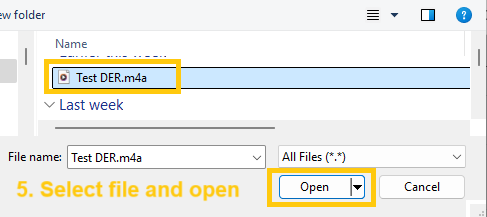
This worked! The audio file was uploaded and is playable.
What did not work was to drag and drop the audio file after step 2. That only works for document and picture types.
I suggest opening up the drag/drop to include audio types such as mp3 and m4a, and adding these to the Custom Files filter on the dialog that comes up after step 3. Then step 4 will be unnecessary.
1 -
I want to thank you so much for providing such detailed information on how you were able to make this work for you! I'm certain other users will be able to benefit from your posts and images. Thank you again!
I will share with the Memory Team Engineers your thoughts about being unable to "drag and drop" audio files. Hopefully, we can make adding audio files easier!
0 -
The Memories Team has fixed this bug. You should be able to upload both pdf and audio files without issue.
As always, thank you for posting your feedback! Please let us know if you run into anything else that is strange.
1

