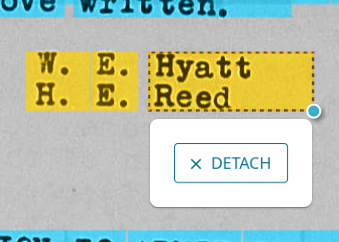
The computer combined names from 2 rows in the same highlight box in full name review.

The computer highlighted 2 rows of names in the same highlight box on this page: https://www.familysearch.org/en/getinvolved/full-name-review?action=EnhanceImageRecords&language=en&placeCode=1&placeName=United%20States&task=Full%20Name%20Review&autoGenImageArk=3%3A1%3A3QSQ-G9ML-NBSH the "W. E. Hyatt" and "H. E. Reed" in the bottom right section of the page are in the same box, so only one can be entered. Also, "H. E. Hyatt" is what is automatically filled in the next step, so it is reading part of both names with this one.
Answers
-
Screen shot, in case that helps more than the link:
 0
0 -
In this instance you can detach the highlight.Either choose make a new highlight or click on a name and attach. It is my personal preference to click on each part of a name separate and attach them. Look at the text boxes to see if everything is In order. Make adjustments as needed. https://www.familysearch.org/en/help/helpcenter/article/help-with-full-name-review
0 -
I could make a highlight for just one of those names, but the AI thinks that they are the same name. So I have to choose between entering W. E. Hyatt, or entering H. E. Reed.
It should be getting seen as 2 different names, so that both people will be indexed. That is the problem that I am trying to report as a bug.
I know how to detach highlights and make new ones, the problem is that it combined 2 rows of text into 1 box. So in this case, it used the first name from the bottom row, and the last name from the top row for how it tried to read it, when really it is 2 people. It should not have both rows of names highlighted with 1 box. It should have different boxes for both lines of text. I have seen this problem before with other pages.0 -
@TimothyE What I have always done is to adjust the highlight so that it contains only one name, either W.E. Hyatt or H.E. Reed. Then I review that name, entering the initials as the given name and the surname as shown. The 'other' name, that you did not review will be picked up and highlighted again so that someone else can review it separately. So far as I know, this is not a bug, it is simply a matter of the highlight size needing adjustment so that it contains only one full name.
If this occurs several times in one session of reviewing, it could be that you need to clear cookies
1 -
I did not think of clearing cookies if I run into a problem, I will keep that in mind. I was thinking that it was a bug for this one instead of that, because there was only one highlight box covering both rows, instead of 2 boxes. I have seen it like that before, with one rows highlights being to big and covering 2 rows, but there still being another highlight below it. Why I am thinking that this one is a bug is because I took that screenshot with all of the highlight boxes shown, and there was only one box, so there was nothing for someone else to do to get the second name out of it I think. Because it is only that 1 box for both names, and it had one persons first name and the others last name for what it auto filled in too.
It is not like this one for example:
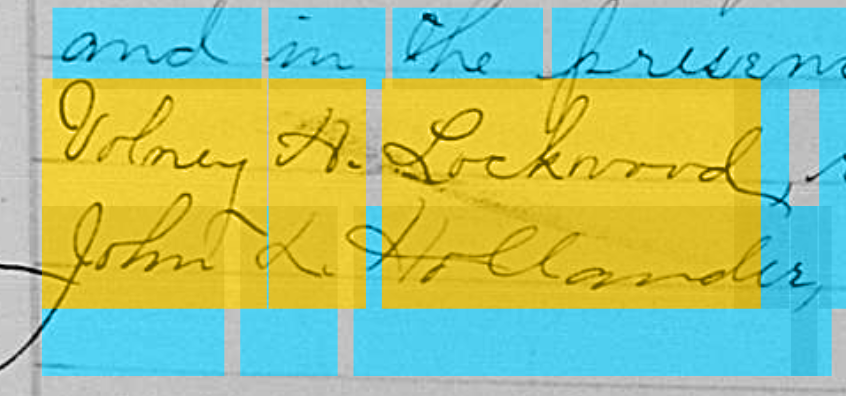
The one I think is a bug only had the one highlight box for both, unlike in this picture. So for this picture I think what you said would work, but I think that the one I was trying to bug report first was a bug.
0