MEMBER # FONT SIZE

Why does the Member Number font size need to be so small? It is not only very small but the print is much lighter than the name. Yes I know it can be increased by the key board, but why can't it be of large font and more legible. My vision is decent, but I find it should not be necessary to get a magnifying glass. Most users are not teenagers with 20/20 vision.
The comments above are using a home computer with a 23" screen.
Today I received a message from family search advising names that need temple work on my phone. The member numbers were impossible to read and would not expand on my i phone 13. and then the entire post disappeared. It it not possible to correct these problems.
Donald Robinson 95
Answers
-
I find the IDs a little easier to read if I highlight the name / ID (so the background is blue) as they appear further down the profile page. It was a great shame that nobody thought of the similarity between "B" and "8" and "S" and "5" in any font, as I frequently have to check I have read these characters correctly. Too late to turn back the clock on that one, but I agree a font type / size change might help with reading problems.
Compare this to how it appears on her FT profile page and, even without darkening the font, the enlarged size is of help to me.
 1
1 -
Developers tend to assume users (all ages) can see as well as they (typically younger) can ... even in my fifties I often found applications unusable at normal screen resolution.
.
1 -
Sorry if my post above doesn't make sense. The image has "shrunk" from how it appeared before saving and the "blue" referred to is the background colour for males, and I have illustrated a female example!
Nevertheless, the ID of P7BS-278 could be read as P785-27B (or other similar examples) by users with imperfect vision.
1 -
@Paul W I agree on the B-8 and S-5 possible confusion — I've misread these characters on occasion as well. It's notable that the encoding pattern specifically avoided O-0 confusion, so someone was thinking about this issue. It's a pity that they didn't think a little harder and avoid the obvious B-8 and S-5 confusion as well.
4 -
@DonaldRobinson95 Many of us share your frustration! One solution may be to work on a device that has a touch screen. My IPad is wonderful because with two fingers, I can expand the screen briefly to copy the PID when I need to. The screen on my phone is the hardest to use, the numbers are so very small and the screen won’t expand. I find myself using several devices - glasses on and glasses off, trying to read numbers. It does become second nature when you want to accomplish something in FamilySearch. There is so much information that needs to be on our screens for the program to be effective- and not a lot of room, but I am grateful to have this amazing tool to use. Hopefully you have access to a touch screen and can use that option!
1 -
I have been trying for years and years to deal with the small font size of IDs on Sealing to Spouse nameslips — confusing B and 8, and especially 5 and S. The font of the IDs on the Sealing to Spouse nameslips is smaller than the font (of IDs) on Sealing to Parents nameslips. Why is that? Could they not be made to both be the same size? And not a smaller font — but a larger one. Both types of nameslips, if possible!
The problem (for me) is not on the computer screen. The problem is the font size of the IDs on the paper nameslips. I have read the comments above, but don't see that anyone has addressed that problem directly — 3 comments seem to deal with small print as shown on devices. On a computer, I can enlarge the image. On a phone, I don't know, because I don't use a phone for genealogy. But the problem — the problem (how to bold these words?) — is the size of the ID on the nameslips. If others would address this problem — here — by writing comments, I would appreciate it a great deal — hopefully to get the attention of the developers/engineers — who, as mentioned, just might not consider the difficulty older patrons might have reading small font on IDs.
One of the previous posters/submitters wrote this: "the ID of P7BS-278 could be read as P785-27B (or other similar examples) by users with imperfect vision." Right on!!Two of the "posters/submitters" appear as "admin." Are they part of Familysearch? Can they submit "suggestions/concerns/complaints" to the engineers?
BTW, I see on this page the dates of Feb. 11 - Feb. 16. Which year?
Repeat (yes, this is overkill!): Please enlarge the fonts of the IDs on ordinance nameslips, especially on those for Sealing to Spouse.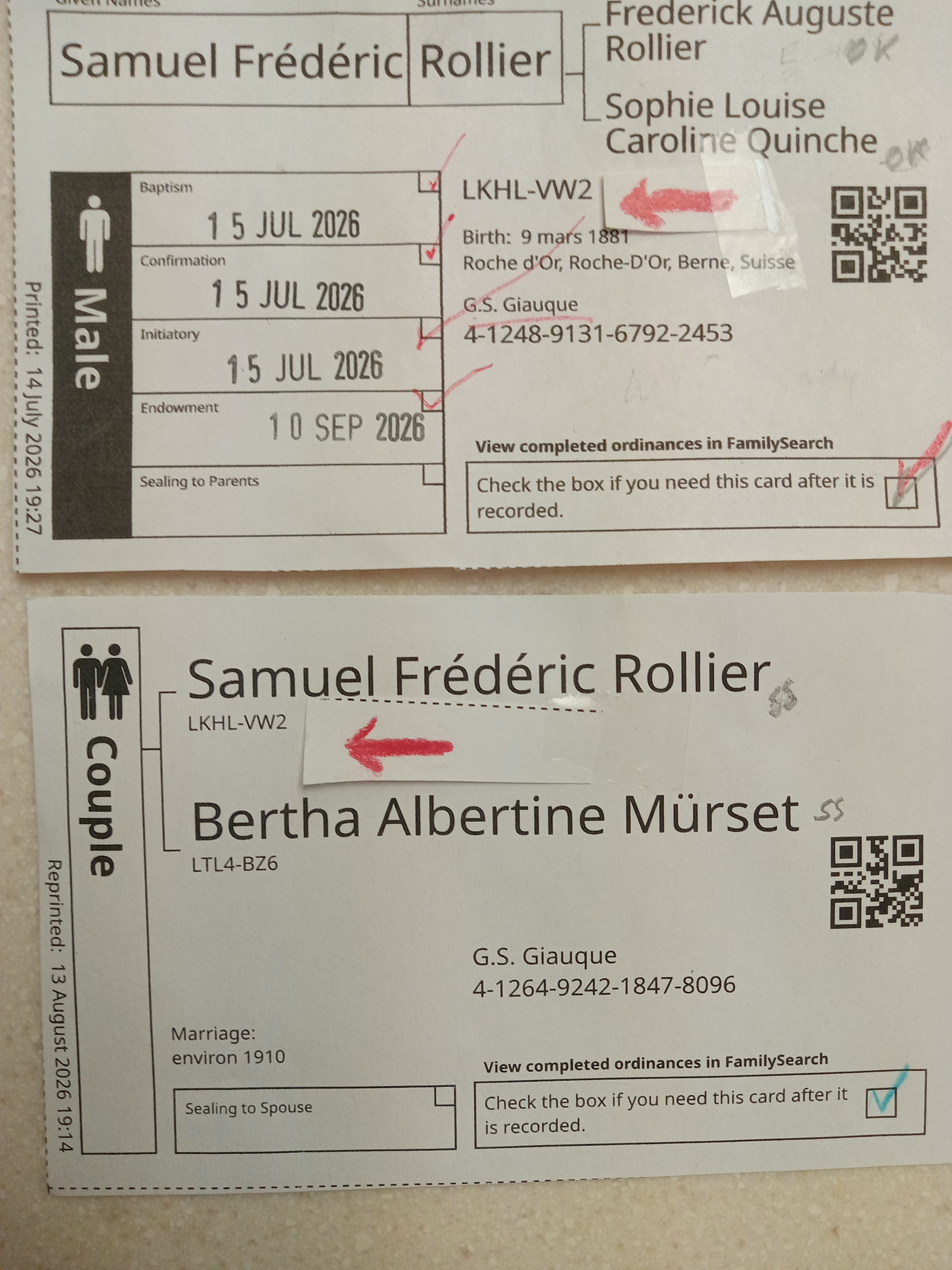 0
0 -
@GSGiauque801-888-5954 You are welcome to use the Suggest An Idea option here on Community to make suggestions.
And regarding your question
BTW, I see on this page the dates of Feb. 11 - Feb. 16. Which year?
The software that powers Community will show dates and times in such a way that if any part of the date or time is omitted, you can assume that it is the current day or year. So if only a time is shown, then it is that time today; if only a month and day are shown, then that is a date in this year. If a post were mad on February 16, 2024, then you would see the date shown with the year; since it says only February 16, you can know that it is February 16, 2026.
1 -
All the text on this site is too small for me, but the IDs are even smaller. Same for my genealogy software. (That's why I miss correcting some typos too.)
0 -
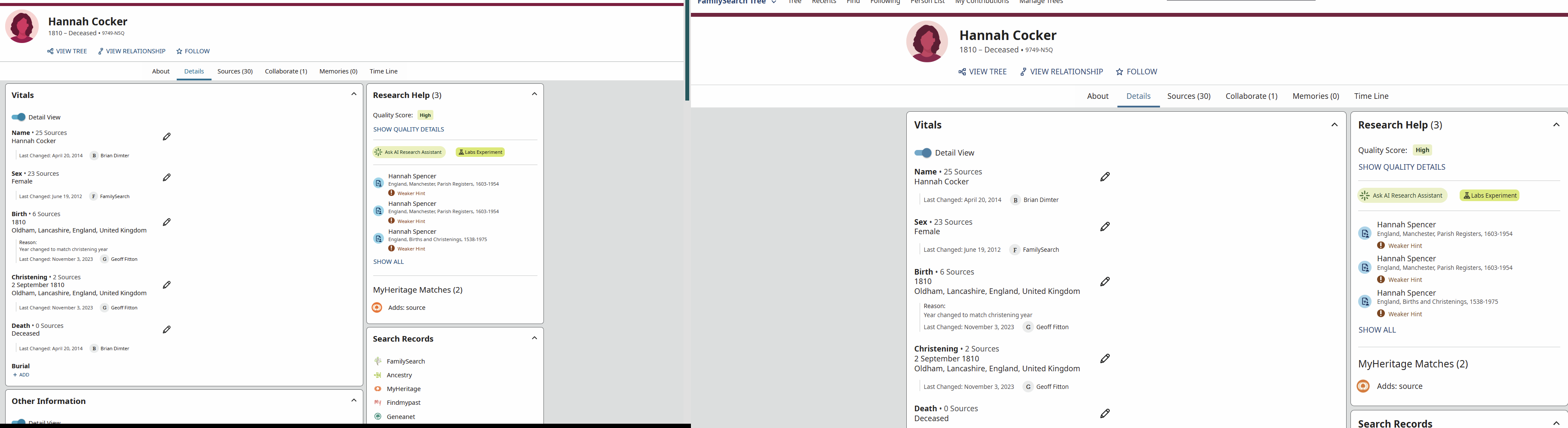
My 32-inch monitor has a resolution of 2560x1440; I have FS set to display at 110%.
On my 27-inch monitor, with a resolution of 1920x1080, I have FS set to display at 90%.
For aging eyes with vision problems, those settings make viewing details easier.
 0
0 -
@DonaldRobinson95 If you are using Windows, you might consider using the inbuilt Magnifier for the occasions when the font is too small. It's a bit clunky but, as a last resort, it does the job.
0

