How do I look up my search history

Answers
-
I'm afraid there's no formal way to do this. You could try searching your browser history for 'https://www.familysearch.org/en/search/record' (Historical Records search) or 'https://www.familysearch.org/en/search/tree' (Family Tree Find).
2 -
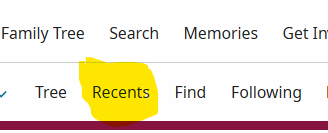
There is a Recents button that shows your recently viewed people. That might be helpful to you.
 2
2 -
As there is no direct provision within FamilySearch to do this, you might wish to copy the URL / address bar references into a Word (or similar) document, created for the purpose. I would save a document with a title like "FamilySearch Search Results" and keep it open, ready to copy / paste in the URLs as you go along. Above each you could add the subject of your search. For example:
Thomas Coverdale Burials / Deaths, Yorkshire 1650-1750
John Hunton Christenings / Births, Yorkshire 1700-1800
That way, one can easily return to the pages in question, modifying the search criteria, if necessary, for further searches.
Actually, I hadn't thought of this idea before reading your post, but I do something similar to keep track of how far I have got back in recording the various ancestral branches I've created in Family Tree. (i.e., I enter the name of the branch I have researched, followed by comments relating to my research, and the URL of the relating FT Landscape view.)
0 -
Just an additional thought, I'm not very good in handling spreadsheets, but it might be better to use something like Excel (instead of Word) if you make lots of searches you think you might wish to revisit. I assume, providing you give a meaningful title to, say, a Surname field, you would be able to find an item (as illustrated above) more easily this way. (Using ascending / descending function?) I'm not very computer savvy, but I guess you get the general idea!
1 -
I know many people who use Excel (or other spreadsheet options) to keep a detailed search log. Thomas MacEntee teaches a class on how to use Excel for a research log.
I find that a little too cumbersome for my needs. I use a free e-diary program that autosaves every entry I make. I can drop a screenshot or snip of a record, or make freeform notes. That works better for me.I don't try to track every search, but I do keep track of troubling projects/profiles - when I'm teasing apart conflated profiles, for example.
2

