Community search results date filters behave weirdly

On 14 March 2024, I started a discussion on this topic. It has long since been closed without any intervention from FS. On 29 May 2025, I flagged the then-closed discussion for a review. That has had no response, so I am starting this discussion.
In the community, the search results list has four date-related filters that can be applied (Date Created and Date Updated, From and To). It appears that I am supposed to be able to directly type in the date that I want, instead of using the date picker pop-up. The date picker is all very well if I am trying to filter over a relatively recent period of a few months, but it is no good if I want to go back several years. Getting to the point of being able to type the date is quite a mission in itself; I have to click somewhere in the date field, then click somewhere else to dismiss the date picker that pops up. That leaves the first field in the date selected, and I can start to type the date I want. That's where the problems really start.
- If I attempt to use my keyboard to enter a date, the behaviour is weird. When I get to typing the month or year, I find that typing will change the preceding components of the date (e.g. the day and/or month) as well, and it is near impossible to enter a date correctly this way.
- When I get to type the year, it will only accept one or two digits which it puts in the fourth place of the year.
- Also when I use the keyboard, what is echoed depends on whether I use the number keys above the alpha keys or the numeric keypad. If I use the numeric keypad, what is echoed may be one less than what I typed (e.g., type "2" and "1" may be what I see).
- I can use the up and down arrow keys to change the selected date component (i.e., day, month or year), but that will likely change other components as well. In the day field (the first field in my configuration), I can use the down arrow (to decrease the day by two days), but not the up arrow. In the month field (second), I can use the down and up arrows but that also changes the day that I just set. In the year (third) field, the down and up arrows, but that also changes the day and month fields.
- When I do use the date picker, it will frequently set the date to the day before the one I select.
For some reason, this reminds me of "You are in a maze of twisty little passages, all alike".
It seems like the way to set dates from the keyboard, is to use the up and down arrows, starting with the year and working backwords through, in my configuration, the month and then the day (subject, of course, to the constraint that the up arrow does not work at all for the day).
I use Chrome on Windows 11 with a Windows regional setting of New Zealand (i.e. short date format DD/MM/YYYY), but the issues remain on other browsers and after I have changed my Windows regional settings to US. I have also changed my keyboard layout from US to INTL, cleared my FS cookies, restarted my computer… to no avail.
Answers
-
Using Chrome 15.0.7977.65 on Windows 11, fully updated, using US-based customized date settings.
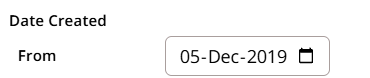
I can tab and enter what I want in the date created fields. For example, if I wanted to search for 5 Dec 2019,
I enter 05, enter 12 (which displays as Dec), then tab, enter 2019.
 1
1 -
@Áine.ní.Donnghaile Thank you. I delayed responding until I visited my local affiliate library. I checked this out on their Windows 11 desktop with Edge. I did not log in to FamilySearch (so as to isolate my account settings, if they had any bearing). The search date filters behave in the same way that they do on my home desktop.
I have also tried this out on my Android phone. There, because of the small screen size, the filters are on a separate pop-up. In this scenario, there is also a date picker, but that seems to be the only way to set a filter date. I couldn't find any way to even try to explicitly type a date into the filter. The only way I can select a date is to select the year then click away one month at a time. As in my desktop, when I get to select a date in the date picker, the date that is actually set in the filter is one day before the one that I have selected, for some reason.
0 -
@JulianBrown38 Using Chrome 152.0.7977.83 on Windows 11. Unfortunately, I was not able to reproduce your issue. I agree that the pop-up calendar is the slow way to change dates. When I clicked off the calendar, placing my cursor in the date entry area, I could enter a date, and the system would advance automatically to the next field, or I could tab to the next data entry point.
This is a function of the system we use to run Community; it's called Vanilla. This date search function seems to be working as designed, at least for me. Is it possible to get some screenshots of your problem / process so I can submit a bug report for you?
0