Any recent changes to standard place name drop-down list when editing places in Windows website?

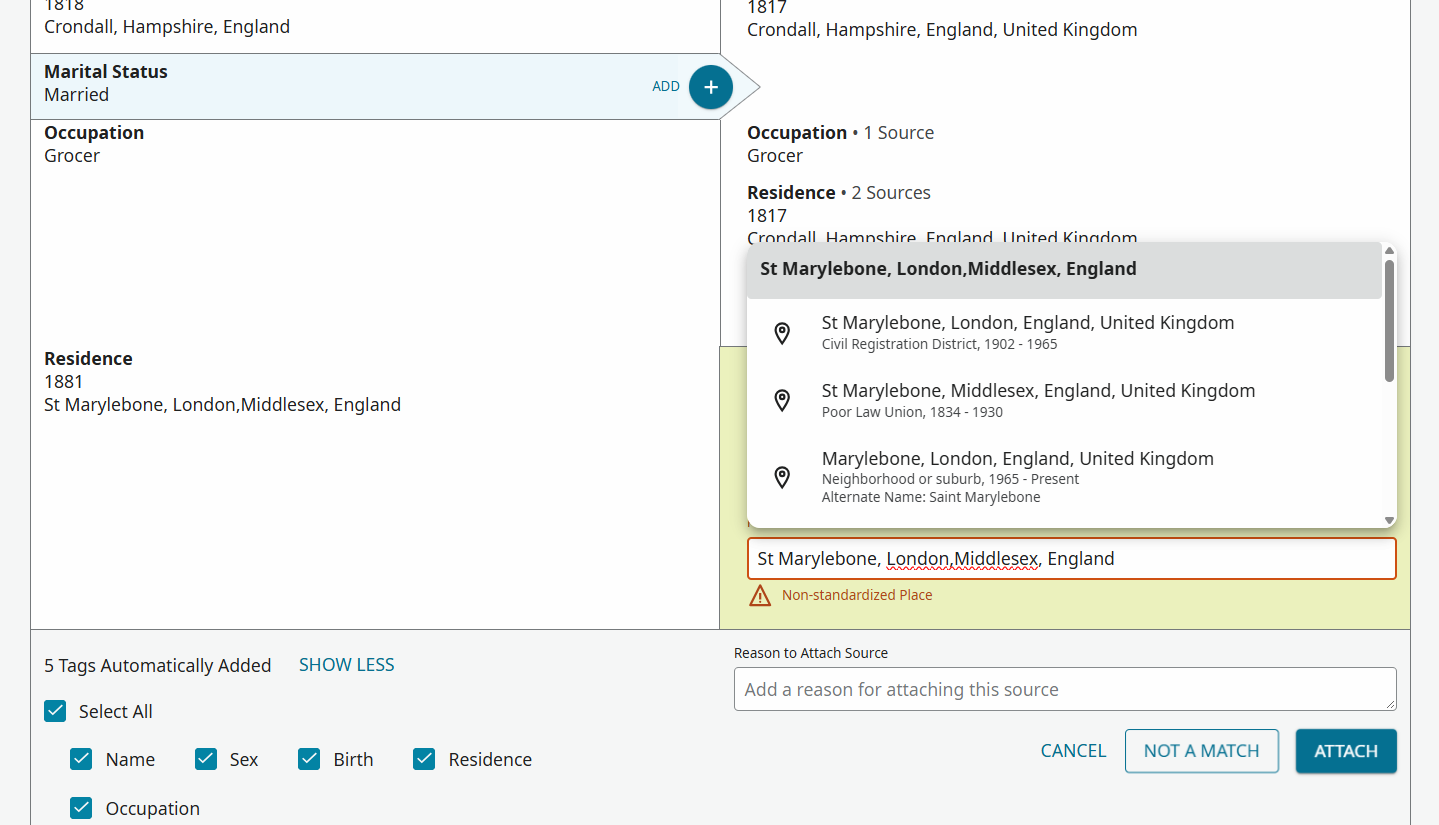
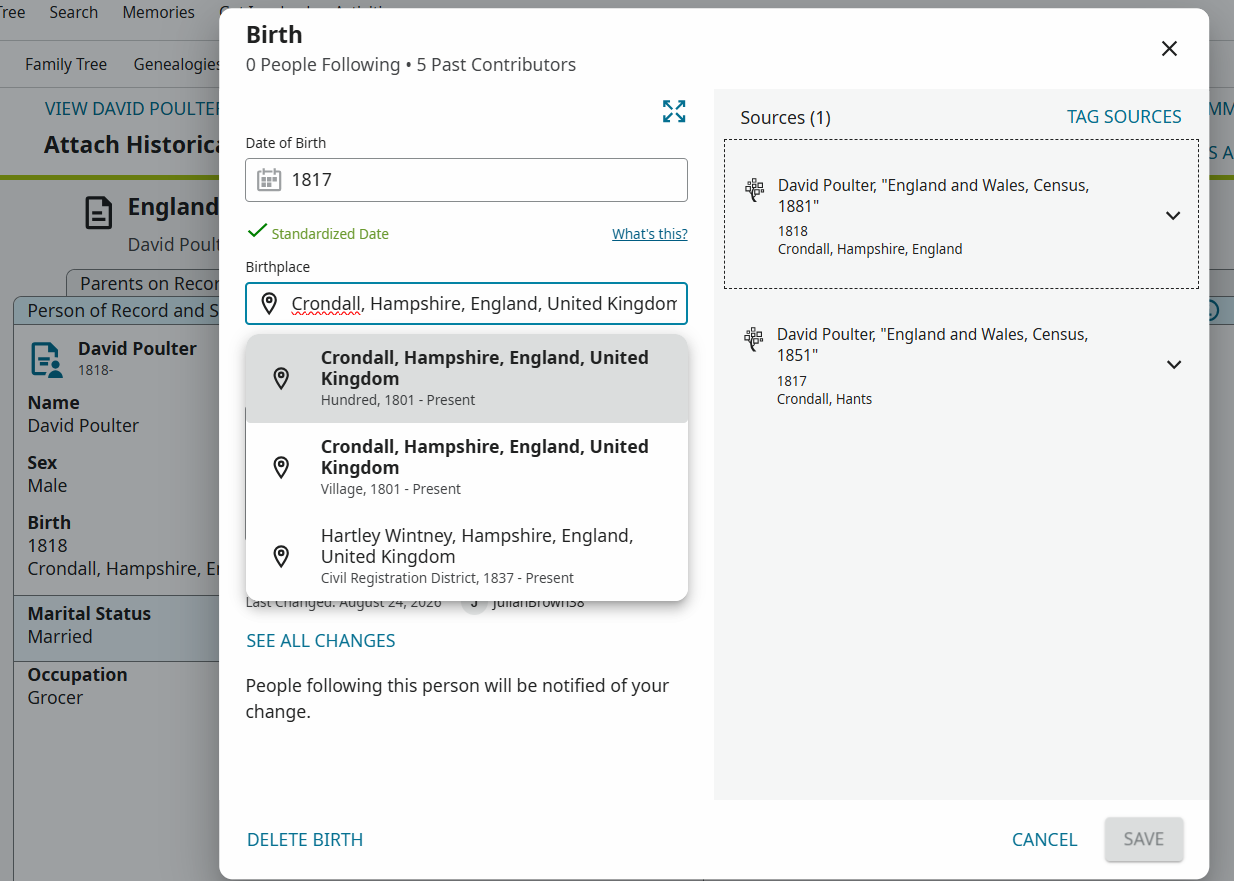
When I am editing the place of an event, etc., in Family Search, a drop-down list of standard places is offered to me. Have there been very recent changes to the way that list is populated in a Windows browser (up-to-date Chrome, Firefox and Edge)? The following two issues occur in those browsers on my Windows 11 desktop, but do not occur in the up-to-date Chrome or Edge browsers or the Family Tree app version 5.4.3 on my Android phone.
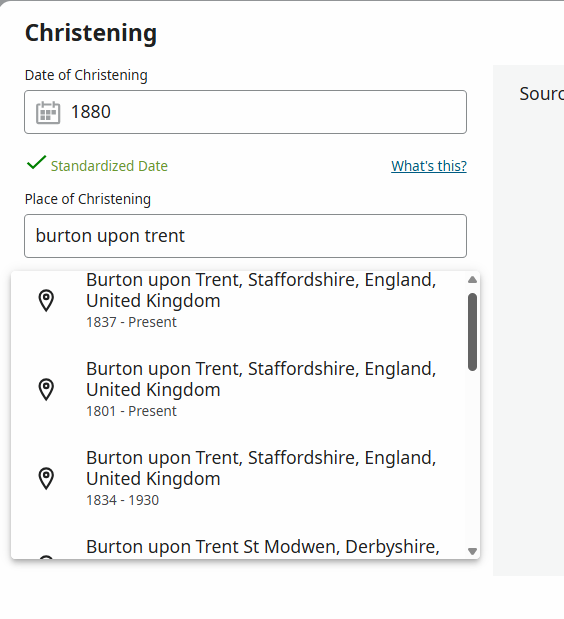
The place types are no longer being displayed on each entry.
This means that I cannot distinguish between places of different types which have the same name and parentage, e.g. Hundreds, Poor Law Unions, Towns, Civil Registration Districts, in order to choose the appropriate standard entry.
For an example, try Burton Upon Trent, Staffordshire, England, United Kingdom. That results in three reasonable offerings which are only discriminated by their date ranges.
Some relevant entries that are in the FamilySearch places database are no longer being offered in the list.
As an example, there is a city in the FS places database "Whanganui, Whanganui, New Zealand (City, 1854 - Today)". That just will not appear in the list any more, and there is no longer any way that I can pick it, or any city named Whanganui, as the standard place.
Answers
-
I can confirm issue 1 (the loss of the place-type) in the drop-down list of suggested values.
My Windows 11 Chrome and Firefox desktop browsers have no place-types. My Android phone Firefox browser has the place-type.
Put simply, this is not acceptable - people like myself have said many, many times in the past that the place-type should be part of the actual physical name (e.g. "Nantwich Hundred, Cheshire, England" or "Nantwich Parish, Cheshire, England") but we have been (mostly) ignored, even though, once the place has been chosen, there is no indication on the person's profile of which Nantwich (or whatever) is on the profile. Now we can't even choose which Nantwich should go on the profile to start with.
NB - IIRC (and I may not) the German language placenames do have the type in. Not sure why genealogical practices change like that?
3 -
Something has broken with the standardization popup for sure. I am putting in names that are a perfect match and the correct standardization is now appears several lines lower rather then at the top of the list like it was before. This makes no sense. If something matches 100% it should always be at the top of the list.
2 -
Are there any answers yet from someone who can say why place names have changed? Personally I join the list of queries with one of my own.
Larvik used to come up as standardized: Larvik, Jarlsberg og Larvik, Norway for before 1919. Now suddenly it comes up as Larvik, Jarlsberg och Larviks Amt, Norway. Sometimes it drops Larvik, the town, entirely and gives you Jarlsberg och Larviks Amt, Norway instead.
och ???? Amt ????, drop the town?
Something is not right here. As far as I can find, the word for and in before 1919 southern Norway was og, same as it is today. Also, why add Amt? We don't normally see the designation County after each county name.1 -
-
I have sent this issue up the line to get an engineer to look into it. I hope we can get the problem solved quickly, but I cannot provide any date for when this might occur. Thank you again for helping to make FamilySearch a better product.
3 -
Here is an example I just encountered (Windows 11 / Firefox):
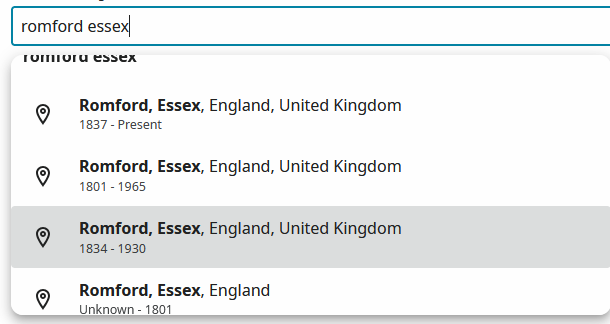
Personally, if the place name and and date range are exactly the same I'd be happy to reduce the choices available in some cases - especially if there are currently separate options for, say, both Parish and Town. (I acknowledge my example above does not illustrate the issue to which I refer.)
The placenames database must be extremely difficult to maintain, but it - and how the various options are presented in Family Tree - does need a complete review. In the above example, Romford, Essex has ceased to be a location since 1965 (excepting it can be of optional use in sending letters), so the 1837- Present option should probably be dropped. (This situation applies to many places in the London area, especially when a "London" or "Middlesex" option is available to "Present" and Middlesex effectively disappeared as a county in 1965.
Obviously the current problems need to be sorted out (so thanks to @sc woz for escalating the issue), but in the longer term the current (amount and format of) choices offered from the database need to be thoroughly reviewed.
1 -
@Paul W said
Romford, Essex has ceased to be a location since 1965 (excepting it can be of optional use in sending letters), so the 1837- Present option should probably be dropped.
Yes. According to https://www.familysearch.org/en/standards/admin/place-reports/?region=74&country=267
FamilySearch Places focuses primarily on the Ceremonial Counties of England.
Which means that Romford should be in (hastily consults Wikipedia) Greater London. In all honesty, I'm not certain that "ceremonial county" is the right target for the level below England, not least because I'm never certain where to find what date X was put into which ceremonial county. (E.g. try following Wikipedia for the article on the Ceremonial County of Herefordshire - most of the article talks about the administrative county of that name!)
In all honesty, I think most of us just use something that seems right to our eyes, regardless of logic, with many of us actually going for the (informal) historical county. I think that the Places Team has more important stuff to deal with.
2 -
Another thing I noticed that changed is for some reason the new dropdown changes is heavily favoring the first word in a place name. I put in a church name followed by county, state, and country and can you guess the first item in the drop down? A church in a completely different country…(Jamica rather then in the USA). The rest of the drop down items are all churches or cemeteries in different states and only 1 in the right state but wrong county. In the past the first item that would popup would be the county (as admittedly this church is missing a standardized name, I probably should submit one). Now the option to select the county is not even there so I cant select a standardized place that would be even slightly accurate.
1 -
Looks like familysearch reverted whatever changes they made. So everything is back working the same as it did before.
3 -
Yes, both the issues I reported appear to have been fixed. The place types are included in the displays, and I can now find the city of Whanganui in the list.
3 -
Yes, very good. Back to normal.
0 -
To illustrate the reverting to the previous presentation, using the example I posted earlier:
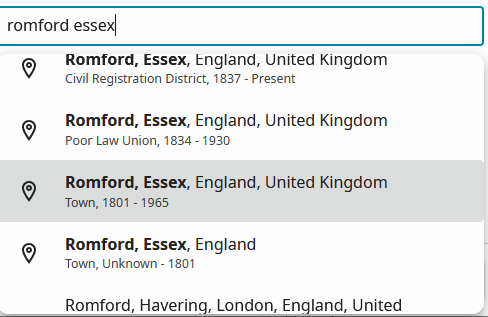
However, as mentioned in other posts, the alternatives for this location are not all necessarily grouped together. As seen in screenshots below, the drop-down list that appears if I just type in "Romford" includes (in no particular order) a location in Connecticut!
As @Adrian Bruce1 suggests,
I think that the Places Team has more important stuff to deal with. (Although perhaps he is not talking about the wider issues being discussed here when making that comment.) Nevertheless, being pedantic, I have to mention that (again using my example) that "Romford, Essex, England United Kingdom" as a Civil Registration District is only correct until 1965, from which year "Havering, (Greater) London, England, United Kingdom" becomes the correct placename (for the registration district).
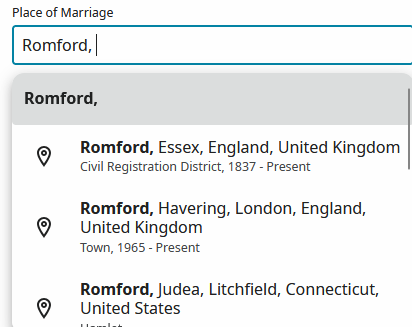
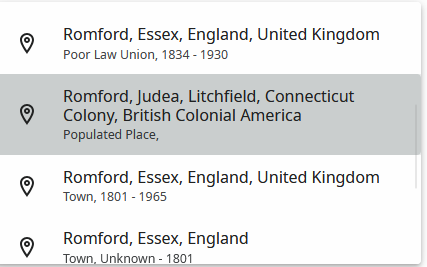
Finally, the point made by @jaredallenjohnson1 about the current order of presentation of the list is an important one, as one has to sometimes scroll a long way down before finding further variants of what is the exact same location. Perhaps not an easy issue for the engineers to address, but having (say) all the Romford locations in the London area grouped together would be very helpful, rather than having a place in Connecticut splitting them up!
1 -
@Paul W said
… being pedantic, I have to mention that (again using my example) that "Romford, Essex, England United Kingdom" as a Civil Registration District is only correct until 1965, from which year "Havering, (Greater) London, England, United Kingdom" becomes the correct placename (for the registration district). …
Yes, that's an amendment that's needed to the Standard Places - see https://www.ukbmd.org.uk/reg/districts/romford.html for the full story. (Actually bits of Romford RD went into Barking and Redbridge as well.) (Update - I have just requested the creation of Havering RD and the closure of Romford RD)
Personally, I'm always dubious about whether Registration Districts should be in a county anyway. That URL appears to suggest that Romford RD was in the county of Essex - it wasn't, it was in the registration county of Essex. We've had at least one query in the Community where the so-called county was all to pot because the geographic county was one thing (Derbyshire?) and the registration county was another (Staffordshire?).
1 -
Places in the London area tend to be particularly problematic. There was a major reorganisation in 1965 whereby places that had previously been officially located in the county of Essex then became part of Greater London. Confusingly, some Essex locations (e.g. West Ham) had had a London E postal address for many years prior to 1965. Others (e.g. Ilford and Romford) retained their Essex postal addresses after they, too, were transferred from Essex to Greater London in 1965. A further complication arises from 1889, when places in Middlesex and Surrey became part of the then London County Council.
Outside of the London area, my main problem has been with the registration district of Stockton (on Tees). A number of north Yorkshire parishes used to be covered by Stockton R.D., which in itself was based -, like the town itself - in County Durham. In ceratin cases, I'm quite certain some of my distant relatives died in Yorkshire but, without obtaining a death certificate, have to make it appear (in Family Tree) that they died in County Durham (because of the cross-county area covered by Stockton R.D.)! Obviously, that problem is not the "fault" of FamilySearch, so difficulties regarding the actual county someone was born, married or died in will always prevail: subject to possibly spending a large amount of money in purchasing the actual BMD certificates, which do detail the precise event locations, of course.
0 -
Thank you to everyone who shared insights and helped work through this concern. It looks like the main problem has been resolved. If you encounter anything else, please begin a new discussion so we can continue to address issues promptly.
2