Find a Grave Metadata Issue is Being Investigated

We are aware of reports regarding Find A Grave metadata appearing incorrectly in FamilySearch. Our teams are actively investigating the root cause of this issue.
At this time, this appears to be a system-related issue, and no additional reports are needed. While the investigation is ongoing, users are welcome to correct any information that is inaccurate in the records they encounter.
We appreciate your patience and understanding as we work to better understand and resolve the issue. Thank you to everyone who has taken the time to bring this to our attention and help us monitor its impact. Updates will be shared when additional information becomes available.
Answers
-
@Tomlinsonkl
Reports keep getting posted to the Community forum.
Should this post be in the Search section? There isn't a problem with searching and finding the Find a Grave records.
Wouldn't this post be more visible if it was located under the Announcement tab located here:0 -
I have not encountered any problems yet. I always try to check my own Keech / Keach / Keetch / Keatch Family Records. I have noticed though that My English ancestors do not have Find a Grave Index Records, and my German ancestors do not have Find a Grave Index Records, but my American ancestors do have a Find a Grave Index, but sometimes I have to go to a Parent’s name to find a Son or Daughter name in the Fund a Grave Index Records. But I always double check each name, birth date and place born, death date and place died, and burial date and place buried on Find a Grave Index with my own family history records first. I am very satisfied with Fund a Grave Index, and Family Search. I also have a free account with Ancestry.com, and I am very satisfied with it and have even started a Keech Family History file on Ancestry.com, but is only a “side line” as I concentrate solely on Family Search. There is one “glitch” I am experiencing when I “log on” with my username and password. That is I see another username and password that is “not shown to me”, and which I don’t use. So I am wondering whether someone unknown to me has been looking at and deleting or adding “false information on my family history names, etc. I am constantly correcting information I encounter during my Family History Search of family names and their history. So if you can tell me how to eliminate and keep off my family history search names and information please let me know by my email address:(email removed). Thank you for your help in advance. Sincerely, BruceLKeech1
0 -
Mod note: Community is a public online forum. For your privacy, your question was edited to remove your contact information. Please see the Community Code of Conduct for more details.
0 -
When checking hints I have found that find a grave usually has the correct burial cemetery name, but the state, county, town are wrong. When one considers the number of "Oak Grove" or other common names that exist, it may explain it, but I am trying to be diligent and only change things I am certain of. I am glad to see that the issue has been identified and will continue as I have been. This is a great resource and thank you for the continued work for providing it.
0 -
@Tim71381 the issue discussed here by @Tomlinsonkl is (or so I assume) the 'multiple cemeteries' one you mention, as discussed here
and on multiple other threads.
2 -
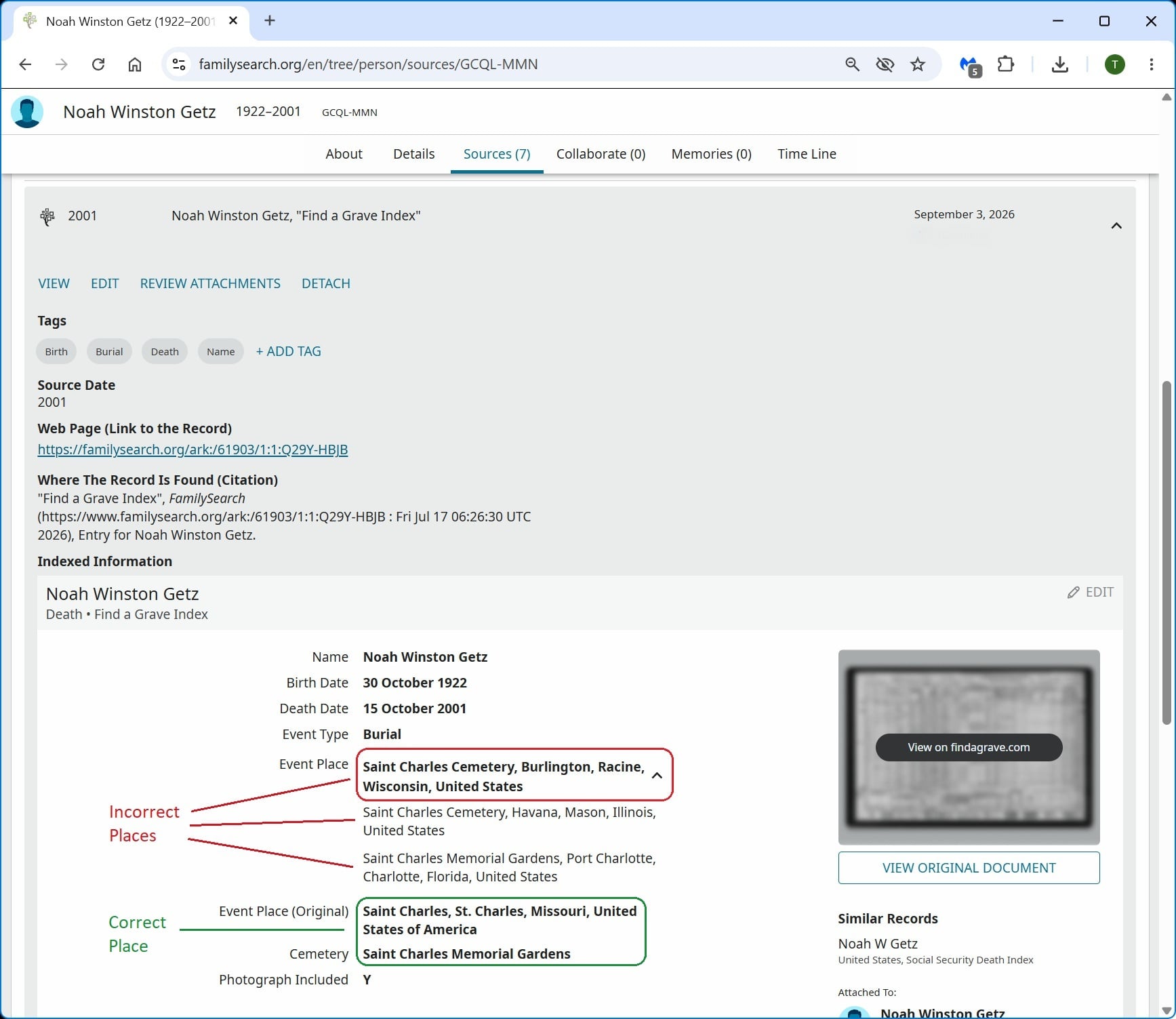
Please be advised. The multiple, incorrect Event Places that appear when reviewing some Find-a-Grave record sources is also impacting the Search Results. It appears that the first incorrect place is what's being listed in the Search Results. See example below.
Source information with incorrect places listed (as "suggestions" ?)
Search Results only showing the first, incorrect "suggested" place.
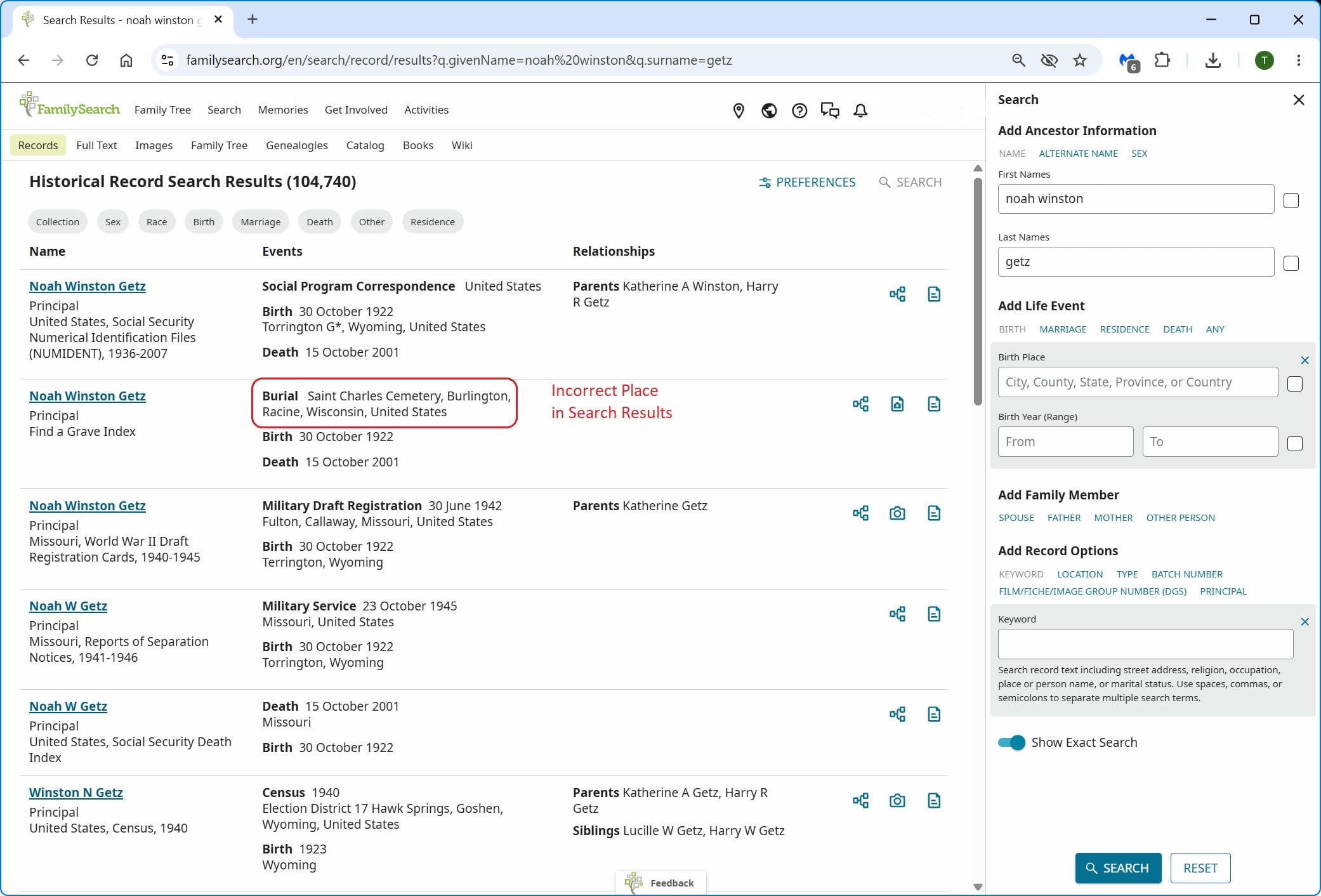
The Burial location displayed for that record is completely wrong and misleading.
3