Find a Grave Index cemetery name matches, but location does not

Typically, when there is a FamilySearch "Find a Grave Index" entry to be added to the Burial field, I have had to copy-paste the cemetery name in front of the location. I had hoped that FamilySearch would figure out a way to have the cemetery name included automatically. Very recently, it seems like that has been happening. Unfortunately, while the cemetery name matches what is on Find a Grave, the location frequently does not. This is a major problem.
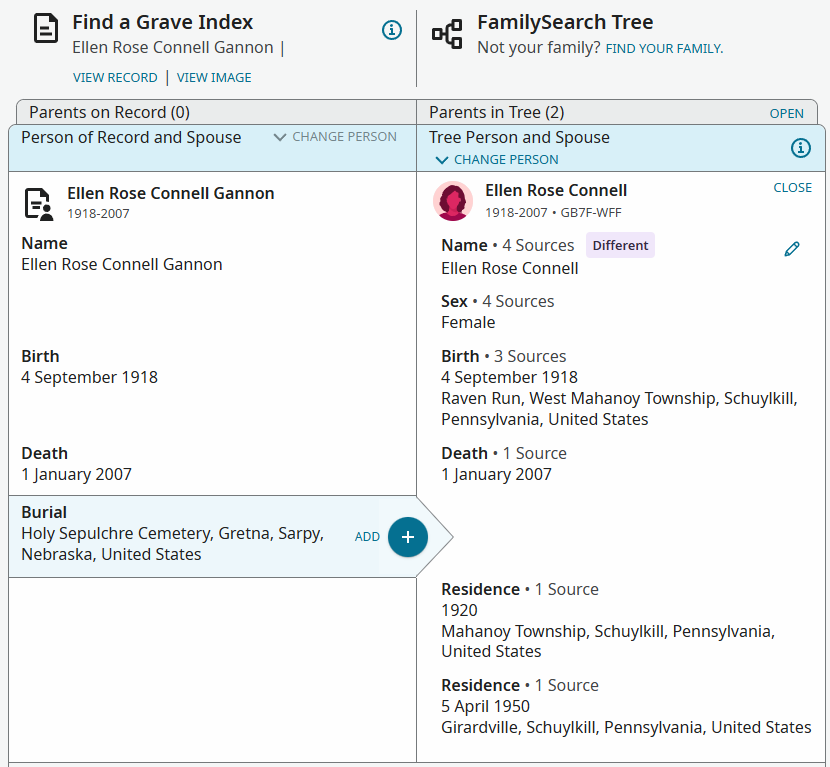
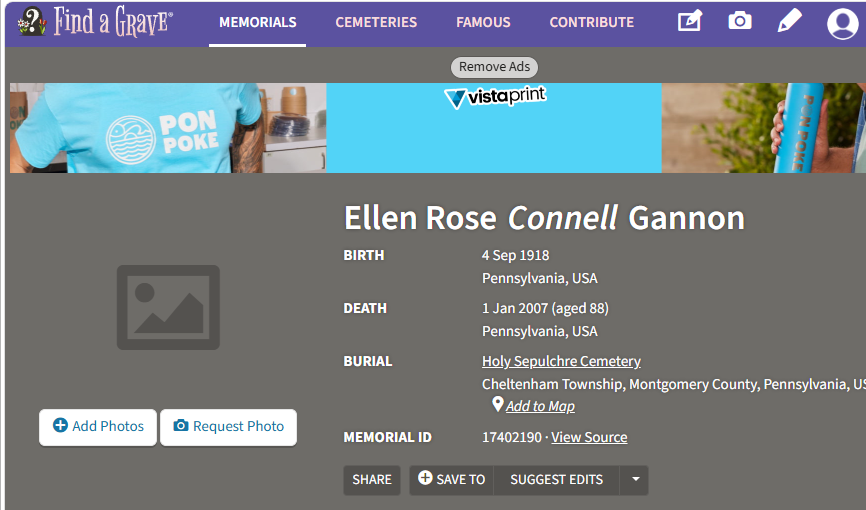
As an example, below are the FamilySearch Find a Grave Index entry for Ellen Rose (Connell) Gannon and her actual Find a Grave entry. As you can see, the cemetery name (Holy Sepulchre Cemetery) matches, but the location in the index is in Gretna, Nebraska, while the actual location is Cheltenham Township, Pennsylvania. I have come across many other instances like this.
Before, I had to open up the Find a Grave page to copy-paste the cemetery name into the Burial field. Now, it is arguably worse, because people might just assume that the autofilled Burial field is correct (and not look at the Find a Grave page), which will cause the completely wrong location to be entered.
Answers
-
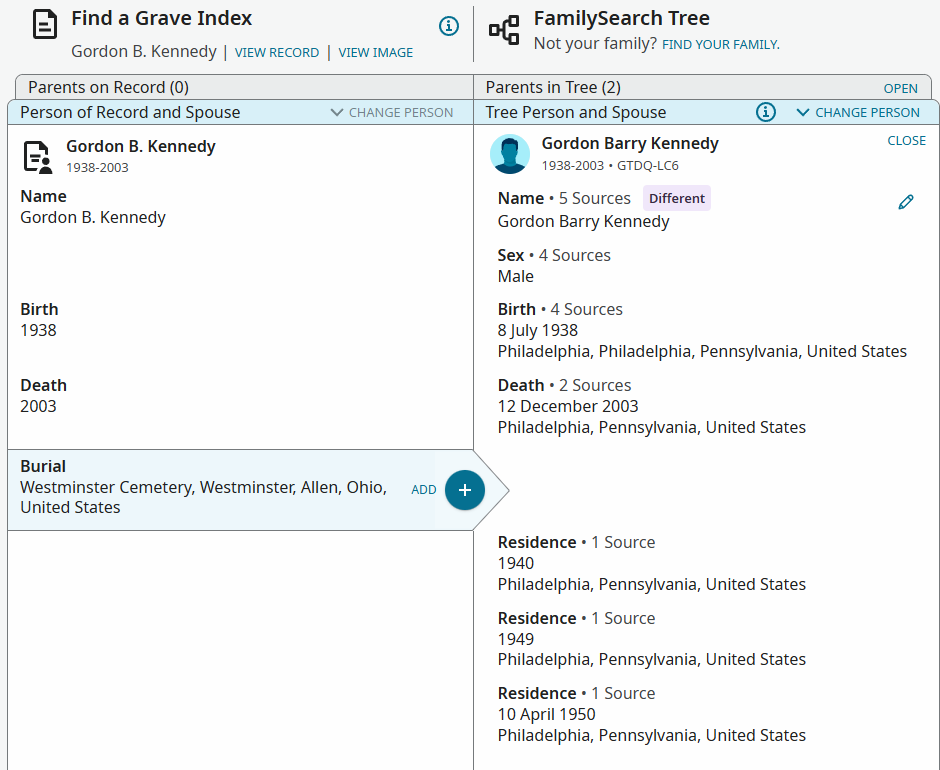
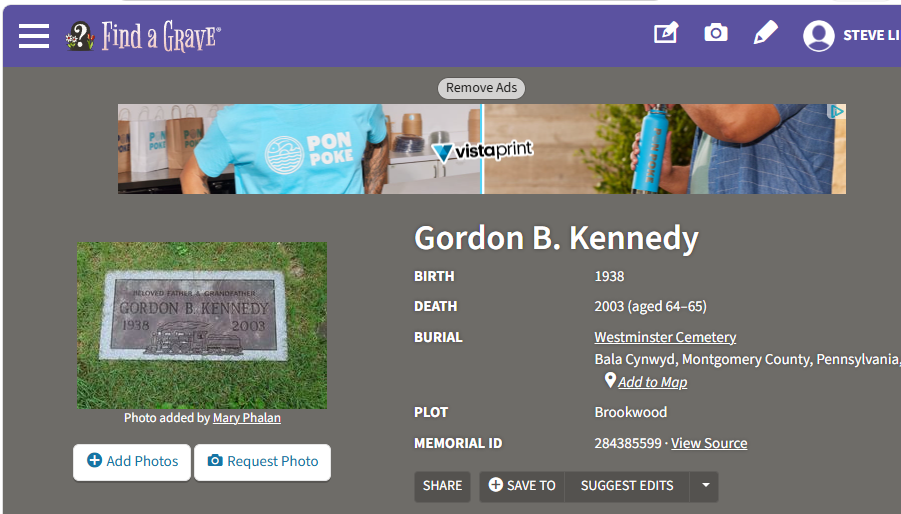
Here is another example (there are many). Gordon Barry Kennedy's cemetery is Westminster Cemetery in Bala Cynwyd, Pennsylvania, but the index autofills with Westminster Cemetery in Westminster, Ohio.
 0
0 -
This may be related to the following topic, and perhaps they should be moved to the Source Linker community area (based on other things I have seen here): Why are there wildly different places on this document? — FamilySearch Community
0 -
@SteveLinke that other discussion is really about the Records and their indexing, not specifically about how sources would use those Records, so I don't personally think the Source Linker is relevant to it. It seems to me that your topic here is a different angle on the same matter, in that I found in my investigation there that the vast majority of my Records had no cemetery on their standardised place.
0 -
I have attached hundreds (if not thousands) of Find a Grave sources for several years now, and, until about the last week or so, I have never seen the cemetery name located in the Source Linker—only the location. In those cases, the location has nearly always matched the Find a Grave memorial—like 99% of the time. Perhaps only when someone had made a change on Find a Grave after the index entry was created has it ever been questionable, which would seemingly be extremely rare, because the cemetery and its location is the underlying basis for those memorials. It is only very recently that the cemetery names have started appearing in the Source Linker, but now the locations tend to be messed up.
The reason I though they may be related is that there seem to be lists of cemeteries with the same name but different locations showing up.
5 -
I suspect this is our old "friend" place-name standardization at work. I've seen several Findagrave records in FamilySearch this week that have the right town in the wrong state. When I opened the details, I could see the "original event" breadcrumb.
https://www.familysearch.org/ark:/61903/1:1:QVKD-BYPT?lang=en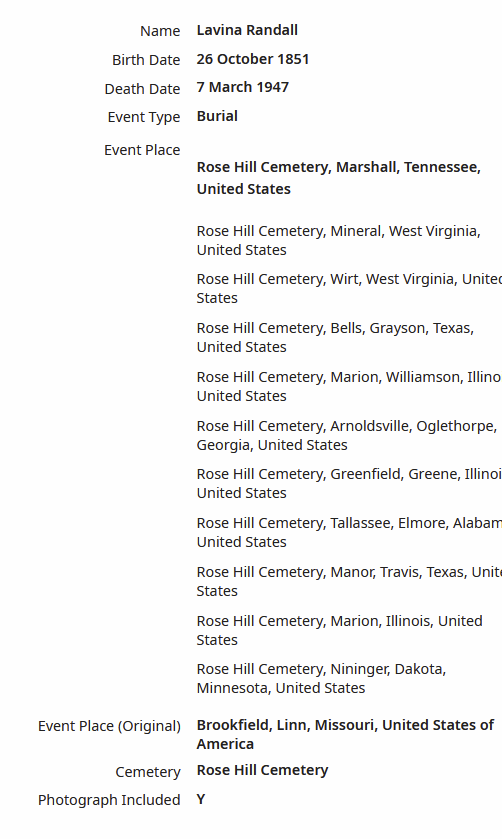 3
3 -
@SteveLinke This appears to be a different issue from your previous post. https://community.familysearch.org/en/discussion/190160/find-a-grave-memorials-were-unable-to-show-this-record
Thank you for taking the time to share your concern—we appreciate your effort to help improve the experience for everyone.
To make sure this reaches the right team and can be reviewed as efficiently as possible, we recommend submitting it through the Record Issues form. This helps ensure that technical problems, errors, or restrictions are addressed directly by those best equipped to assist.
You can report the issue here: Records Issues Form
When submitting, please include as much detail as you can—such as the record name, collection, and what you’re experiencing—so the team can investigate thoroughly.
The Community is always here for research help, collaboration, and discussion, so please don’t hesitate to continue posting if you need assistance finding or interpreting records.
Thank you again for your contribution and for helping us keep the Community organized and effective for everyone!
0 -
Recently I have been experiencing (what I think are) similar problems with the place names from FindAGrave during the Source Linker process. I don't know if the FindAGrave entries are "indexed" incorrectly or if it's in the familysearch processing, but the place names definitely don't match. An example, (see PID:LXDY-22D) where the cemetery place should be "Redwood Memorial Mortuary and Cemetery, West Jordan, Salt Lake, Utah" but the entry from FindAGrave was "Redwood Cemetery, West Lebanon, Pike Township, Warren, Indiana" …. obviously, not close.
2 -
Here is a screenshot of part of the results list from a records search I did on the FindAGrave collection. I have selected the first visible result. The red-marked event places in the list and the Record Information panel are all incorrect. The correct place (for the selected result) is marked in green. The correct places are all cemeteries in New Zealand whose names match but, in these cases, not even the offered country is correct.
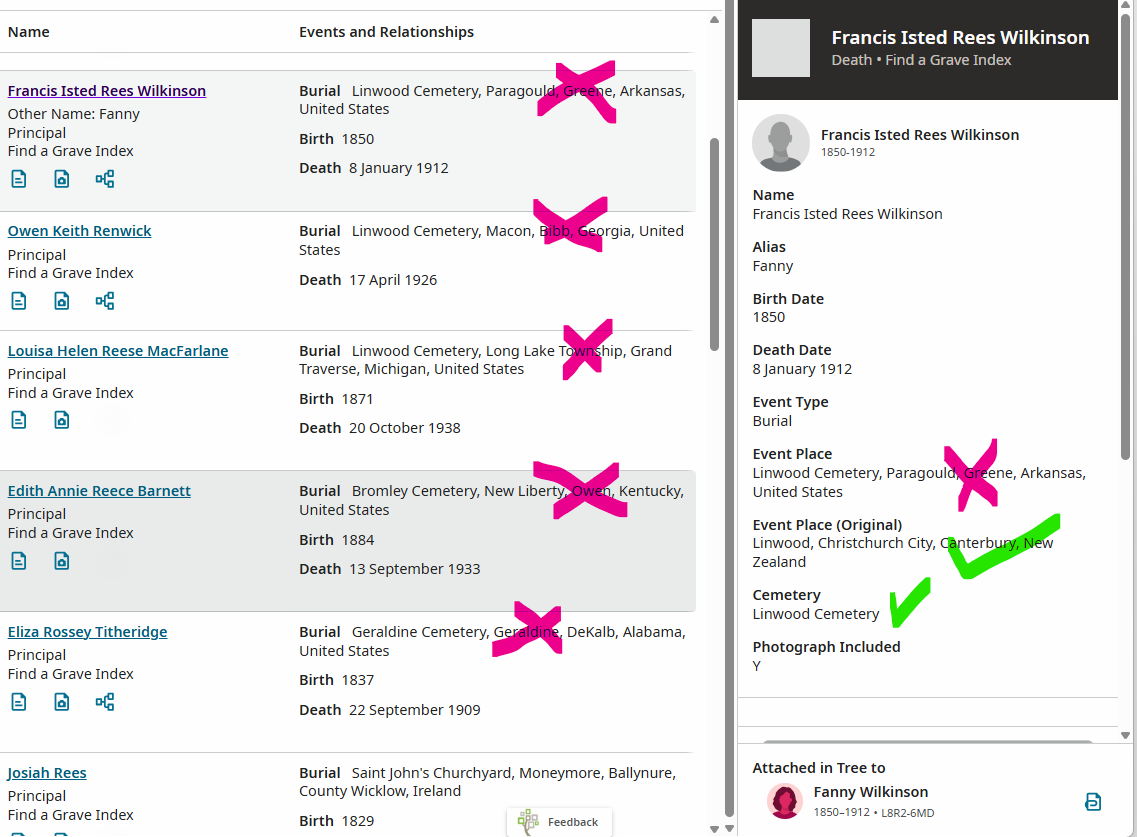
A few weeks ago, I started seeing that the website source linker was sometimes adding the cemetery name to the suggested place that it offered the user. This is something that the FamilyTree Android app has been doing for several years; I started a discussion a year ago, suggesting this could be done on the website too. Maybe my suggestion is coming to fruition. I think that the problems that we are seeing in the source linker are, at least in part, caused by the standardizer, as Áine.ní.Donnghaile
described, because the same behaviour occurs outside of the source linker, e.g. in the record search results list.1 -
@JulianBrown38 see the post @SteveLinke links to. I did some detailed investigations and have reported this bug as a Records Issue which we gather is being looked into.
@shecorwe I can't see how closing that other post can prevent duplicate reports, or that it is even a good idea to do so (merging threads if necessary), especially if (as here) it adds evidence. My completed Records Issues form pointed the engineers back to the linked post for more information since 2000 characters was insufficient.
4 -
It's great this issue with cemetery place standardization has been documented and reported. It is exceedingly time consuming and frustrating to attempt to search the Find A Grave Index to create links for burials with this naming issue.
Is the expectation we document every single error we find? (I would believe that most people do not have the time or patience to do this.)
And, after reporting the issue, it seemingly goes into a black hole with no feedback as to issue received, problem identified, being worked, solution found and planned for release of solution.
3 -
@SueBaker84 I have raised the 'black hole' issue with these forms also, and it sounds like that is (at last) being looked at.
I don't think we need to report exactly the same issue again through the Records Issues Form once we have heard it is being investigated, @shecorwe am I correct?
2 -
It would be helpful to get an explanation of how the Records Issues Form should be used. I come across random records that have errors that cannot apparently be edited by users, like marriage records where the parents are assigned to the wrong spouses, obituary records that combine multiple obituaries and mangle the names, etc. I would consider these individual problems. It would be time-consuming to report these individual errors, and I am not sure they can or would be fixed if reported.
In contrast, I have recently reported three seemingly new "systematic" bugs that affect many records: (1) auto-filled cemetery locations in Find-a-Grave hints being completely wrong in the web interface (reported in this thread, and it is interesting to hear that it works in the mobile interface?), (2) frequent generation of the "We're unable to show this record" error for other Find-a-Grave hints (reported in a different thread), and (3) the Quality Score checker preventing the changing of wives' names because they do not match their husbands' names (also reported in a different thread).
I continue to encounter all of these systematic bugs, but it would be nice to understand how these types of issues should be reported and get updates on how they are being handled. I heard from another user that FamilySearch is having problems updating things with Find-a-Grave, that there are glitches with both FamilySearch and Find-a-Grave, and that FamilySearch is "waiting" to see if things get resolved.
In the case of the Quality Score checker, I have just been going ahead and making the name changes and putting the phrase "FS bug" or "FS error" in the Reason field to allow the changes to be saved. It is probably not a good idea to get used to ignoring quality checks like this, but the system is currently quite flawed and not ready for prime time, so I am now in the habit of using this workaround.
3 -
@MandyShaw1 thank you for the information. I'm extremely new to the community and reporting things. I truly appreciate the help.
0 -
Please stop referring to the issues being tracked and investigated as a black hole. This is negative and not fair to those taking the time to investigate and to interact with teams behind the scenes. I know you would all love to have automatic resolution, however, there are complicated and diverse systems that may or may not make a quick resolution possible.
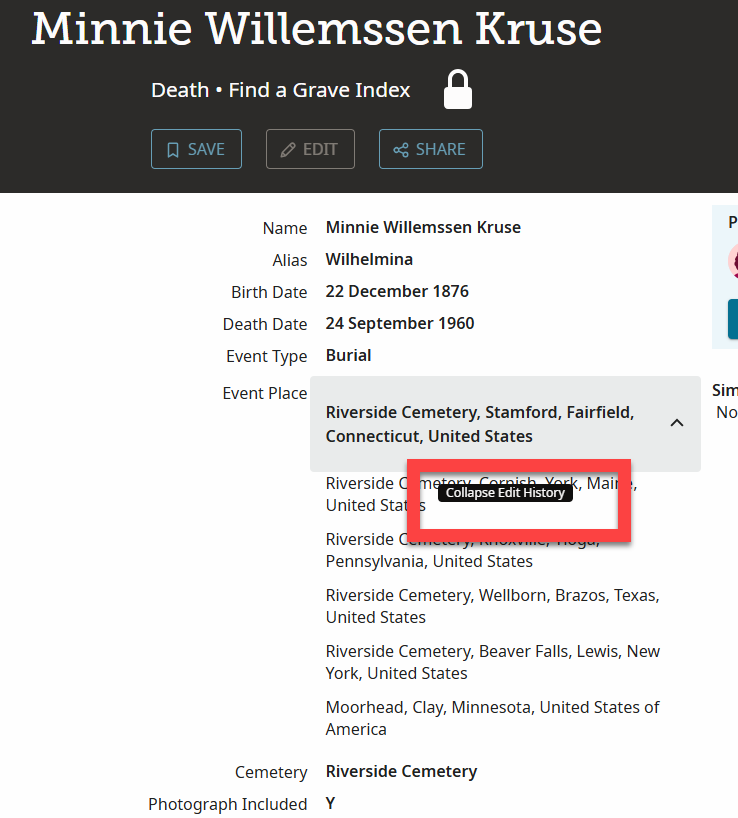
In response to the information for cemeteries being incorrect, could you check something for me and see if you are able to perform this function. Hovering the cursor says "Edit History" are you able to see that?
 -2
-2 -
@Tomlinsonkl said:
"Please stop referring to the issues being tracked and investigated as a black hole. This is negative and not fair to those taking the time to investigate and to interact with teams behind the scenes. I know you would all love to have automatic resolution, however, there are complicated and diverse systems that may or may not make a quick resolution possible. …"
With respect, the issue is that once something has been raised via the Record Issues Form (and also earlier) there is no guaranteed feedback of information. (This also applies to other forms like the Suggestions form)
Things dropping into something and nothing coming out is what a black hole is. That's a scientific fact.
Those of us with professional experience in solving IT issues know very well that it can take a lot of time to solve issues with complex systems such as FS. The "black hole" issue is not about the length of time. Nor do we expect "automatic" or immediate resolution.
Rather it's the point that we don't get regular reports (originating from the Techs) on outstanding issues. Currently we are dependent on the good offices of mods to pass on what they've learned in their own interactions - I am profoundly grateful to them when that happens but even those heros can't know everything.
7 -
The short answer is, yes, if I bring up the FamilySearch Find a Grave Index records, I can hover over the carat and see "Collapse Edit History."
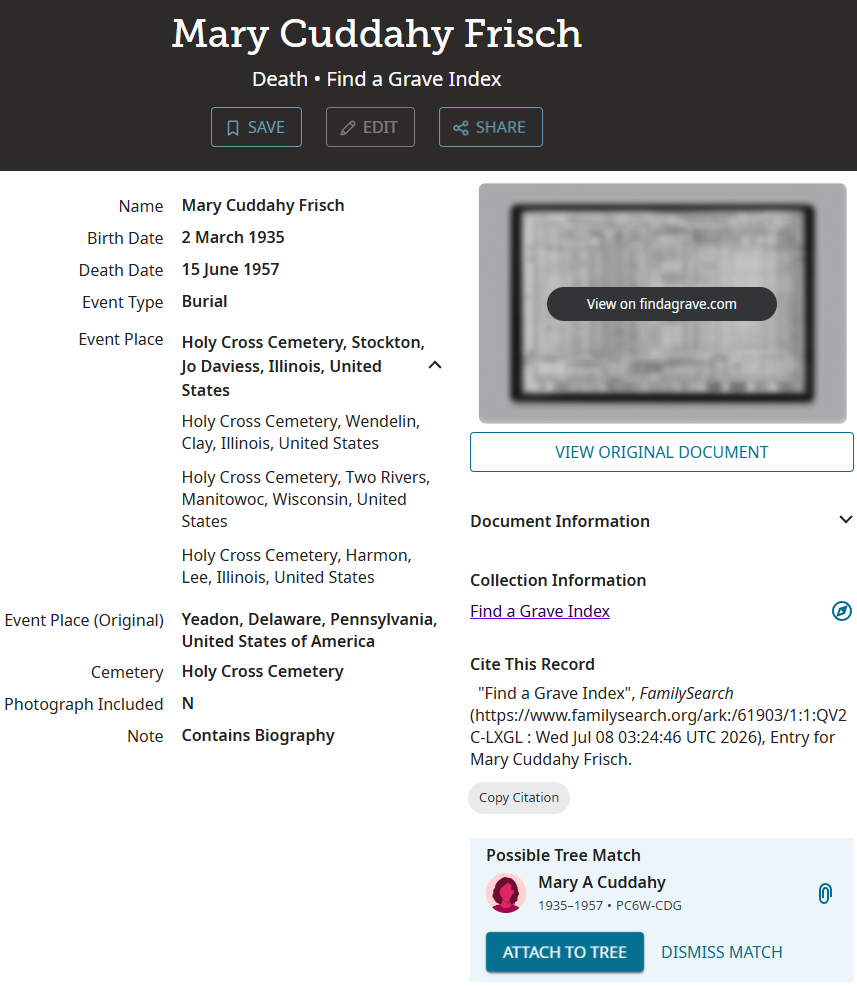
As another example, here is a FamilySearch Find a Grave Index record showing the burial location of Mary Cuddahy Frisch as being in "Holy Cross Cemetery" with the correct "Event Place (Original)" of "Yeadon, Delaware, Pennsylvania, United States of America" but an incorrect "Event Place" of "Holy Cross Cemetery, Stockton, Jo Daviess, Illinois, United States" in bold with three other Event Places in Illinois or Wisconsin in non-bold below it (where the "Collapse Edit History" carat is located):
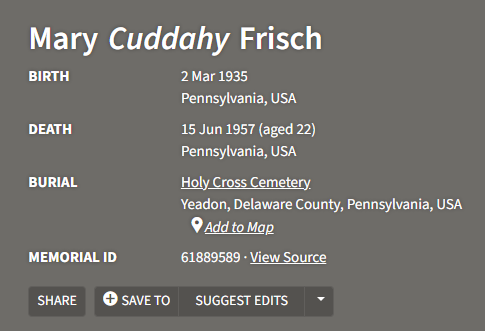
Now, here is the actual record on Find a Grave showing the correct burial location at Yeadon, Pennsylvania, which corresponds with the "Event Place (Original)" in the FamilySearch record:
Finally, here is how it looks in the FamilySearch Source Linker after clicking on the Find a Grave hint—it defaults to the incorrect "Event Place" that is in bold in the FamilySearch record, rather than the correct "Event Place (original)":
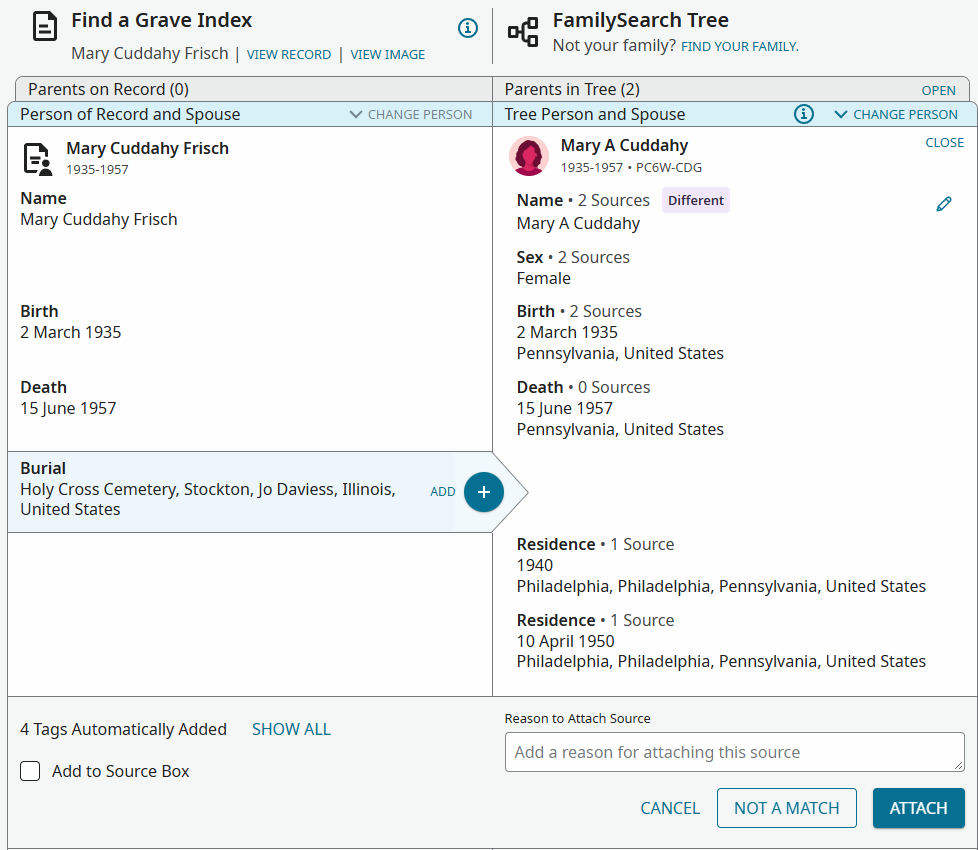
Before the last week or so, the Source Linker would almost always contain the correct city/state location but never included the cemetery name at all in front of that. I had to copy-paste the cemetery name from the Find a Grave site. More recently, though, the Source Linker now includes the cemetery name, but it almost always includes the incorrect city/state event place. This has arisen in dozens of cases for me.
It is no more work for me than it was before to copy-paste the entire cemetery name + city/state from the Find a Grave website. However, if people just blindly hit the "+" button in the Source Linker to add it, the incorrect city/state of the cemetery will get added. I don't know how complicated the programming is at FamilySearch, but it seems like you should be able to use the "Event Place (original)" text to autofill the Burial field in the Source Linker, rather than the other Event Places.
3 -
You see, this is an example of the current process being less than adequate. @SteveLinke has copied out this latest case - it's taken him away from his research and increases frustration, I'm sure.
Now, my impression is that the Techs actually know about this FindAGrave issue - I did try to find confirmation of this because I'm sure I've seen one of our most valued community contributors say this, and I'm also sure that he said that no further examples were needed. This should not be regarded as a brush-off from him - I can say from personal, professional experience that there are times when the issue with the code is 99% clear from a few examples. (Nothing is ever 100% clear!)
But the issue is that I couldn't find those clear statements because there's a lot of threads and a lot of text in each thread. Quite probably I missed the statements.
But if there were a repository of current underlying issues with a 1 line current status, then this would give us a fighting chance of not wasting everyone's time re-inventing the wheel and resubmitting error reports on the same issues.
(And yes, I am totally certain that there will be those who won't read the "current issues" list!)
5 -
Mary's husband August Frisch is similar. His correct cemetery is "Saints Peter and Paul Cemetery, Springfield, Delaware County, Pennsylvania," but the Source Linker auto-fills with "Paul Cemetery, Sabine, Louisiana."
August Werner Frisch (1929–1985) • Person • Family Tree
I added the Find a Grave Index sources to both Mary and August, but you can detach them, and the hints to add them back will re-appear. Then, when you click on the hints, you will see the incorrect locations on the left side of the Source Linker again.
Apparently, though, this only broken in the "desktop web browser" version of the FamilySearch site, because I think somebody else reported that it works OK in the mobile version? I never use the mobile version, so I don't know.
1 -
@Adrian Bruce1 I believe this is the comment you were seeking:
https://community.familysearch.org/en/discussion/comment/632431/#Comment_632431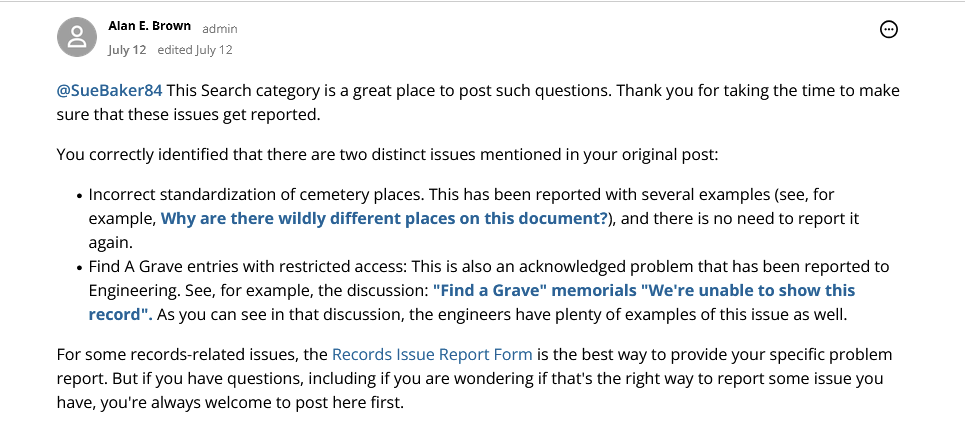 2
2 -
@SteveLinke said:
Apparently, though, this only broken in the "desktop web browser" version of the FamilySearch site, because I think somebody else reported that it works OK in the mobile version? I never use the mobile version, so I don't know.
To be clear, the Family Tree mobile app is what you are referring to; the FamilySearch site works the same in a browser on a mobile device or a desktop/laptop computer, but the actual app (for iOS or Android) is different (although it uses the same data from Family Tree as the website does).
The Family Tree app has had the ability to connect the specific cemetery place from records such as Find A Grave for several years. It does that by combining the cemetery name and the place from Find A Grave. That continues to work nicely.
The recent change is that the website is now trying to do a similar thing and use the specific cemetery name for the burial place. However, it seems to be using only the cemetery name without the additional place context. Since there are many cemeteries named "Holy Cross Cemetery" (for example) throughout the English-speaking world, just using the cemetery name has a good chance of choosing a cemetery in the wrong place.
0 -
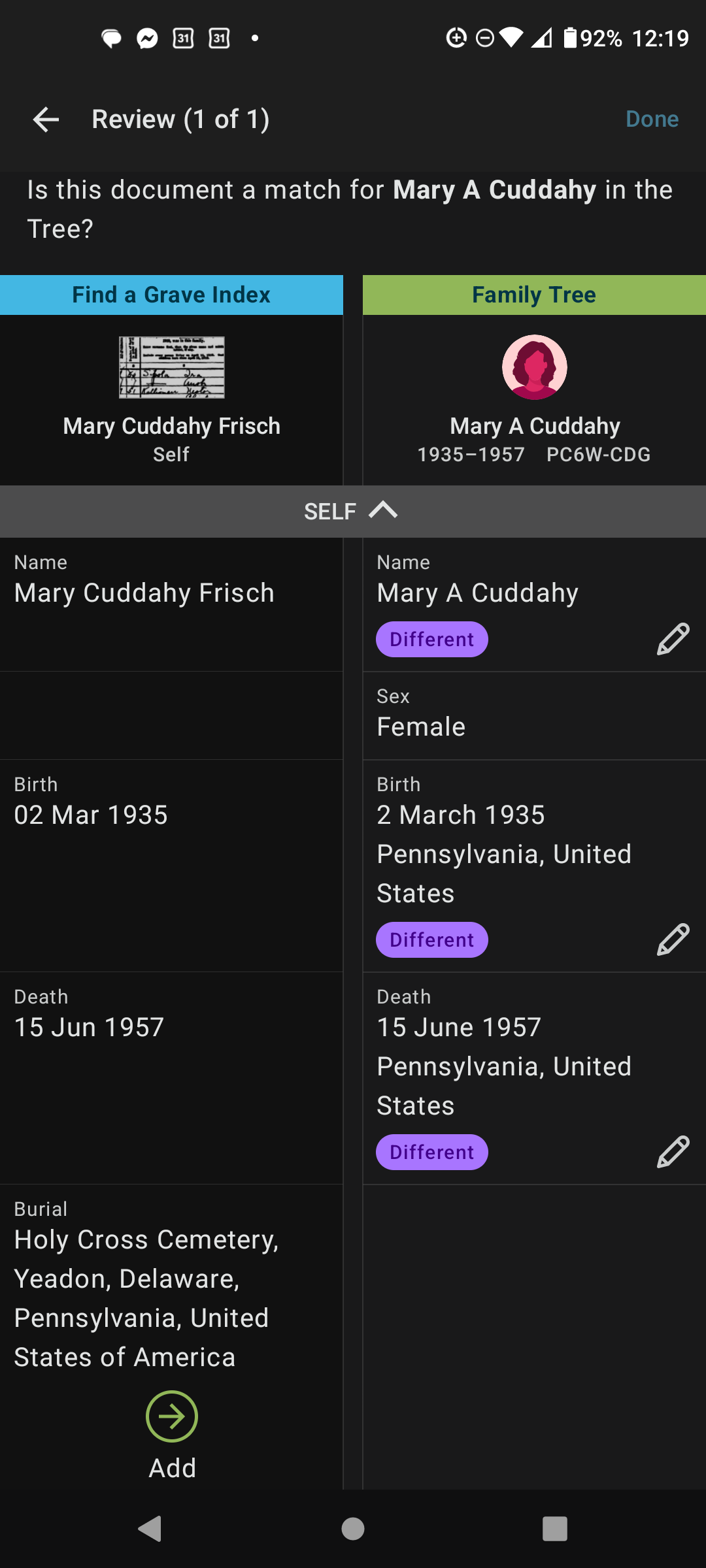
OK, yes, the FamilySearch Family Tree mobile app. I just detached the Find a Grave record and deleted the Burial entry for Mary Cuddahy, and then re-attached it using the mobile app. Sure enough, it works fine there. It is strange to me that it would be so complicated to enable the same functionality for web browser users.
 0
0 -
Hi. I note that this problem has popped up in the last month at the same time that Family Search began populating cemetery name (along with City/County/State), rather than simply loading City/County/State from Find-A-Grave and having the user look up the cemetery name and add it to the record if that is what he prefers.
I note in passing that Billion Graves does NOT have this problem, and continues to act as it usually does (and as Find-A-Grave did prior to last month) — it pushes only City/County/State and you have to add Cemetery Name manually using cut-and-paste. But at least you consistently get the correct City/County/State.
I assume this difficulty is the result of the search keying first on Cemetery Name, and second (if at all) on City/County/State. The software clearly creates a list of all cemeteries with the Cemetery Name and selects one to merge into my individual records according to some internal inscrutible algorithm — giving you a record with the right Cemetery Name in the wrong part of the world <sigh>.
I LOVE the fact that Family Search now populates Cemetery name as part of the record merge and saves me a few keystrokes cutting and pasting cemetery name in after the fact.
Since I know the problem exists — I have seen this happen at least 50x in the last week — I am experienced enough that it does not throw me, particularly if I have a partial burial record which visually clashes with the new data. However, what really frosts my pumpkin is where I am linking a burial record where none currently exists, and if I not careful the incorrect data simply sockets into place without my noticing it.
As I say, I have seen this problem more than 50x in the last week — and my honest appraisal is that the incorrect data is presented much more frequently than the correct data. Since data integrity has been my job for several years, I am less concerned with catching the errors as they come up, with how (once the source of selection problem has been eliminated and corrected) the data can ever been identified and cleaned up at a future date.
1 -
Thank you everyone for the feedback. We don't want you to think we have forgotten about it. We are still actively researching and investigating to determine the root cause and fix to the issue. Though we cannot provide a specific time for resolution of the issue we hope for your patience and understanding.
0