Why are there wildly different places on this document?

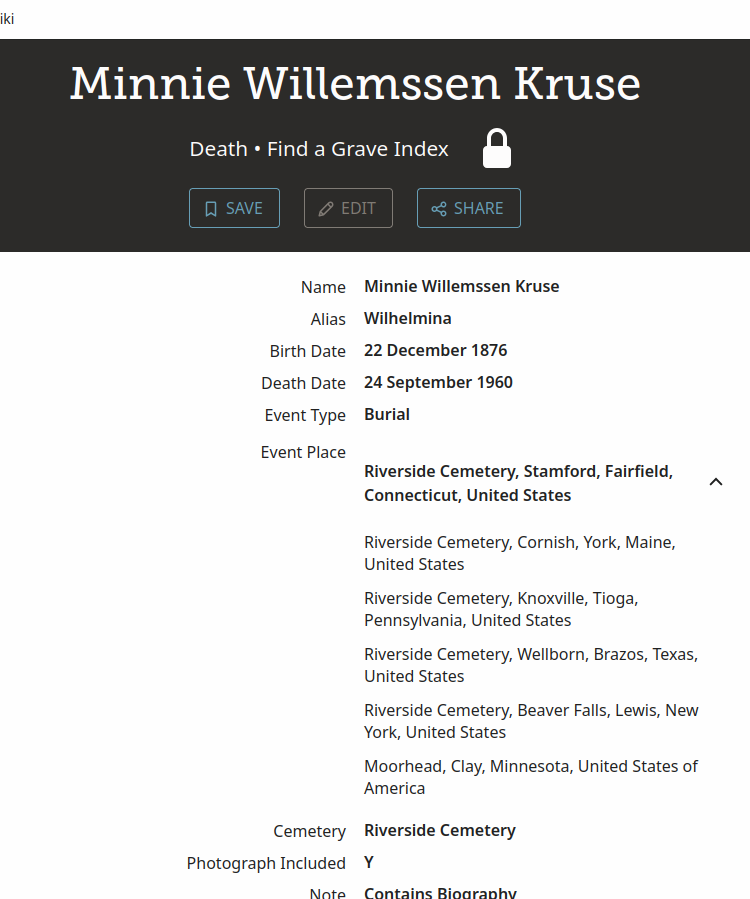
Here is the link to the source → https://www.familysearch.org/ark:/61903/1:1:QK1X-Z4PN?lang=en
I am just really confused as to why on this grave head, which theoretically would only have one location, there are six hilariously different locations? Was Family Search just trying to list all the Riverside Cemeteries in the US? It won't let me edit it, and when I follow the link back to Find a Grave, they only have Minnesota listed.
This isn't the first time I've seen this, maybe the third or fourth, so it seems to be a reacquiring issue. What's also annoying is that it's kind of a wild shot as to which place Family Search will show, which is incredibly confusing while I am trying to keep places straight while I sort out places and people. Any thoughts, sympathy, advice?
Answers
-
@HeidiSchreiner - I don't have the complete explanation for what you (and lots of us) are seeing when you click the arrow to reveal the multiple placenames, but it's clearly something to do with the need to go from the placename on the original source (a cemetery here, namely Riverside Cemetery) to the finalised Event Place - which needs to be a placename from the list of Standardised Placenames.
So, you're not far off when you said it was a list of all Riverside Cemeteries.
So far as anyone knows, the only one of that list that means anything for search purposes is the top one. You personally can ignore the rest - we think that the rest of the list is there for debugging purposes to help FS tune the algorithm to go from the abbreviated placename to the full Standardised Placename.
The appearance of a list behind an arrowhead (the icon reveals or conceals the list) can mean that the value has been edited and this is the list of previous values. However, that is clearly not the case here for places (or for date standardisation lists either).
Basically, you can click the arrowhead, make the list go away and forget about the list. Unless you're like me.
Note that I am not an engineer for FS, though I was an IT professional. I'm just trying to explain and reduce puzzlement. I'm not 100% certain of all the details but, despite appearances, computers do behave logically so one can try to reverse engineer potential explanations.
If anyone thinks that this reply is speculation that we shouldn't indulge in, then I invite you to permanently document this feature so that no explanation would be needed.
7 -
See, I would ignore it, except the one at the top next to the arrow is definitely wrong. It was really weirding me out that the document that was recommended to me was in Connecticut, when the family member I was working on was buried in Minnesota… until I saw the list of places, followed the link back and saw that the grave stone was in Minnesota. I do believe this document refers to my ancestor, but the address next to the arrow makes that seem wrong. I guess I could attach the document anyways and leave a note as to what is happening. But it is incredibly frustrating.
So I guess I am like you! LOL.
3 -
I've had a look at the relevant data via my analysis database.
The example above has the following place-related metadata:
label
text
EVENT_CEMETERY_ORIG
Riverside Cemetery
EVENT_CITY_ORIG
Moorhead
EVENT_COUNTRY_ORIG
United States of America
EVENT_COUNTY_ORIG
Clay
EVENT_PLACE
Moorhead, Clay, Minnesota, United States of America
EVENT_PLACE
Riverside Cemetery, Beaver Falls, Lewis, New York, United States
EVENT_PLACE
Riverside Cemetery, Wellborn, Brazos, Texas, United States
EVENT_PLACE
Riverside Cemetery, Knoxville, Tioga, Pennsylvania, United States
EVENT_PLACE
Riverside Cemetery, Cornish, York, Maine, United States
EVENT_PLACE
Riverside Cemetery, Stamford, Fairfield, Connecticut, United States
EVENT_STATE_ORIG
Minnesota
EVENT_TYPE_ORIG
Burial
The _ORIG ones, as usual, will be the information provided by Find a Grave. The EVENT_PLACE ones will be FS' interpretation of the place.
The FS-interpreted ones split into 2: the (correct) non-cemetery place, which has not been modified since initial take-on, and the Riverside Cemetery entries, none of which are in anything resembling the right area.
I suspect that FS has simply looked up the cemetery like this: q=name:"Riverside Cemetery" and taken the 1st 5 entries as they then were (the Stamford location now seems to be absent from the Places database).
If you put the Find a Grave supplied cemetery, city, county, state, and country together and look that up, you get a single entry representing what is clearly the correct cemetery in the correct location:
q=name:"Riverside Cemetery, Moorhead, Clay, Minnesota, United States of America" gives just
Riverside Cemetery, Moorhead, Clay, Minnesota, United States.
I looked into this further using 20705 US Find a Grave entries in my analysis database.
Of these, 269 have FS-interpreted places with 'Cemetery' in the placename; these 269 appear to demonstrate the above behaviour of having a non-cemetery FS place added at take-on time, with additional interpreted cemetery place(s) added later.
As far as I can see, all but 67 of these 269 have at least one FS-interpreted cemetery place present that is in the wrong state; it looks to me as if everything except the cemetery name has been ignored in doing the placename lookup. Several entries have more than 60 FS-interpreted placenames, and one (https://www.familysearch.org/ark:/61903/1:1:QVLR-SSHF?lang=en) has 100.
I have done my own placename lookups, using the Find a Grave supplied cemetery, city, county, state, and country, for many of the other 202 entries (which obviously include the Riverside one discussed above).
In almost all cases I get a single, clearly correct, place listed as in the Riverside example above. I have never seen more than two placenames returned; where there are two, the ones I've seen consist of a non-cemetery placename plus what is clearly the correct standardised cemetery placename. (I am happy to do further testing if useful.)
For the example mentioned above with 100 placenames currently showing,
q.name:"Cedar Hill Cemetery, Big Clifty, Big Clifty, Grayson, Kentucky, United States of America" gives:
Big Clifty, Grayson, Kentucky, United States and
Cedar Hill Cemetery, Clarkson, Grayson, Kentucky, United StatesIt is not clear why so few of the 20705 entries have FS-interpreted cemetery placenames on them at all. I don't think those cemeteries can all be missing from the Places database (certainly the ones I have tried all seemed to be present). Perhaps there is a new project to add them (which would make sense to me). Whatever, I don't honestly think that the way the FS-interpreted cemetery placenames appear to be working at present is fit for purpose.
6 -
Wow. Seems like this is definitely a widespread problem then. I wish we could edit it down to the proper name ourselves, but with the Edit button disabled that makes it hard. I agree, whatever system Family Search is using to come up with these addresses is not working very well. Thanks for looking into it so much!
1 -
@HeidiSchreiner We can't edit index information that is imported into FamilySearch.
@shecorwe Could you raise this as a bug or a multiple-record data issue for us please? Thanks.
3 -
Aaaah, that does make sense. I probably should've noticed the pattern sooner.
0 -
Thank you for taking the time to share your concern—we appreciate your effort to help improve the experience for everyone.
It looks like your post may be related to a record-specific issue. To make sure it reaches the right team and can be reviewed as efficiently as possible, we recommend submitting it through the Record Issues form. This helps ensure that technical problems, errors, or restrictions are addressed directly by those best equipped to assist.
You can report the issue here:
Records Issues FormWhen submitting, please include as much detail as you can—such as the record name, collection, and what you’re experiencing—so the team can investigate thoroughly.
The Community is always here for research help, collaboration, and discussion, so please don’t hesitate to continue posting if you need assistance finding or interpreting records.
Thank you again for your contribution and for helping us keep the Community organized and effective for everyone!
2 -
@HeidiSchreiner @sc woz I'm happy to do the form.
(Edit - well, I'm doing my best, the little box won't accept any formatting, is tiny on the screen, and has a max length of 2000 characters)
(Edit again - and when I submitted the form it gave me no ability to save what I had entered for future reference (and a screenshot wouldn't have helped, because the Description box is so small). Form contents are however posted in a new comment in this thread.)
5 -
I would appreciate that, thank you!
0 -
Posted form contents:
Issue type:
Place Errors
Description:
Matter discussed in detail here: <this thread> to which please refer for more detail.
Here is a summary:
FS' Find a Grave placename standardisation is causing problems where the standardised placename shown is that of a cemetery, because the relevant placename lookups appear to be ignoring all aspects of the Find a Grave-supplied placename except the cemetery name itself.Re the screenshot and URLs provided below:
None of the Riverside Cemetery standardised places shown are in anything resembling the right area.
It looks as if FS has simply looked up the cemetery like this: q=name:"Riverside Cemetery"
and taken the 1st 5 entries as they then were.
If you put the Find a Grave-supplied cemetery, city, county, state, and country together and look that up, you get a single entry representing what is clearly the correct cemetery in the correct location:
q=name:"Riverside Cemetery, Moorhead, Clay, Minnesota, United States of America" gives just
Riverside Cemetery, Moorhead, Clay, Minnesota, United States.I looked into this further using 20705 US Find a Grave entries in my analysis database.
Of these, 269 show FS-interpreted places with 'Cemetery' in the placename.
As far as I can see, all but 67 of these 269 show at least one FS-interpreted cemetery place in the wrong state; again it looks to me like an over-wide placename lookup.
I have done my own lookups, using the Find a Grave supplied cemetery, city, county, state, and country, for many of the other entries.
In all cases this returns either one or two clearly correct placenames. Where there are two, the ones I've seen consist of a non-cemetery placename plus what is clearly the correct standardised cemetery placename.In conclusion, I don't honestly think that the way the FS-interpreted cemetery placenames appear to be working at present is fit for purpose.
I am happy to provide any further information you may need.
Collection URL:
https://www.familysearch.org/ark:/61903/1:1:QK1X-Z4PN?lang=en
Image URL:
https://www.findagrave.com/memorial/138593858/minnie-kruse
DGS:
n/a
Research Issue Type:
Standardization Errors
Screenshot(s):
<Heidi's screen dump above>
1 -
@MandyShaw1 - re "no ability to save" - I really hope that is a limitation in the underlying Vanilla platform given the similar inability to save a suggestion… Sigh
1 -
I don't think any of them are Vanilla forms. The Research Wiki reporting form is a Microsoft one that you can save in a Microsoft 365 account, I have successfully done so in the past. The others seem to use a different service.
I'll start tracking requests here in Community to use the new Records form, to try to ensure everyone is warned to save their content locally pre submission.
Meanwhile, @sc woz, would it be possible to change the standard new-Records-form advice to include this reminder, please? Also, any chance of these forms being changed to provide some way of accessing previously submitted content? (Automatically emailing the completed form to the email address the submitter has provided, maybe?) Thanks.
0 -
@MandyShaw1 and @HeidiSchreiner We received your form and information. Thank you for bringing this record issue to our attention. This will allow the issue to be reviewed and investigated by the appropriate team.
To avoid confusion and duplicate reports, this discussion will now be closed while the investigation is underway. If additional information is needed, the team may reach out for further details.
Thank you for your patience, for helping improve FamilySearch records, and for being a valued member of the FamilySearch Community. We will provide an update if further information or a resolution becomes available.
0