Living People in the FamilySearch Tree

Another Community thread got me thinking about this and thankfully this Help Article was included in one of the responses. I noted this particular piece '…. FamilySearch does not automatically mark an individual as deceased when the first rule [AGE] no longer applies…'
So I dug out this PID for an Albert Bishop I created back in 2020. At the time I marked as 'Living' as he was born in 1912. So here we are today and that PID still shows as 'Living' confirming that there was not an 'automatic' change made to the living/deceased status. This is the family group and you can see two 'Alberts' along with two other 'living' siblings that I also created at the time, Louis and Mary.
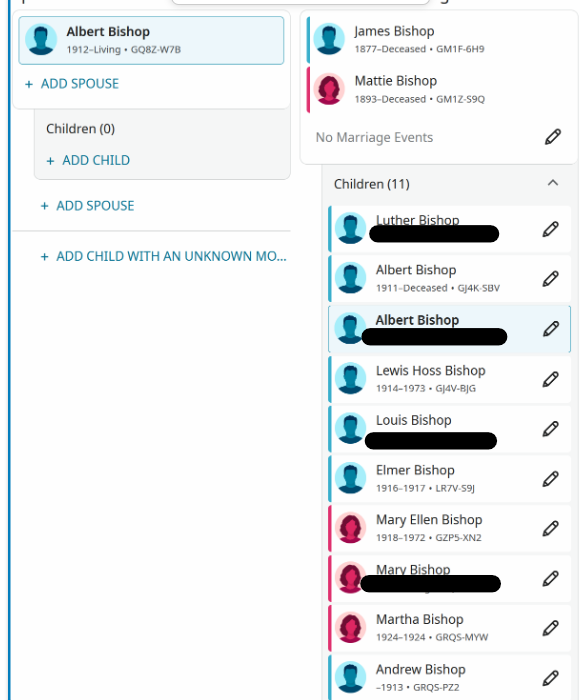
My concern is that if I had added any Memories or Sources to my 'living' Albert they would only be viewable by me, unless someone else had separately found them and added them to the 'deceased' Albert. And if the Help Article is right, that would be true for the foreseeable future [i.e. forever]
Now on a more personal level, I have numerous stories/photos/documents of my living siblings that I had planned to add to the FamilySearch tree. In the hopes that they would be made 'visible' at the expiration of the 'Age' limit. A 'gift', if you will, to my yet-to-be born relatives many years from now. But my hopes for passing on this legacy thru FamilySearch Tree may be fruitless if I understand things correctly.
I had mistakenly thought that the conversion living to deceased was automatic and that all would be 'revealed' at the appropriate time. There would be numerous 'duplicates' eventually exposed, much like in the Bishop family group, but better than 'loosing' valuable genealogical family history or records that I and others add to Living individuals.
Wonder how many 'Living' individuals are in the FamilySearch Tree and what was the original purpose, other than to the person creating them?
Best Answer
-
@Mark McKenzie_1 Mod note: Your post was edited to maintain the privacy of a living person. Please see the Community Code of Conduct.
As to your first question, you can assign an executor to your account.
Because FamilySearch requires a manual update to change a status from living to deceased, you need someone to trigger the unlock.
- Write Down Your ID: Locate your FamilySearch Helper Number and your profile's Person ID (e.g., L123-ABC). Leave these with your estate planning documents or a trusted relative.
- The Transition Step: Instruct your chosen relative that upon your passing, they simply need to go to your profile in their tree, click "Edit" next to your name, and change your status to Deceased while inputting your death date and location. This single action instantly merges your private profile into the public tree and publishes your memories.
- There is a useful YouTube video on What Happens to Your Account when you die.
The other question;
Wonder how many 'Living' individuals are in the FamilySearch Tree and what was the original purpose, other than to the person creating them?
There are possibly 10s of millions of living names in the FamilySearch tree, based on the size of the global user base (millions of accounts), and the fact that every user creates their own private copies of living relatives. Every user has their own private “bubble” of living people — and those bubbles never overlap. So if 10 cousins each add the same living grandmother, the system holds 10 separate private records, not one.
The modern "Private Spaces" system that strictly enforces the living person privacy rule on FamilySearch has been in place since August 2014.
Just a quick clarification about Living profiles in Family Tree:
Living profiles were never designed to be full genealogy records. They were added to the system for one simple purpose: to help each user connect themselves to the public, deceased portion of the shared tree.
They act as a short bridge:
You → your parents → your grandparents → the public tree
Because the shared tree is only for deceased individuals, the system needs a way for each user to reach their deceased ancestors. The only way to do that is by allowing temporary placeholders for living relatives.
For that reason:
- Living profiles are private
- They are not shared with other users
- They do not merge
- They are not searchable
- They are simply the scaffolding that lets your account attach to the main tree
They were never intended to be permanent or visible to anyone else.
I hope this helps to answer your questions.
1

Answers
-
@sc woz That explanation helps alot. Guess all of those 'Living' people I've been adding over time, primarily thru census records, just clutters up things and has no value added, now or ever. I had hoped that FamilySearch, thru the Family Tree, would be a 'trusted caretaker' until the appropriate time for all of my personal family history. Kind of sad as the commercial companies out there are not my desired long-term [after my decease] repository for my family info.
0 -
my opinion, Family Tree is not the best place to maintain "living" family history. I would suggest using a "third party" software package, such as Ancestral Quest or Roots Magic.
0 -
Thank you for the reminder about sharing info for 'estate planning'. Very useful. Something I had thought about but hadn't done. Now it is done.
Re: Living Persons:
- They do not merge (I am able to merge them on my laptop, but not on the phone version)
- They are not searchable (I assume you mean using the Find feature, I am able search for them in My Contributions and Private Persons)
I actually find Living Persons to be very helpful. I use them most when attaching obits because the relationships are usually viewable (to see the relationships I click 'View Record' to locate who the obit is actually for, then I click 'Change Person' to make that person the 'Person of Record'.)
Often, while attaching records I find that a deceased person has been attached that matches my living person. After review to ensure that it is the same person, I then change the living person to deceased and merge.
Sometimes the system actually provides hints for Living Persons. Working the hints, you may then be able to make them deceased - then everyone can see/work on them. The system does seem to do a better job of this with a bit more info than just a name though. A carefully thought out approximate birth date helps greatly in addition to other family members (I only add approx. dates in specific instances - not always). Another thing I have found very helpful is to add Married Alt Names for women, especially if she has married more than once.
I find that Living Persons can sometimes provide me with more info on Deceased Persons. Naming patterns and Sr/Jr are an example. These clues can help me figure out the names of those that have gone before and also give insight into relationships that I may not know about.
I also use Living Persons when I help others with their tree. I love the look on their face when they see the Fan Tree expand out. I think it is one of the most influential ways that I have been able to get others interested in their family tree.
I plan to keep adding living persons as much as I can. I review Private Persons frequently, look for duplicates to combine, look for people with hints (must click on them to see), add Alt Names, add judicious approximate birthdates, etc. It does work.
I'm sure that there are even more ways that I use Living persons but that is all I can think of for now. Interested to see what others think.
0 -
In an earlier comment, @sc woz said:
… you can assign an executor to your account.
Because FamilySearch requires a manual update to change a status from living to deceased, you need someone to trigger the unlock.
Write Down Your ID:Locate your FamilySearch Helper Number and your profile's Person ID (e.g., L123-ABC). Leave these with your estate planning documents or a trusted relative.The Transition Step:Instruct your chosen relative that upon your passing, they simply need to go to your profile in their tree, click "Edit" next to your name, and change your status toDeceasedwhile inputting your death date and location. This single action instantly merges your private profile into the public tree and publishes your memories.That is a creative suggestion that may seem like it could work, but it actually won't work. The reason for this is that your chosen relative will be unable to use your profile's Person ID to "go to your profile in their tree." Your profile exists in your account's private space, and no other user can see your profile.
There was a reference to the Helper Number. I suppose the chosen relative might hope that they could use Helper Mode (if they are a user who has that ability) to become a proxy for you in making edits to the private people on your account. That would not work either. The person profile associated with the account holder is a special profile can never be changed to Deceased (neither the user themself nor a Helper acting as proxy can do this). And it's also possible that the account of the deceased user became locked after their demise became known to FamilySearch, in which case Helper Mode won't work at all.
I'd also like to comment on the suggestion that "Living profiles … were added to the system for one simple purpose: to help each user connect themselves to the public, deceased portion of the shared tree." This is a commonly-held belief, and users are welcome to follow it in their own practices. After all, their private space is private to them.
But I don't limit myself to that narrow guideline at all. I have many living profiles that I have created for reasons that are very helpful to me:
- I keep track of my children, and their in-laws, so that I can easily research the part of my grandchildren's ancestry that is not within the ancestry of our family.
- I create living profiles for people who are close to dying so that I have a place to put memories and sources and other details in the Tree. Then when they do pass away, all that information can be easily merged with information contributed by other users.
- Like @Tiffany Farnsworth Nash , I sometimes create living profiles for people mentioned in sources by using the source linker. Then I use those living profiles to do additional research to determine if they are deceased. If they are deceased, then I have a great start on their profile; if I didn't do this, I would have to keep a lot of notes in a separate place and go back and create a profile later.
I'm well aware that some of the living profiles will still be in that state when I pass away. That doesn't concern me at all, because I benefited from having those living profiles during my lifetime. And in many cases, those connections ended up improving public profiles.
Finally, I would note that Family Group Trees were created specifically to share living profiles within a family group. In that context, many of the suggestions made about living profiles are reversed:
- Living profiles are not completely private — they are visible to all users in the family group
- They are indeed shared with other users
- They are often rather full genealogy records — they are far more than "scaffolding that lets your account attach to the main tree"
One suggestion for @Mark McKenzie_1 is to consider creating a Family Group Tree. That would be a place where the living profiles he has created over time could be copied. For this to be successful, it would require that there would be other family members (hopefully some in a younger generation who will outlive him) who would care for the living profiles he created over time. These shared profiles could be maintained by other group members and eventually marked as deceased when the associated people pass away. Then those living profiles will not "just clutter up things and have no value added, now or ever" but instead will become public and benefit other users of Family Tree.
4
