Out of Birth Order - TWINS

Currently, instructions indicate that, "If a child shows out of birth order in Family Tree, check the birth date. As needed, select a standardized version of the date. The system decides the order based on the standard date."
In the instance of TWINS this does not correct the order; John was born at 5:00 PM and his twin brother Samuel was born at 6:00 PM on the same date. If Samuel had been discovered before then the order would probably be correct based on first added, but Samuel died at 12 months and was not found until later.
I've tried entering the time of birth, but even with non-standardized birth dates (and including the time), the order does not change. The system currently does not allow for "time" of birth; is there another remedy that I'm not aware of to accomplish this, without manipulating the data?
Best Answer
-
You’re right to notice that the twins are not displaying in the expected order. FamilySearch’s published guideline is that children are sorted by birthdate first, and when two children share the exact same birthdate (such as twins), they should then appear in alphabetical order.
However, the system does not always apply this rule consistently. In some cases, twins with identical birth information still appear out of alphabetical order. This is a known display inconsistency in the Family Tree interface.
A few important clarifications:
Death dates do not affect the sort order
Order of entry does not control the sort order
Editing the children does not force the system to refresh the order
When this happens, it is not a data problem and not something the user has done incorrectly — it is simply how the system is currently behaving.
Keep the correct birth information for both twins, and if the true birth order is known, you may document it in a Note or Custom Fact. At this time, there is no user‑controlled way to force the display order to match the guideline.
Hopefully this helps clarify what you’re seeing.
I will check with some of the experts to see if this is an issue being worked on. Hopefully, an answer will be coming soon. Thanks for helping to make FamilySearch a better product.
1

Answers
-
Hi @Ottley BQ
It would be nice to have the PIDs of the twins so we could see their profiles.
In the meantime, as I understand it, birth other is based on the standardized date as you correctly state. In the case of twins with the same date, they are listed alphabetically by first name. Based on your description it sounds like that is not happening.
The other suggestion is that you include some notes. You can add to the Reason statement the birth order, add a note in collaborate section, or add an event in other information.
3 -
You cannot directly set or control the birth order of twins in FamilySearch. The system always sorts children by birthdate first, and when two or more children share the exact same birthdate, FamilySearch sorts them alphabetically by name. There is currently no feature that allows users to manually override this order.
Tips How do I add a Child
- Add each as a separate individual.
- Do not add the word "twin" in the name. Instead, you can specify it in Other information, or the Notes section of the Person page for each individual.
- Even if added in a particular order, the children can appear out of order. If 2 people show the same birth date, the system lists them alphabetically. You cannot change the order.
- If the twins died without names, enter only the last name with birth and death dates. To avoid a later merge of the apparent duplicate records, you can take these steps:
- Create a note for each to explain the situation.
- Check for possible duplicates, and mark the twins as Not a Match with a clear reason statement.
1 -
@sc woz you indicated that, "The system always sorts children by birthdate first, and when two or more children share the exact same birthdate, FamilySearch sorts them alphabetically by name. There is currently no feature that allows users to manually override this order."
In this situation, it appears that there is something that is overriding what you've stated, because they both show the exact same birth date (I've corrected one), and they do not sort alphabetically - John should be shown as child #6 and Samuel as child #7. Here are the PID's for your review - John K27Y-4N1 and Samuel G493-WY6. Thanks for your information and help!
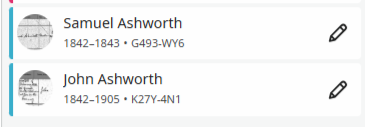 0
0 -
I have tested this multiple times on the Beta instance of Family Tree. I have been unable to determine a consistent pattern, but I have seen enough examples to conclude that the order of children born on the same day:
- has nothing to do with the given name (or surname), contrary to that statement in the linked help article
- Is not dependent on the creation order
- Once set, never seems to change, no matter what I change on either profile.
I'm having a hard time drawing any conclusion beyond @Ottley BQ's droll observation that "…it is simply how the system is currently behaving."
4 -
I noticed that John's language template was set to Other - I updated it to English. It didn't change the birth order.
I am wondering if it is sorting by death date - with the earliest first? I did not edit the dates to try to see if this is the case. @Ottley BQ - maybe you want to test that idea?
2 -
@Amy Archibald Excellent idea. Yes, it does appear that the death date is used to distinguish the order, all other things being equal. I tested this with several scenarios on Beta, and the sibling order consistently followed the death date order.
When I set the death dates to the test twins on Beta to be the same, then I found that the name actually did make all the difference. So it looks like the algorithm is:
- Show the siblings in order of birth date.
- If the birth date for one or more siblings is the same, order those siblings by death date.
- If the death date for one or more siblings is the same, order those siblings by full name.
On that last point, I tested and Frank Brown came before James Brown. But Frank Anderson came before Frank Brown. And Frank E Anderson came after Frank Brown. So I conclude that it is using the full name in its sorting. So the help article is somewhat correct in stating that they will be sorted by name, but only after the death date is first used as a tiebreaker.
It's nice to know the algorithm, but it doesn't particularly help when you're trying to get historical accuracy. If Frank Brown was born at 8:55am and James Brown was born at 9:00am on the same day, but James died first, there's no way to have Frank listed first.
I'm just glad that my wife and I named our twins such that their birth order matches alphabetical order, so they are in the correct order for now. But if the slightly younger one dies first, they will no longer be shown in birth order.
3 -
@sc woz , @Ottley BQ , @Amy Archibald
I submitted a content correction for the help article How do I add a child to Family Tree? to note that the death date is used as a tiebreaker before the name.
6 -
The excellent contributions to this discussion make one realise the worth of participating in Community!
As I have expressed previously, I wish the FamilySearch "publicity" team would do more to advertise / promote use of this forum. It proves of great help to FamilySearch users at all levels of experience / expertise.
Fortunately, the current level of employee / moderator participation is as good as it has ever been. I won't name them, but there are a few individuals who are really being of great help, especially in escalating issues to relevant sections of FamilySearch where they don't have a direct answer themselves to hand.
That is not to undermine the contributions of "ordinary" members, who also offer tremendous support to those with less knowledge of certain FamilySearch features.
7 -
Thank you Paul. 😊 We've worked really hard to be responsive and helpful in getting your questions answered and escalated when needed. It's really important to us that you know we hear you and that you hear from FamilySearch.
Sam ❤️
6 -
Hello everyone! This was an interesting discussion for me, as we have several sets of twins and even some triplets in our family, and they are listed in many ways, according to @Alan E. Brown ’s findings. Thanks for helping us understand how this works! In my simple estimation, a note can be added to the record, and this can state the actual birth order of the children, clarifying any question that might come up in the future. I’m going to add this to my family record for our twins and triplets. Thank you @Paul W for your kind words!
2 -
Thanks to all for your entertaining and informative analysis; even after all the effort, it seems that the system is currently behaving pretty much how is was programmed to perform…. Thank you for your extra effort in testing, analyzing and correcting as needed; John is just going to have to get used to being the last child displayed - his life was rather complicated while in mortality anyway, so I'm sure this is no biggie….
0

