FamilySearch Logo is not showing up on ancestry.com when I click on a profil

FamilySearch Logo is not showing up on ancestry.com when I click on a profile. When I look at someone on the tree in ancestry, I can see that they are connected to FamilySearch, however, when I click on their profile, the FamilySearch Logo button does not show up.
Answers
-
this week the FamilySearch icon that normally appears on each of the profiles in my Ancestry tree has disappeared. I am signed to my member Ancestry account and also into FamilySearch. Is this an issue or setting just for me or has this happened to others?
0 -
@Pat Nieman @Rayleen H Barnes I combined your similar questions into one thread and will ask about the issue.
0 -

Just to verify, we're talking about this icon, right?
Are you experiencing this issue for every single deceased ancestor's profile, or is it only missing for a specific individual or branch in your tree?
Please open the Ancestry profile in an Incognito Window. If the icon shows up here, the issue is definitely caused by your browser's stored cache, cookies, or extensions. Browser extensions or cache corruption can prevent individual profile page scripts from executing properly
Instructions to clear your cache in Chrome: https://support.google.com/accounts/answer/32050?hl=en&co=GENIE.Platform%3DDesktop
0 -
I am seeing the same thing. No FamilySearch icon where it should be. This is true on multiple computers ( Windows and Chrome) at the FamilySearch center and on my personal computer at home.
0 -
Thank you @Lovett Gordon Allan1 We are looking at the cause and will report back.
0 -
It has disappeared from every person in all my trees, even those previously linked. I've cleared my cache. Tried it in incognito Chrome window, same result. I was out of town, using a Windows laptop when this started, but had my daughter open her Ancestry account on her laptop and she still has the icon. Now I'm home on a Mac, but icon still missing. It must be something specific to my account, although I've checked that I am signed into my LDS member account.
It seems I saw someone suggest that if you accidentally went to an international Ancestry url, it might break the link…but I don't know how to reestablish it.
0 -
I too am generally missing that Family Tre icon that used to appear on the profile page for individuals in an Ancestry tree that is synced with FamilySearch Family Tree.
But I have found a workaround to give you access to the options that were available by clicking on that icon.
- Go to the Tree view for your Ancestry Tree.
- At the left edge, you'll see a vertical navigation bar that looks like the image below.

- Click on the tree icon (Temple Status), and you'll see a list of people with their ordinance status (this option might be hidden in the More menu with 3 vertical dots). The list looks like the excerpt below. Note that there is a search field that allows you to search for a particular name, which is very helpful when the list is long.
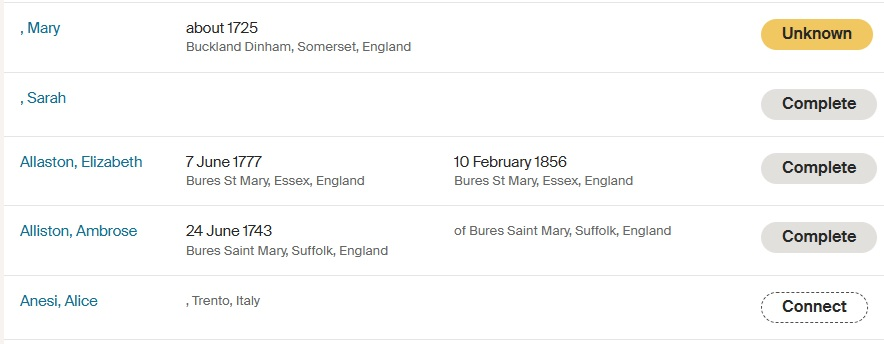
- Clicking on the ordinance status button to the right will show you all the options you are used to seeing on that tree icon on the profile page:
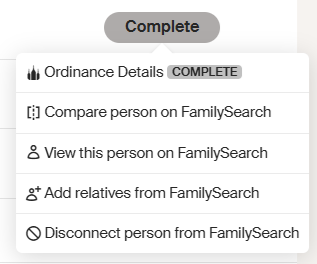
- Or if the Ancestry profile is not yet connected to a Family Tree profile, you will see the option to Connect those profiles.
Finding a person in the list is certainly more tedious than having the option on the Ancestry profile page, but if you really need those options, this process will give you access to those options, until Ancestry manages to fix the problem.
3 -
Interesting…this works.So it seems like my account is still connected…just the missing icon? Hmmmm?
0 -
Ancestry retired its previous API in early May. Several partners from the Solutions Gallery have recently updated their products to enable continued functionality with Ancestry.
0 -
This does indeed work…. but it sure isnt as convienent as before
0 -
Thankyou everyone for your timely feedback. Ancestry is aware of the issue and we are hoping it will be fixed within the next couple o f hours.
0 -
The engineers reported that this has been fixed. Please let us know if there are any further issues.
0