what should I do in full name review, when the same name repeatedly appears to be corrected

Answers
-
Often the same name appears multiple times on a single image or document, just do the FNR for each one. Also the same name appears in the same position or place in the sentence/list, to me this means the FNR is stuck or has no other names available. In this case you can try the Go Back button or you can go out of FNR to clear FS cookies and then sign back in to return to FNR but most often this happens when the system is overloaded by users or has no more names to be done. This happens often when you are working in the English language in the US in any state. Again, my answer is to find something else to do and come back to FNR at some other time
0 -
@maryellenstevensbarnes1 I have found the same issue in doing FNR. This is a good question to take to our Get Involved team. Have you tried viewing the entire record by zooming out? This morning, while doing FNR, I noticed that the AI found few "Full Names". I had to attach a lot of highlights. Thinking it would take me to another record, it seemed to start over on the same record, but this time, I didn't have to do as much editing. I will discuss this with our team. For myself as well, I would like to know if it is rechecking the record and adding the edits.
0 -
@dancingintherain Yes, I often zoom out to review the entire record/image - sometimes its the only way to determine if the word is actually a person's name is to read the entire sentence/phrase in context. In FNR, for the user it seems the idea is volume or number of names they can accomplish in a given time period - not the quality or correctness of the output. Rechecking spelling (letter placement) is probably exactly what its doing because when I view the same name later in the document, that name is already corrected, especially in cursive
0 -
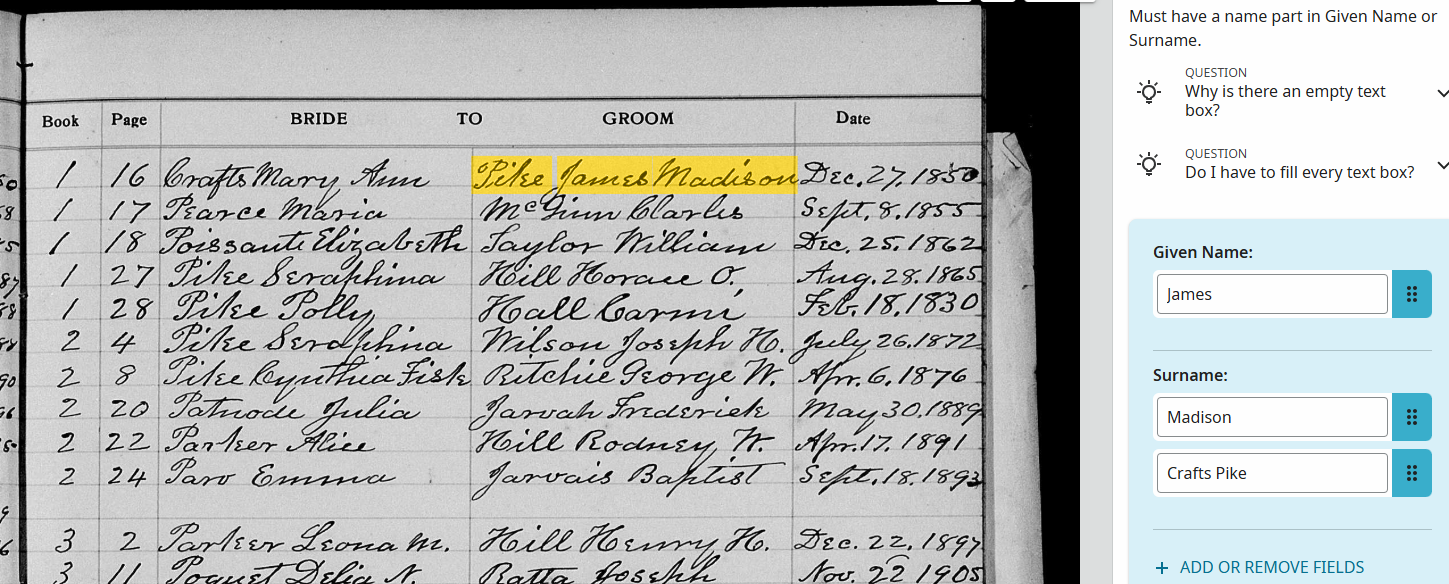
@dancingintherain Look what AI or someone is doing to Full Name Review and take it to your team! This has gotten way out hand — also @sc woz — I've saved it with the url
 0
0 -
@maryellenstevensbarnes1 Looking at this record, it appears the Surname is Pike, followed by the given name James Madison. So, if I were doing this record, I would type Madison alongside James, enter Pike as the surname, and delete Madison as a surname, along with Crafts. This is why we have volunteers, like you and I to correct the mistakes that AI makes. I appreciate your good help, for it is people like yourself who make corrections and make it possible for people to easily find their ancestors.
0 -
I know how to do it and I did correct the image as well as the others - I'm reporting it to you because it seems like a malfunction - it appears as tho AI is trying to give each person/name a "maiden name" in the surname box because this is only one of many and FNR didnt do this earlier
0 -
@maryellenstevensbarnes1 I know I sometimes expect AI to be more accurate than it really is, and it can be frustrating. I have to keep telling myself that AI is only a helper: it increases the number of records available for people to search, and it does a decent job of reading the record and copying the information it contains. But it does make mistakes, and sometimes we can't explain why. This is where the importance of Volunteers like you and me is especially evident: we can put names in the right order and ensure the transcription is correct. But I feel we do need to investigate some of the issues that come up to try to determine whether it is a bug or if something in the system just needs tweaking.
0 -
I was trying to explain is that AI is picking up the name Crafts which was not highlighted ever.
0 -
@DayEdithFarnsworth1I think I need further clarification as to what is happening. Does it seem like the computer keeps returning to the same name, as if it's stuck?
0 -
Interesting… Just throwing this idea out there… If this AI is working off pattern recognition (if) it might be detecting the pattern of women retaining their maiden surname after marriage. But then it's totally misapplied that pattern (hallucinated it?) and not highlighted "Crafts" either.
1 -
A key point here is that it's even harder to derive indexing information such as names from text (whether cursive or printed) if you don't have a clear picture of what sits where on the image (the excellent video at https://www.familysearch.org/en/rootstech/session/advances-in-computer-automated-indexing-of-historical-records is specific and detailed about CAI needing this level of understanding).
In this case the image demonstrates what is clearly a standard format, with a Bride area and a Groom area (and one marriage per line), so I would expect CAI to be reading the chunks of text separately, which doesn't appear to be happening.
2 -
@MandyShaw1 - I would hope that was the way that it worked, but I don't know enough about this AI methodology to have any expectation. There must be something it is told because it's not reading all the page at once (Last Words, Famous!) but I've not seen anything more detailed - it might be written down somewhere but I've not seen it
1 -
@Adrian Bruce1 I don't know anything about AI but I do think/know the pattern of picking out maiden names in this way doesn't belong in FNR — FNR is supposed to be a simple task of recognizing a word as a name and correcting it ie spelling or whether it is a given name or a surname — I don't think FNR has any other purpose or does it?
0 -
@maryellenstevensbarnes1 This has been reported and will be investigated. Thank you for bringing it to our attention.
0 -
"FNR is supposed to be a simple task of recognizing a word as a name and correcting it ie spelling or whether it is a given name or a surname — I don't think FNR has any other purpose or does it?"
Well, that's part of the issue - you can probably tell those of us with IT backgrounds who are very wary about telling ourselves what the various parts are supposed to do, in the absence of precise instructions.
1 -
And also, how the various parts fit in to the wider framework that is FS' Computer Aided/Assisted/Automated Indexing strategy as described here: https://www.familysearch.org/en/rootstech/session/advances-in-computer-automated-indexing-of-historical-records
and here: https://www.familysearch.org/en/wiki/FamilySearch_Computer_Aided_Indexing
The latter link does not yet reflect marriages or English language images, but presumably (that again...) the same sorts of rules wouid apply to them.
1 -
@MandyShaw1 and @Adrian Bruce1 and all of this is part of my problem - I don't understand the AI/CAI part and since my stroke years ago can't always find the words to explain the how's and why's of FNR but my feeling is that AI often "does too much". The purpose of FNR is name recognition; not relationships between people so for AI to put multiple surnames names together in the same box means AI is "doing too much" in the context of FNR. I hope I'm making sense?
0
