Relationship calculator and undivorced spouse

Relationship calculator KA suggests that only undivorced spouse is included in the search. My ex-spouse continues to show up in various relationship screens. What must I do to have her not included? I have added a Divorce and date as a marriage fact. Do I need to remove her from FS entirely?
Best Answer
-
The Knowledge Article that is mentioned is here: How does the relationship viewer determine how I am related to someone?
That article does indeed say "In October 2024, the relationship viewer was enhanced to include relationships through your undivorced spouse’s line." But I see no evidence that this statement is precisely true. Every situation that I have tested shows that all of my spouses are included. It doesn't matter whether they are divorced or preferred (as @sc woz incorrectly assumed — the KA correctly does not mention preferred spouses at all, since that is not a factor in relationship calculations). Similarly, in situations where one of my ancestors has multiple parents (e.g., adoptive and biological), all parents are candidates for calculating a relationship path.
I don't know whether FamilySearch intends to fix the relationship calculator to exclude divorced spouses (as the KA promises). But for now, I believe you can only exclude your divorced spouse from relationship calculations in by deleting the couple relationship to that spouse. This will have different effects, depending on the situation:
- If you share children with the divorced spouse, you could delete the couple relationship and still keep your relationship as co-parents to the children. Make sure you delete the couple relationship from the person page of one of the children; otherwise deleting the couple relationship will also delete the parent-child relationship(s).
- If you don't share children with the divorced spouse, then deleting the couple relationship will completely remove the spouse from any connection to you.
Neither of these options is great, since it requires you to remove the couple relationship, which did really exist at some point. You just have to decide which problem you prefer to live with — having someone not listed as a spouse who truly was a spouse, or having relationships calculated through them, even though they are no longer your spouse.
2
Answers
-
Do you have your preferred spouse set ….

This will ensure the spouse you want shows up in the relationship calculator.
0 -
Good counsel here from @Alan E. Brown : "Neither of these options is great, since it requires you to remove the couple relationship, which did really exist at some point. You just have to decide which problem you prefer to live with — having someone not listed as a spouse who truly was a spouse, or having relationships calculated through them, even though they are no longer your spouse."
Genealogy and the FamilyTree are a statement of families and family relationships. Both the good and long running branches, as well as the short term and failed branches. It is not about feelings and 'sanitized' family lore. Definitely leave historical sourced relationships in place (good and bad ones).
I would understand that your (ex)spouse is also living - therefore your FS login is the only one to see said entry; and the only login to see the effects of the relationship calculator.
Being then a living entry the ONLY one effected by deleting the individual will be your own FS login.
0 -
Thanks for the detailed explanation — this matches what I’ve been seeing as well. In my testing, the relationship viewer still considers all spouses in the calculation, regardless of divorce status, which doesn’t fully align with what the Knowledge Article suggests about the October 2024 update.
At the moment, it seems the only practical workaround is removing the couple relationship if you want to stop those paths from being used, but as you mentioned, that creates historical accuracy issues. Ideally, the calculator should respect divorce status without requiring users to delete valid past relationships.
It would be helpful if FamilySearch clarified whether this behavior is intentional or if a fix/update is planned.
0 -
Hi Randall,
You don’t need to remove your ex-spouse from FamilySearch entirely—that can actually break historical accuracy in your tree.
Here’s what’s going on and how to fix it:
✅ Why your ex-spouse still appears
Even after adding a Divorce event, the system may still treat the person as a valid relationship for certain tools (like the relationship calculator), especially if:
- The divorce isn’t fully recognized in all views
- The relationship is still marked as “spouse” without proper status update
🔧 What you should do
- Confirm Divorce Details
- Make sure the Divorce event includes a date and place
- Double-check it's attached to the correct couple relationship
- Edit the Couple Relationship
- Go to the relationship section and ensure:
- Status reflects Divorced (not just married with a divorce fact)
- Go to the relationship section and ensure:
- Check Preferred Spouse (if applicable)
- If multiple spouses exist, ensure the correct one is marked as preferred
- Refresh / Recheck Relationship Views
- Some tools cache results—changes may take time to reflect everywhere
❌ What NOT to do
- Don’t delete your ex-spouse unless the record is completely incorrect. It’s still part of your historical data.
🔢 Helpful Tool
If you’re working with relationship calculations or genealogy math, you can also use this calculator:
👉 https://ti84calculatoronline.org/If it still keeps showing after all this, it may be a system limitation or bug, and reporting it to FamilySearch support would be the next step.
0 -
Thank you for this information. This is what it shows (all are standardized values):
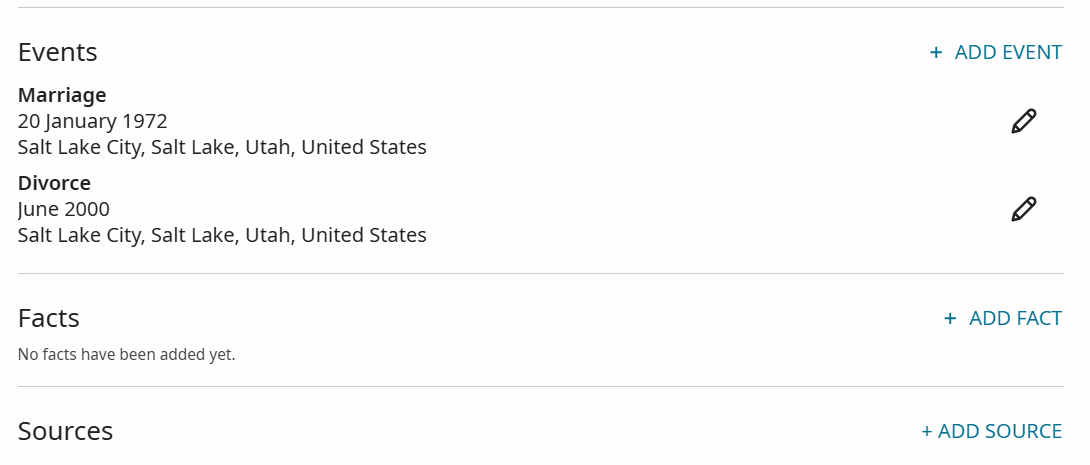
How else do I make the Relationship Status reflect Divorced (not just married with a divorce fact)
I see one note that suggests the developers are aware of this issue, but that it is a low-priority issue, and may get resolved sometime in the future.
0