How do I create a source from a physical book of limited production?

I have in my possession a printed book of family history. Rather than source facts by writing a detailed note for each fact in the Reason box, I would like to Add a New Source to my Source Box. Then I could simply select it and add the page number and other specific details. This would enable a more permanent link to a detailed source than a note that can be deleted or modified by others.
Answers
-
Please see the instructions
2 -
When you create that general source in your source box to attach to each person it applies to, remember that any editing done to the source changes the source on every person it is attached to. This means that you will want to put the page number and specific details in the reason for attaching the source and not in the main body of the source. You add that reason either when first attaching the source or afterwards by clicking the appropriate link as shown below:
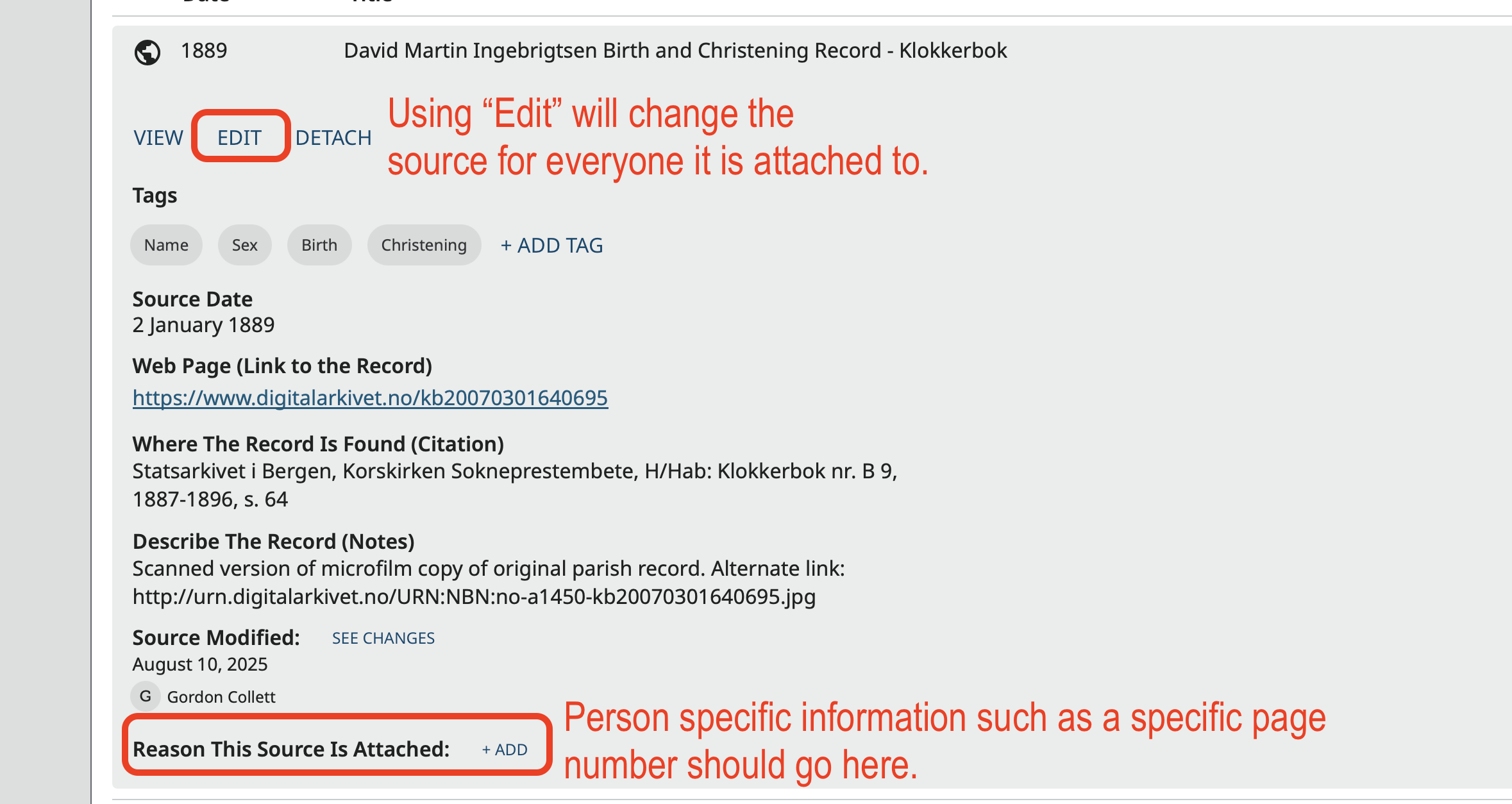
If the book is not too large, another option is to create a source in the source box for each page of the book.
I agree that is it much better to put sources where people expect to see them under sources rather than in the reason statements on the detail page.
3 -
Along with the instructions from Graham, after you have created a new source in Source Box, you could also make a NEW FOLDER with the title of the book, so it could easily be found. In addition, when adding from Source Box it's important to Add Tag(s) once the source is selected for a profile.
1