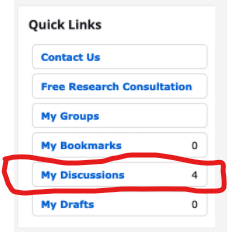
Accessing My Discussions under Quick Links

I have contributed to a number of discussions and wanted to go back to one of them. When I click on the link 'My Discussions' under Quick Links the page comes up blank? Not sure what's going on?
Is there a time limit to what can be seen under 'My Discussions'?
Best Answers
-
Try clicking on your name/photo at the top of this question you have just posted. A window will open showing your profile, with Discussions and Comments. Click on Discussions, and you will find a list of discussions you have posted.

This works for us, hopefully it works the same for all users of the Community.
Best wishes.
1 -
@Liz Solomon - Unfortunately, this is a known issue. We have turned this over to the engineers, and all we can do now is wait.
The workaround is to go to your profile and look at the list under your profile picture. Click on Discussions to see those you've started. Select Comments to find posts you've created under a discussion.
I'm sorry for the inconvenience.
2 -
@Liz Solomon - I worry that I may not have been clear enough when I directed you to your profile.

You should see your information below the big picture on the right side of the page. Let me know if that helps or not.
0 -
Just to summarize and make clear, with pictures but hopefully with also the right words so that it'll still make sense if the forum fails to convey the pictures (as it often does) ....
The "My Discussions" link in the Quick Links box doesn't work.

(It's at the top of the right-hand column on most Community pages.) For some people, it's completely blank. For me, it shows 11 out of the supposedly 33 discussions I've started. I can find no pattern for what it does or doesn't show.
What works slightly better is to go through one's profile. To access this, click your profile icon at the top right.

In the resulting drop-down, click your name.
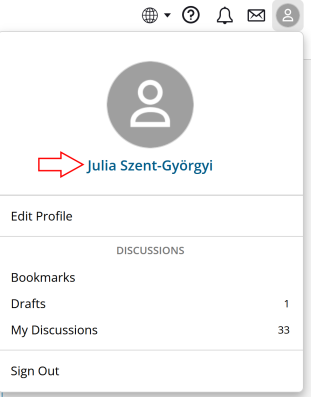
In the right-hand column of the resulting page, below your profile picture and above your badges, there are links to Activity, Notifications, Moderation, Inbox, Discussions, and Comments. It is the last two that are of interest here.

If you click Discussions, it'll show you the seven most recent discussions you've started, with "more" links that'll add 10 more each time, until you get to the end of what it's willing to show. (I can get 29 out of my mythical 33.)
If you click Comments, it'll show you the ten most recent comments or replies you've made, with a "more" link that'll add ten more at a time. (I've gotten back to two years ago and it's still going, so it doesn't seem to have a limit.)
0 -
You solved it for me!! Woohoo! I have to click on my profile avatar at the beginning of my question or discussion, NOT the avatar at the top right of the community page. Thanks!! We can close this.
1



Answers
-
Thank you both for your help. I've been to my profile pic and clicked on Discussions but it only shows this discussion. ??? And there is no option for Comments?
0 -
@PiperTWilson - this is what I see
0 -
I am not connected with Family Search.
What I see on my page is different to that of PiperTWilson.
In the screen shot immediately above, you need to click on your name.
This should take you to another page, where on my equivalent page I see Discussions and Comments.
Discussions are topics you commence, Comments are what you add to other people's Discussions.
0 -
What works: From FamilySearch Help here on Community in the menu on page right I can link to my Discussions. I can also link to my Discussions from the popup menu under my profile button on the top right of all Community pages.
What does not work: From my profile I cannot reach my Discussions. I see that I have N discussions but when I click that link I see only a blank where the discussion list should appear. The More Discussions link has the same result: the page where the list should appear but no list.
I did a few tests: from the profile pages of others I can link to their discussion lists. So it is my own profile, not everyone's, that is not fully functional. Weird!
0 -
More tests. The two discussions I started today I can see in my profile.
0 -
@dontiknowyou - This is a known bug and has been forwarded to the platform engineers. They are working on a fix, but they don't have an update on when a fix is expected.
1 -
@PiperTWilson good to know. Is there a main discussion thread about it somewhere?
0 -
@dontiknowyou and @PiperTWilson thank you so much! I have the same problem so I wait for the fix 😀
1 -
@dontiknowyou - There isn't one in the community. I'm tracking it offline, though.
0 -
When I click "My Discussions" in the panel on the right hand side, I just get a blank screen (as per image). Should my current and/or past questions appear there, or have I got that wrong? What is the best way for me to check my previous questions to my community group?
Thanks!
 0
0 -
0
-
Thanks Norm. When you click on that (My Discussions) in you account, do all your discussions appear on the left? Mine doesn't.
I just noticed that when I bookmark a question I've posted that it registers next to "My Bookmarks", and also appears to the left of that panel.
I'm just wondering if my "My Discussions" tab is not working properly perhaps?
0 -
@Norm Jones ... sorry, I forgot to tag you in my response above ....
0 -
0
-
hmmm, that's interesting you can see it. All I see when on click "My Discussions" is in the screenshot. There are clearly 5 discussion threads but only this one is showing. The other 4 are from one other group. There must be a setting in the group account I haven't set properly. I'll go and have a tinker around there now. Thanks @Norm Jones
 0
0 -
I noticed that your profile indicated your role was not verified. I verified you, so perhaps now it will give you access?
0 -
@Norm Jones : Just tried it but 4 discussions are still not showing when I click "My Discussions". But when I bookmarked those 5 discussion threads just now and then click "My Bookmarks" they appear there using that tab. Still not right but at least I can use the bookmarks. Thanks Norm.
0 -
Neither from the Community Home page nor from my profile page, I cannot access any of my Discussions and only the most recent 10 of my Bookmarks. When I click on My Discussions, the page simply refreshes -- empty. When I click on My Bookmarks, the most recent 10 display and there is no option to display more -- even though they were posted in January and February of this year. This has been the situation since I started using the Community Groups again after the update which coincided with an 18-month absence from genealogy research and posting in the Groups.
Pleae help me get access to My Discussions and My Bookmarks.
And now that I bookmarked this question, I have lost access to the oldest one that had been displaying. The system is only keeping the most recent 10!
Please HELP!
0 -
Thank you, Brett. It was kind of you to offer this hint. I was able to access Discussions in general in this way and leaped back to 2018 discussions, but paging through everyone's discussions didn't bring up the ones I'm needing. I can't remember exactly when I posted the ones I need now for current research.
Have any "Systems" people or moderators indicated that this problem is being worked on?
Thank you for your help. I appreciate it very much. I recently spent a week at the Family History Library in Salt Lake City and asked two of the Help staff for help with it. Neither of them were aware of the problem and suggested I post here. So thank you for coming to my aid. I do hope it is being worked on and will be fixed.
Elizabeth
0 -
Thank you, Brett. Using your "system," I have been able to get to some "Notifications." So I've been able to see some of my posts and some of the responses. I have copied and pasted all I could find into a Word document, for safekeeping. Not all of the responses displayed. But now that I have the dates, I can page through "All Discussions" and get to all the responses to my queries. Thank you very much.
0 -
I am just glad that I could help/assist. Just in case your were not aware, the same method works, for one's Comments that one made, as well.
The link to see one's Notifications is https://community.familysearch.org/en/profile/notifications
1 -
I'll admit I'm confused.
I've been sidetracked for about a month and am coming back in to see how things have progressed.
Initially, I logged into FamilySearch and reviewed some individuals, checked on one thing in group discussions, opened a second tab and was told I needed to login to see the group discussions.... Say Whuuuuaat? Chalked that up to cookie management issues.
Then I really looked at the page:

If I have 11 entries for 'My Discussions' -- right hand column, why are there only 2 entries on the left hand side?
What is the 11 counting?
Or
Why aren't there 11 entries on the left instead of only 2?
0 -
My thread on the topic: https://community.familysearch.org/en/discussion/124051/the-mysteriously-increasing-discussions-counter#latest
The conclusion was that for some inexplicable reason, flagging/reporting a post (using the "Flag" button) increments the discussion counter. Sam promised to ask about getting this changed, but that's the last I've heard, and it was months ago.
1 -
I have 20 discussions, but when I click on discussions, I can only see a few of them. How can I see all of them?
0 -
The label Discussions is misleading. It does not indicate how many threads you have started. Many other activities are included in the count but not shown. For example, if I report a thread as needing to be edited to remove personal info, my Discussion count goes up by 1, but is not listed in my Discussion list.
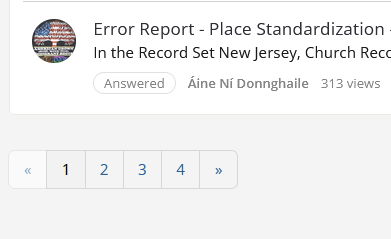
If you have started more than 10 threads, at the bottom of the 1st page, you will see a row of numbers, to access the additional pages of actual threads started.
 1
1 -
Besides the phantom activities that increment the counter but do not show anywhere, the activity-listing capabilities of this forum have another quirk: there are actually two discussion lists. "My Discussions", which can be accessed via the sidebar, or via the link in your profile drop-down, is the shorter of the two, because it only includes threads you've posted in a category, not anything you've posted in a group. To see a list that includes your activity in the groups you've joined, you need to go to your profile and click "Discussions". (Notice the lack of the possessive pronoun.)
1