Duplicate entries, How do I remove?

Could someone look at the following.
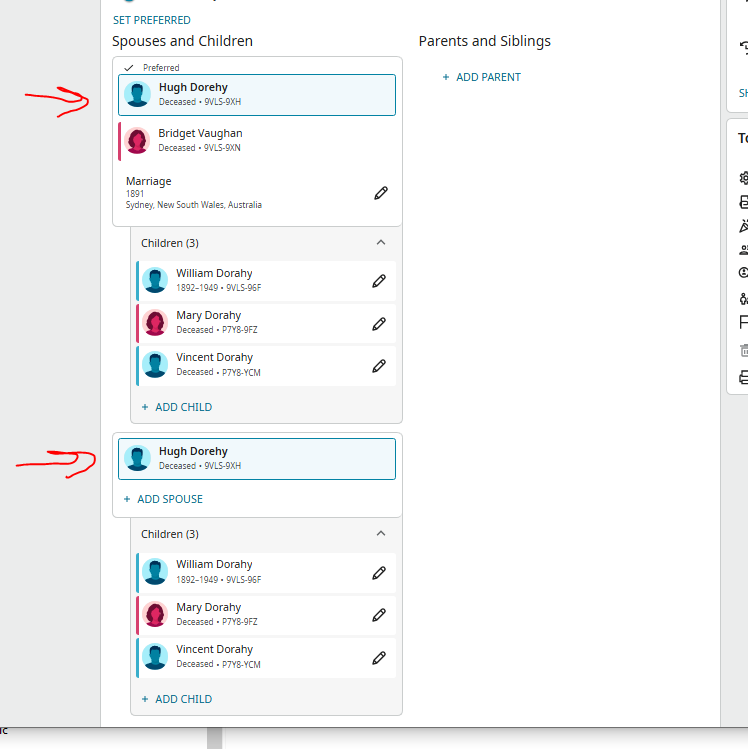
It looks like I have duplicate father and children. Dont know how to remove.
Thank you.
Best Answer
-
@ColinM0288 It's true that you can't edit a Birth conclusion so that it has neither a date nor a place. But if you have neither piece of information, the best course of action is to delete the birth conclusion. That will make it clear that you have no information about the birth of the person, and avoid the problem with a nonstandard place value "unknown." To delete it, start the edit process by clicking the pencil icon to the right of the Birth conclusion, then click the DELETE BIRTH button at the bottom of the screen.
0

Comments
-
If you add 9VLS-9XN Bridget to the lower set, you will see it will either automatically remove it as a duplicate since all of the other information is already identical.
0 -
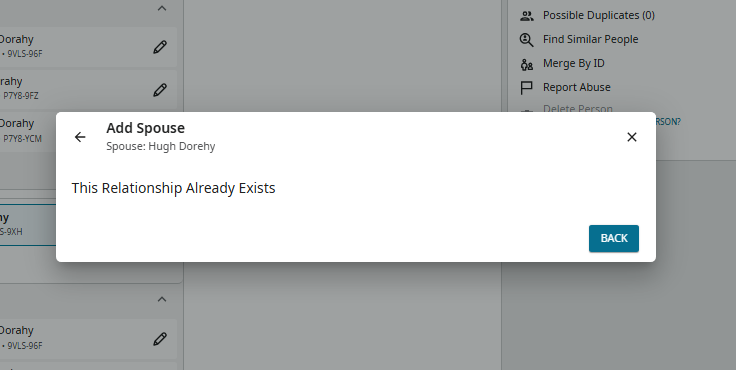
This makes sense but when I try to do this from that screen it does the following.
 0
0 -
PS. And it will not let me go any further to change it. The software is too smart and will not let me add it.
0 -
I just checked your page, and it looks like you found the answer to your problem above. If you have no further issues with this, we will close this discussion in a few days. If you are still having trouble feel free to continue your discussion.
0 -
As you probably discovered, it was not a case of adding Bridget, as she was already added as the children's mother. Rather, you needed to remove the children from their relationship with Hugh alone. I usually remove them one by one (in similar cases) with a reason statement such as, "Child (already) appears under both parents".
0 -
umm no its not fixed yet. Not sure what you are looking at?
https://www.familysearch.org/en/tree/person/details/9VLS-9XH
So I have removed the children from Hugh but the second Hugh remains (at the moment anyway) and now the children are gone?? We dont want them to be lost??
Stumped. What am I doing wrong??
0 -
Assuming Bridget is the mother of all three children, simply copy/paste the children's IDs, one by one, using the ADD CHILD feature under their relationships. Then, if necessary, delete their relationship with their father once they are correctly connected to both parents.
Another user may suggest an alternative method. Also, check to see you do not have the same problem with them being shown with just Bridget as their parent.
You should really do this yourself as it's a problem that will no doubt arise in future with other branches on which your are working. Otherwise, I'm sure another user could solve the issue very quickly, as it is often encountered.
0 -
BTW - it is best not to add "unknown" as a birthplace, as I can see you have recently done on Hugh's profile. If you don't know the facts, just leave the field blank. Otherwise, you will get the flag that the birthplace needs standardizing.
1 -
Thank you for the sound advice. I will try.
BTW You bring up a great point. Glad you asked. Let me tell you why specifically "unknown" is in the birth place. I'm going from memory now which was several days ago, but. When I created this person I put in various bit of info to hopefully to find a match when I created him. A match was not found so I created them as a new person. However when I created him I had the birth place as some location say XXXX don't remember now . The Software created them. However for some reason I wanted to remove XXXX after the person was created because I was not sure of his birth place. I only put it in at the beginning of the process to hopefully find a match. I did not realise that the birth location info would be copied over to the newly created person. Now that they were created I could not change the birth location. I did not want to leave it as it would be a red herring for people. (possibly the wrong location) So I found the setting "unknown". If there were a way of clearing it and leaving it blank I would have done that. But I could not. I. I thought If I or someone else found better info they could change it. The point being once I created the person I could not clear the birth location and make it empty. So the only option I had was Unknown.
Thank you.
0 -
Ok done. Whew. You may have meant this but hard to understand descriptions here sometimes.
It seems I first created a second wife like the husband and thought RATS, mistake, but then went to each child and saw in the drop down box the other siblings under the duplicate name. As I deleted the relationship in each one in the list the dup disappeared. Then went to each sibling and did the same. It worked. That is probably what you meant to say but as I say somethings its hard to understand in this forum what is meant, well for me anyway. Anyway On that things are solved thank you again !😊
0 -
Ahh so on the Unknown. I have resolved this. Thanks for forcing me to re examine.
I went back to it and tried a few things unsuccessfully. But then noticed that I could delete the birth. So I did that and that fixed the annoying. not standard birth place message.
0 -
For future reference, what I find to be the most efficient way to fix your problem as shown in your initial image, and the more children there are the more efficient it is, and the best way to not accidentally lose any children in the process is this simple three step process:
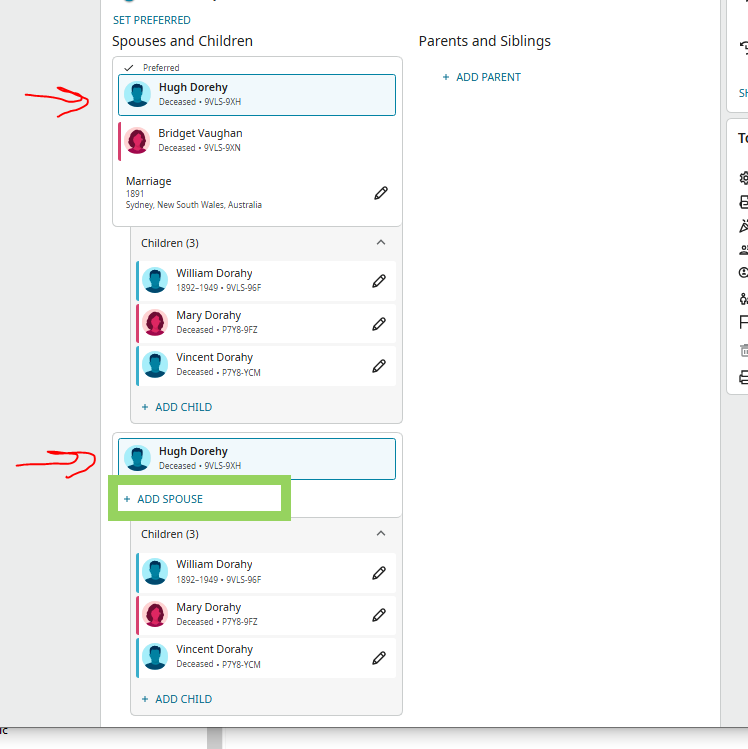
A) Click +ADD SPOUSE:
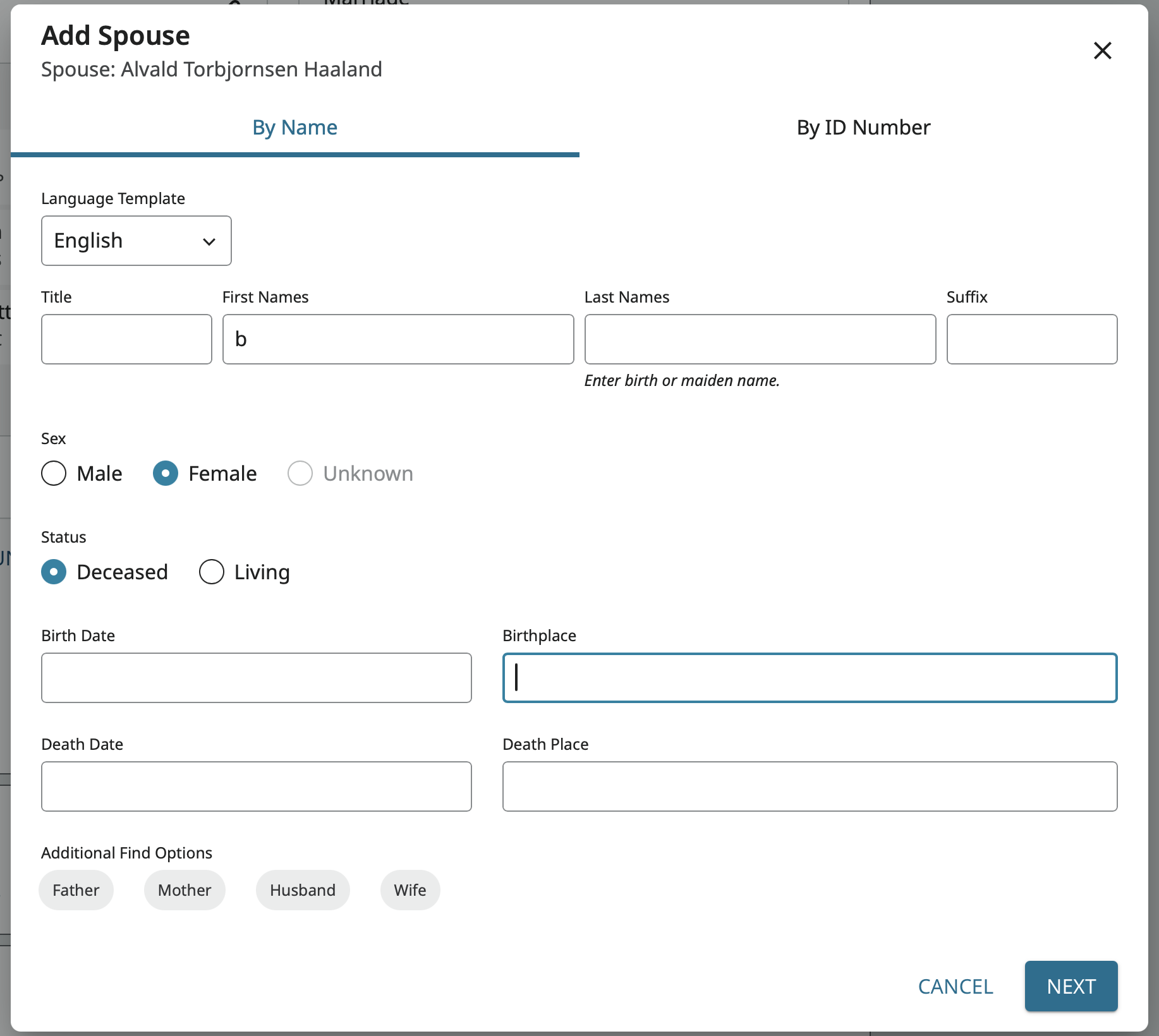
2) Create a duplicate for Bridget with the minimum information required (Yes, the following is all you need to enter):
3) Merge Bridget and b.
Takes less than a minute and all the relationships sort themselves out just fine.
1 -
Late last night I suddenly remembered you had provided the best advice on how to deal with this, when the matter had been raised in the past! Glad you noticed this thread and was again able to illustrate the easiest way to handle. With a situation involving around 10-12 children, "my" method proves rather cumbersome, of course.
0 -
Thank you all. Now all I have to do is remember it for next time. (my memory, the weak link in the chain.) 😀
0
