Unable to Link Parent to Child Across Pages in Index

In the index page "San Buenaventura. Baptism Records 1785–1790", image 56 of 369, last entry on the right-hand page, I'd like to improve the index by linking Gerardo José Francisco ( link ) to his mother Petra Matiana and his godfather Domingo Rivera, who appear at the top of the verso of the same page, next image, left-hand page.
A few months ago I was able to do this sort of linking. I would click the edit icon by "Relationships", click link "+ Add More Information", add another "Parent", click "Update" to close the dialog, start typing "Petra Mati…", and select the name from "in surrounding images". However, that last option no longer appears.
Is there another way to link the names, cross-image, in the index?
Best Answer
-
@davidleelambert If you don't see the words "Others mentioned in this record", then it's a little more complicated. After opening Relationships click on "Help with Relationships" and then on "Open Split Screen Mode".
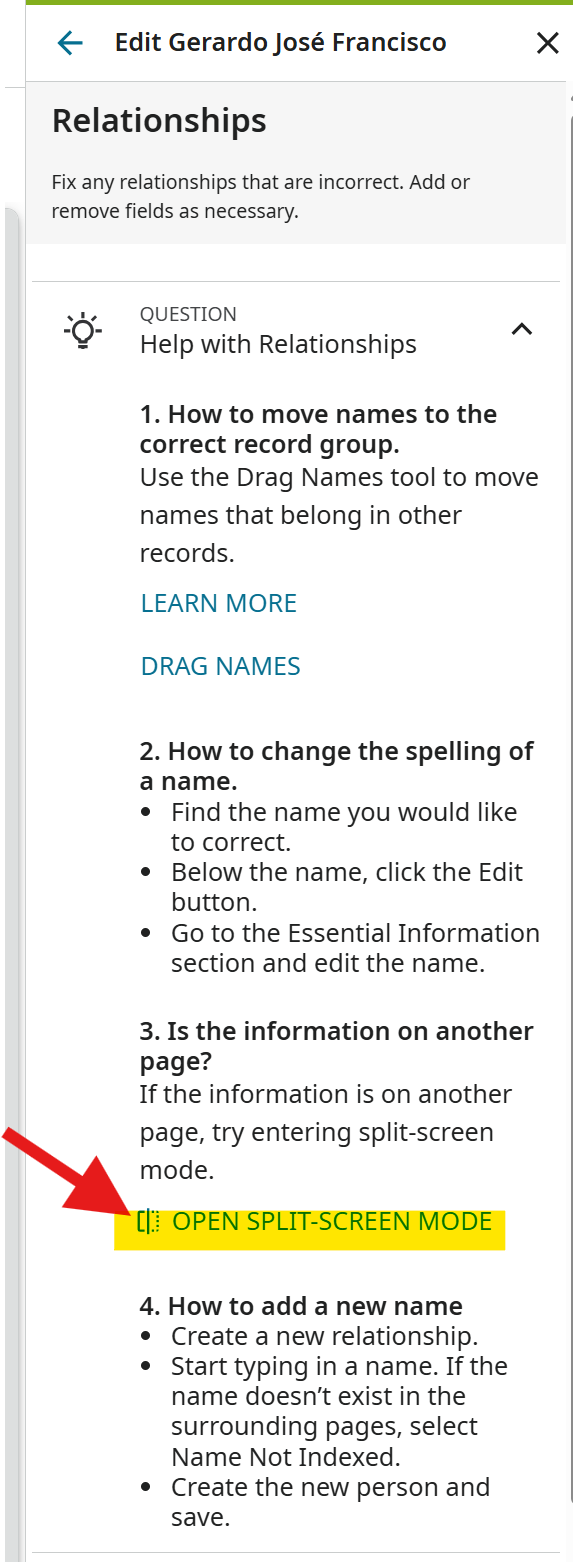
Open the new image to Image 57. Then Click on Add More Information and add "Parent", etc. Now you can start typing "Petra Mati…" and it should work.
2