Please supply the step-by-step of how to use the BETA familysearch

Please supply the step-by-step of how to use the BETA familysearch
Answers
-
Do you mean one of the Labs Experiments, @JanTropp?
1 -
https://www.familysearch.org/en/help/helpcenter/article/can-i-use-the-beta-version-of-familysearch-to-teach-a-class
There is a link at the bottom of this page to sign in to Beta
As far as I know you just try things out as you would on the regular site.
3 -
Here is another link to a discussion related to this topic.
https://community.familysearch.org/en/discussion/177455/caution-when-using-beta-familysearch?h=community-search&utm_medium=organic-search&utm_term=familysearch+beta+
0 -
Beta FamilySearch works just like the regular FamilySearch site with a couple of exceptions:
- Not all features of the full site are in the beta site. For example, the Recents list is always empty.
- Sometimes new features that are being developed will be on the beta site. You can generally assume these new features will show up in the full site when development and testing is complete. It can be a fun preview of future updates.
- Information entered in beta is not kept. It will eventually vanish.
Otherwise just use it as you would the regular site to practice or test things out.
3 -
Once I'm in the BETA site to practice a question on merging, for a guest, do I sign in as the guest or myself?
0 -
I would think yourself. If you are just practicing it shouldn't matter what data you are working with.
0 -
@JanTropp - see my reply to your sign-in question on
… but for convenience and completeness I'll repeat it here…
- I am certain that you must sign in with your own details - anything else would be contrary to all the security rules. After all, unless there's a way that I don't know about, the same security details are used for both the main site and Beta.
- Assuming that we're talking about profiles of deceased people, your login will see exactly the same as their login does, so there's no need to pretend to be anyone else.
- If there's some aspect that I've missed, please let us know
1 -
@Gordon Collett A couple of clarifications to your post:
1. It's true that "Not all features of the full site are in the beta site." But your example of the Recents list is not one of them. The Recents list works on Beta exactly like it works on the main site (but of course it records the people you visited while you are on the Beta site, not the main site). If you have not previously visited the Beta site, then when you first sign in to Beta, your Recents list will be empty. But as you use the Beta site, your Recents list will grow as you visit people there.
3. Although it has been true in the past that the production data was copied on top of the Beta site each year (typically around late November), that did not happen in 2024 and I've heard rumblings that it might not happen in 2025. The data is from December 2023, with whatever changes have been made since then. So although it's prudent not to rely on your Beta data being available forever, we also should not depend on it reliably vanishing, either.
3 -
@JanTropp Of course you should always use only your own account to sign into FamilySearch.
But are you actually asking if you should test out the merge using Helper mode or just as yourself? First off, I don't know if Helper mode is available in Beta and don't have time to check right now. Secondly, since it is not the real database, I agree with Jamie that it really doesn't matter.
1 -
Helper Mode is available on Beta, the same as on the main site. The only reason to test a merge in Helper Mode is if living or confidential persons are involved in the merge. Otherwise, there's no need to use Helper Mode.
1 -
@Alan E. Brown indicates that the last copy of production into Beta was in December 2023. That means if anyone wants to practice in Beta on a profile that was added to production after that date - it won't be on the Beta site. You could, of course, try to recreate that profile in Beta (with a different PID) but that's quite often seriously hard work.
0 -
@Alan E. Brown , Regarding the Recents list in Beta, this is what I see. When I first sign into Beta if I go to my Recents list I see:

I click on Add Unconnected Person as I usually do to create an illustration for a comment here and create a new profile:

Then I jump to my profile, then my father's profile, then my mother profile. Then I return to the Recents list to see:
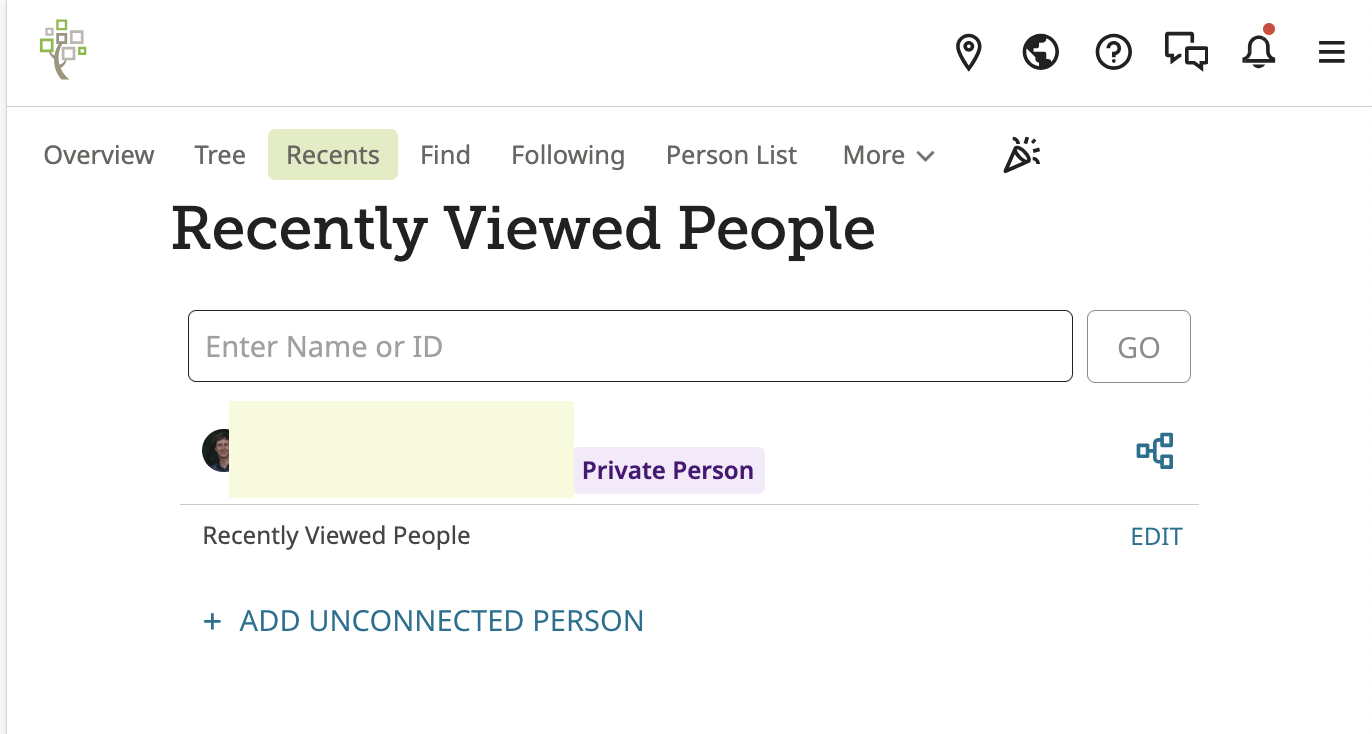
For me, Beta has been acting like this for months. The Recents list does not populate.
0 -
@Gordon Collett Your experience with the Recents list on Beta is certainly odd. I can't explain it. But I know of many people who have used Beta with a completely normal experience with the Recents list. You are the only person I have ever heard of who does not have the normal experience. I have more than one account on Beta, and all of them work normally.
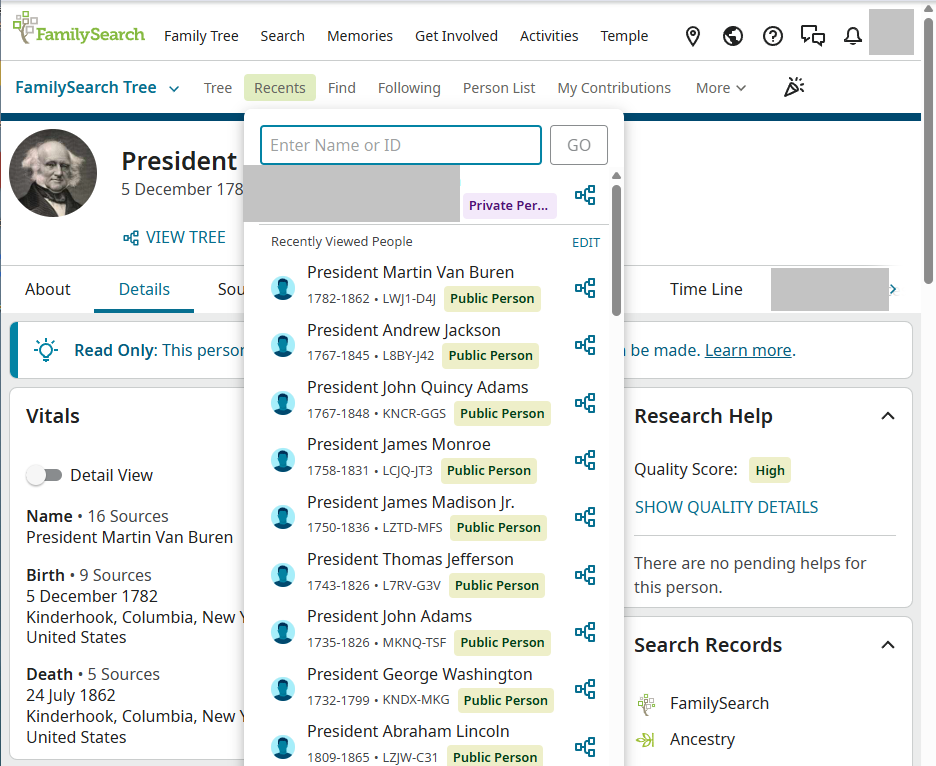
Although you have clearly documented your exceptional experience, it is nonetheless true that in general, the Recents list works on Beta just as it does on the main site. Here, for example, is a screen shot of my recent Recents list on Beta, which correctly updates every time I visit a new person:
 0
0 -
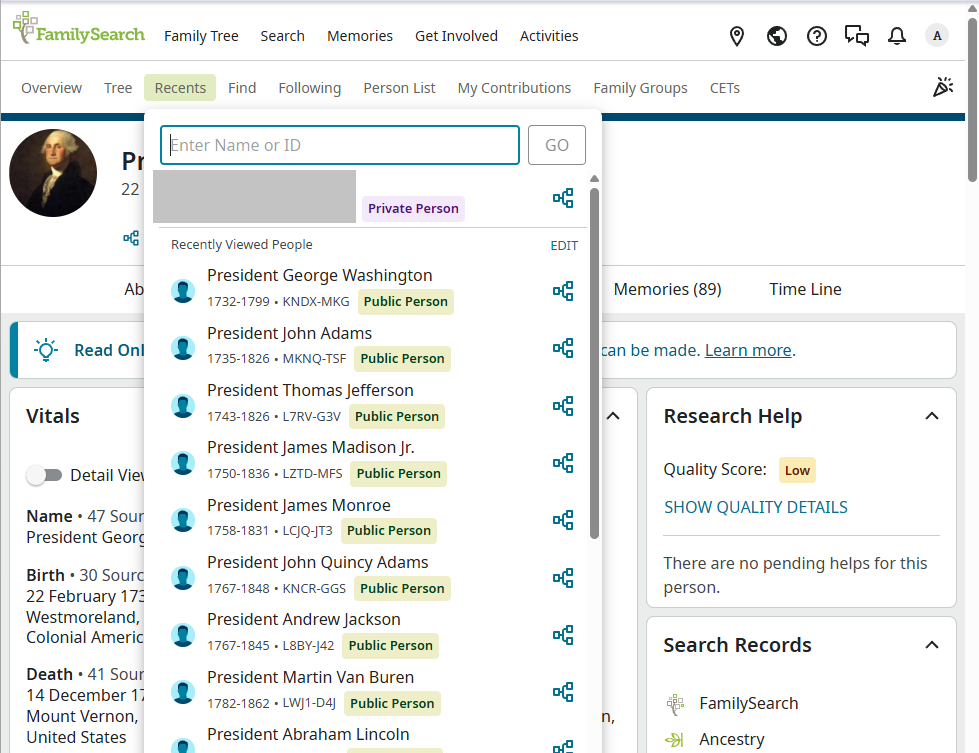
And here's the Recents list on Beta for another user, who doesn't participate in a Family Group Tree (just in case it seemed like that might explain the difference). It works normally as well:
 0
0 -
So this might be one of those occasional browser specific issues. I use Safari 18.5. I'm not too concerned with it since the regular site works fine. I just hope this is not an update to the coding that is going to break in Safari if it gets migrated to the full site.
0 -
Just to add the huge sample of one, I can confirm that my Android phone using Chrome shows and updates the Beta Recents List as previously expected - ie any profiles that I look at appear on the Recents List.
I had a list already on my front screen. I checked my Uncle, who was top of that list and then his 2 parents - all 3 appeared immediately in the list in order of viewing - last seen as top of the list.
The only minor point was that the members of my list were all listed as Private, even though they weren't, ie that short lived bug affected them. After my views, the 3 that I viewed (but only those) became marked as Public. I'm sure that tells me something about the contents of the Recents file - not sure what and I don't think it matters.
0 -
I just decided to test this and can confirm my Recents lists on Beta and the production version are totally different. I haven't signed into Beta for quite some time and found all the names on the Recents list are for profiles I viewed back then. Switching to the production version after looking at a "new" name in Beta, I don't see that carried over: top of the list are those names I looked at earlier today.
I'm using Windows 11, but Chrome for beta and Firefox for production. I presume I am speaking about the same issue as discussed above!
1 -
@Paul W Everyone acknowledges that on Beta, your Recents list contains the people you visited on Beta, and the production Recents list contains the people you visited on production. The lists are appropriately separate. I believe that you are simply confirming this and agreeing that this is the desired behavior.
The only oddity is that @Gordon Collett 's Recents list on Beta doesn't ever get updated. No one else has seen that exceptional behavior.
(Well, @Adrian Bruce1 mentioned that short-lived bug where all entries on the Recents list appeared as Private, even when they were Public. That bug has been fixed, but for entries on the Recents list that were incorrectly shown as Private because of the bug, you need to visit those persons to reset their privacy indicator to be correct again.)
0 -
Thank you confirming I have misunderstood the issue! Of course, I can now see the point being made clearly. As I write, I have 48 minutes to edit / delete my comments and save my embarrassment, but as deleting would make your response appear most confusing I'll make no attempt to do so. Therefore, please simply ignore my unhelpful "contribution"!
0

