List function

Answers
-
With the updated Gallery, the decision was made to change some of the filtering options. The Engineers tried to do their best to thoughtfully included necessary filter items.
There is still an option to filter by "Memories not tagged." You can find this in the Filter with either the Grid or List view.
0 -
what about filtering items that ARE tagged
(as in the case to then, move them to a "processed" album/folder)
before you could easily see items that were not tagged (OR NOT) - simply by the icon that was on top of each item.
filtering option is one thing -
but PLEASE put back the icon/note on each item that allowed us to easily see which items are and are not tagged - especially helpful for multi item select.
I dont think a lot of thought went into this - - people have been asking for the inverse filters for some time - with no results. and the dropping of the visual icon of tagged or not - is a step back.
if we can filter on "not tagged" then please allow us to filter on "tagged" - why is one allowed and not the other - - it has never made sense.0 -
Many of us who are heavy users of memories - often keep albums of items that need person tagging - and then as they are person tagged - we select such items and successively move them out of such an album to a different folder (processed folder).
This was so much easier to do when we saw the add tag icon on the item that it needed tagging (or not)
could then do a multi item select - and then could move to a different album and remove them from the current album.
this seems very tricky - if not impossible in the new environment0 -

A post of what I see in "List" feature. I see no "Tagged" or "Not Tagged" item. Thank you.
0 -
Here is the way I find out which of my Memories have been tagged or not….
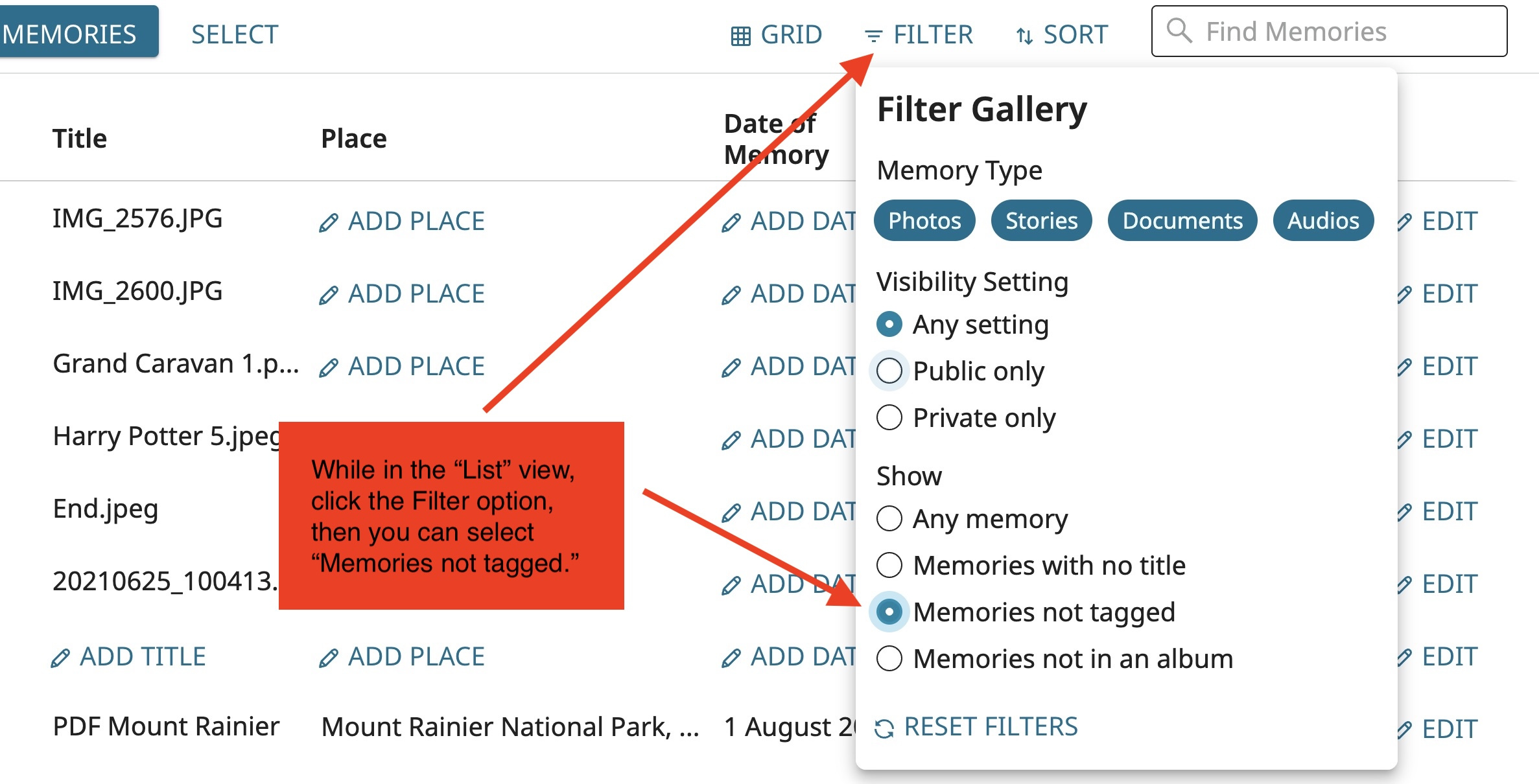
I know everything about the new Gallery's filters is not ideal, but hopefully this can help.
0 -
ok . . . but no way to select or browse thru the ones that ARE tagged
before it was so easy to see visually BOTH tagged and not tagged on the same screen
and then you could do a multi item select (on the ones you wanted to process) and take an action.0 -
I really wish the engineers would put back the icon indicating what items were needing to be tagged.
It was so much easier when you could just see visually what items in an album needed to be tagged or those that were already tagged - and then take some common action against multi selected items.
why do we have to go to a filter - which only allows you to see items not tagged
rather leave it the way it was - showing those that were tagged and those not - and allow you to take actions against either group. This was really a step backward!!!0