
While tagging, "Attach to Another Tree" is causing problems

@RasmussenDavidE1 has posted:
"Attach to another tree" makes sense to me if you are talking about records of living people - there can be several records of the same person with different PIDs residing in different family group trees that one subscribes to and it is convenient to be able to tag a picture to all of the records.
A problem occurred with a family member clicking on this feature without knowing what it did. They had tagged the husband in the picture and they thought they were tagging the wife. The result seems to be to have created some kind of composite tag with one name - that of the husband. Any time they add a tag to any other picture to either the husband or the wife, they get tags for both and the frame around the picture invariably has the husband's name. Note both people are deceased and reside only on the FamilySearch tree; not on any CET trees. There seems no way for my family member to break out of this. I can find no help articles on this "feature" and no one seems to know much about it (we talked to two customer service representatives).
Comments
-
I was looking over PIDs that were in another post (Evan Justin Skidmore KWCT-MML & Eleanor Lyman KWCT-MMG).
While looking in the Memories of Evan, I can see a couple together (Evan and Eleanor). And yes, I see that both boxes have the Tag name "Eleanor Lyman," and the two tag in the right side-bar say "Evan Justin Skidmore."
Regardless of the question about problems surrounding "Attach to Another Tree," here is a quick fix:
-Delete one of the tags in the right side-bar. You really only need one "Evan Justin Skidmore." It's probably best to delete the one associated with the box surrounding Eleanor.
-Then click on the one tag, which is for Evan, but says "Eleanor Lyman." Click the incorrect name which is in blue and is underlined. It opens a new page. The tag name will be large and blue at the top of that page. Click it, and change the tag name to Evan Justin Skidmore. Save your changes.
-Then go back to your Memory and add a new tag around Eleanor, and type in "Eleanor Lyman."
-(I was able to do this without any problem….so you will see some new changes in the Change Log on Evan's page).
**********
I am not sure if there is a problem with "Attach to a Tree" or not. I will talk it over with the team engineers. However, I do know that this sounds very similar to a recent problem with tag names.
Recently, the Engineers made changes to the User Interface, and some tag names are reverting to what that tag name once was. What you are seeing now is probably an original version of that tag name. Strange tag names can also occur if two individuals were merged together over time.
Please let me know if this helps, is confusing, or is not at all what you need. I do hope you can find solutions.
0 -
I started to do what you suggested, i.e., delete one of the tags in the sidebar. I was viewing tags by tree. I saw two tags. Both were pointing to Evan Justin Skidmore KWCT-MML. The title under each frame was Eleanor Lyman.

I deleted one tag, but both of them disappeared. I now see no tags to Evan Justin and two unattached tags to Eleanor Lyman. (These may have been there before and maybe I ignored a scroll bar or a "see all" button.)
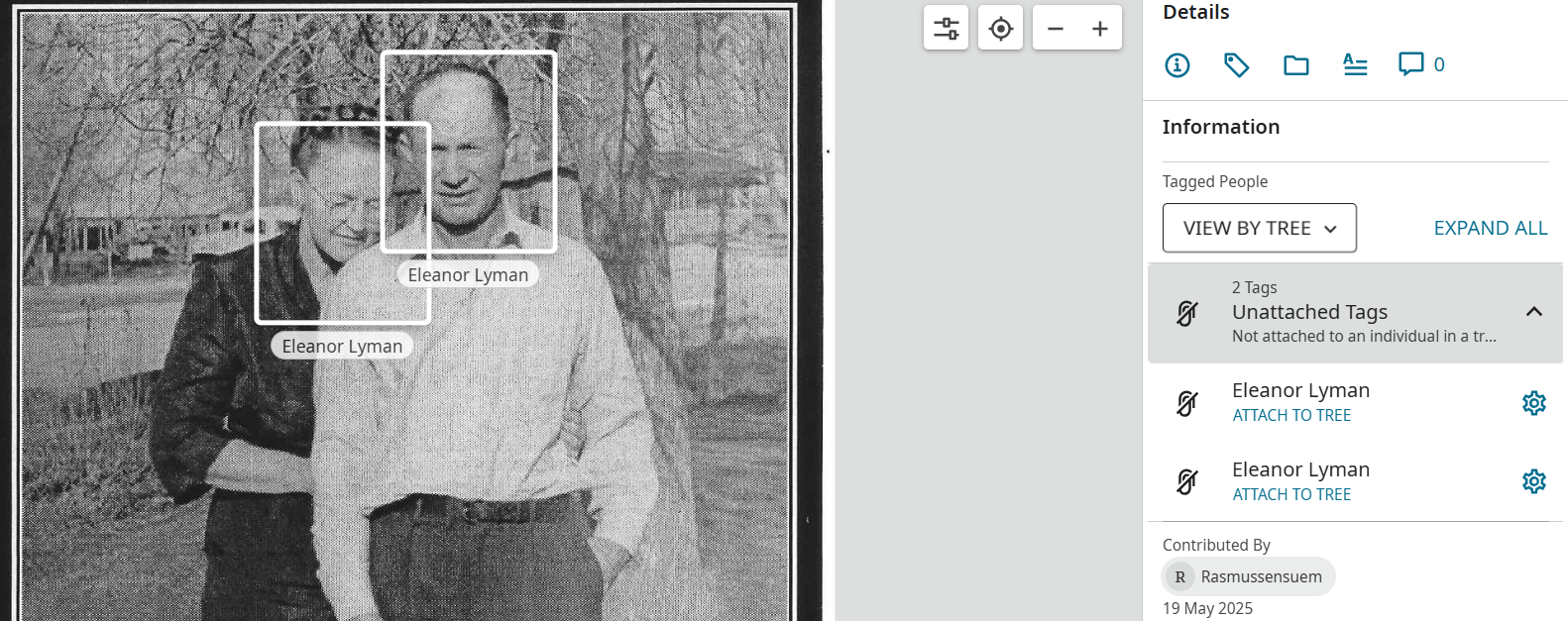
The picture no longer appears in the memories of either Evan Justin or Eleanor Lyman (KWCT-MMG). So I stopped there.
Your second instruction takes me to a page, as you described, with the title Eleanor Lyman. The page has three sections. In the first section all of the pictures and documents are tagged to Eleanor Lyman (KWCT-MMG), and the tag name is Eleanor Lyman. (Some are tagged also tagged to Justin Evan Skidmore (KWCT-MML) in the tree. On some of these, the tag name is Evan Justin Skidmore; on others the tag name is Eleanor Lyman.)
Scrolling down, 2/3 through the page, there's a dividing line followed by "Attached to another person in Family Tree". The pictures and documents below this line are tagged to Evan Justin Skidmore (KWCT-MML) but the tag name is (incorrectly) Eleanor Lyman. (Some are also tagged to Eleanor Lyman (KWCT-MMG) and these appear above the line also.)
All the way at the bottom of the page is another line followed by ""Not Attached". Below this now appears the picture that I just removed the tags to people in the tree from, but still have some unattached tags with the tag name Eleanor Lyman.
Clearly I cannot just change the name at the top of the page to Evan Justin Skidmore, because this will change all instances of tag name Eleanor Lyman to Evan Justin Skidmore. Most of these should not change - only the ones that are below the line "Attached to another person in Family Tree" and only the tags that point to Evan Justin Skidmore in the tree.
So the quick fix will not work. Doing something similar yesterday brought us to this point. Yesterday my family member did something with "Attach to another tree" that caused every subsequent attempt to tag a memory to either Evan or Eleanor to create a tag for both under one tag name - at the time the name of Evan Justin Skidmore. A support person suggested clicking on the tag to Eleanor Lyman that bore the tag name Evan Justin Skidmore and changing the name to Eleanor Lyman by the process you describe. There were only three memories at the time that were tagged to Eleanor and bore the tag name Evan Justin. I believe the change just made the problem worse.
0 -
Here's our workaround: If my family member (at present) adds a tag to Evan Justin Skidmore (KWCT-MML) it shows a tag name of Eleanor Lyman. But if I add a tag to Evan Justin Skidmore, it shows a tag name of Evan Justin Skidmore. Our solution to the mislabeling is for me to add a second tag to Evan Justin Skidmore on all the memories that show the incorrect tag name, and for my family member to then delete the one with the incorrect tag name.
That doesn't solve the issue if my family member in the future wants to add tags to Evan Justin Skidmore, but that need is almost done. It's still a bug that may show up for other users, so it should be diagnosed.
0 -
Again, apologies for this challenging situation. I'm glad you found a work around for now.
I will take this to the engineer and see what might be causing this problem. I'll report back with anything we can find.
Thank you again for bringing this to our attention. You are obviously trying to accomplish great work that will benefit your family. And thank you for your patience with our product—which does have flaws sometimes.
0 -
@RasmussenDavidE1 @Rasmussensuem
I just wanted to let you know that we have an engineer looking into your problem specifically.
I did want to clarify a few things for you, to hopefully help you better understand what happened.
First, what happened to you is a very complicated problem that probably began with a few small errors in tagging.
Someone at sometime wanted to create a “tag,” but they clicked on two different people for the same tag. You can do this, but it isn’t how the system was created to work. Only one person at a time should be tagged.
To make the matter more complicated, someone at sometime probably then used the “Attach to Another Tree” option, and clicked multiple people at that time, as well. Essentially, many people on the Tree with different IDs were all given the same tag.
Look at the images below to see how this problem can occur. I believe this happened in your situation.
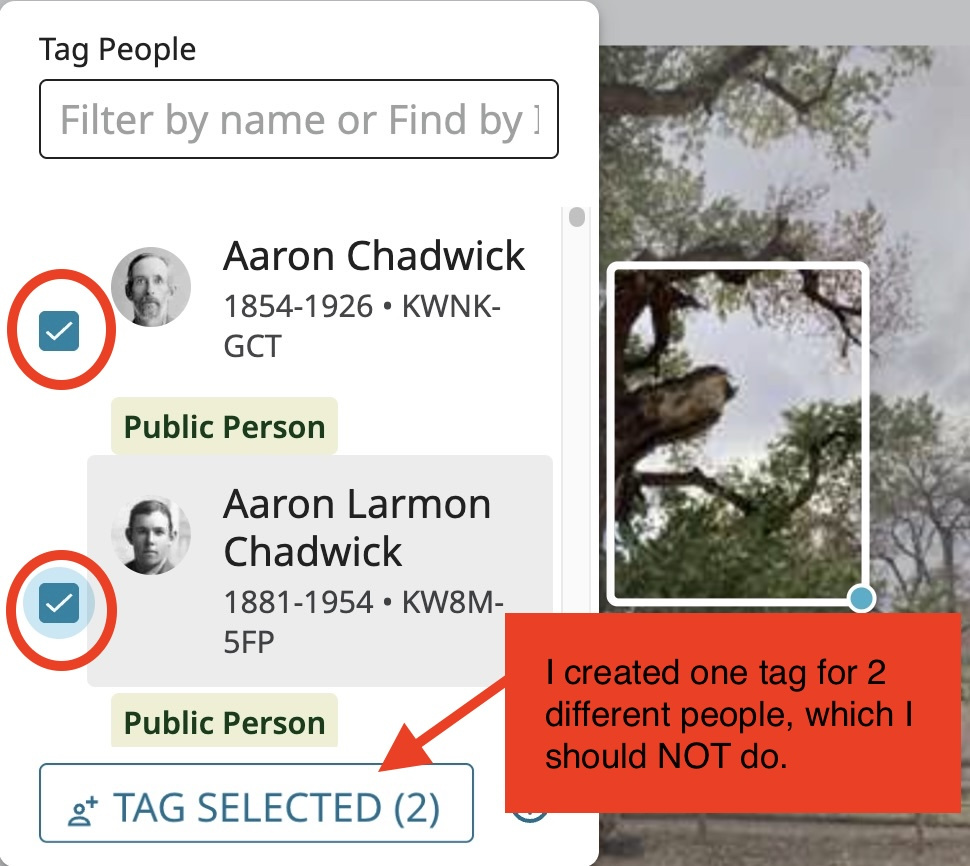
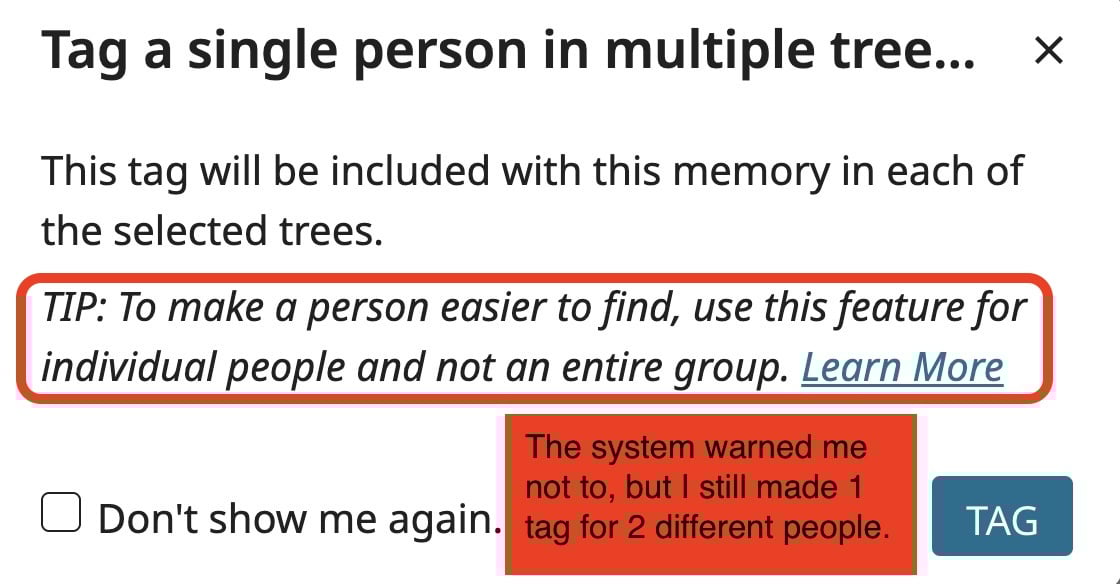
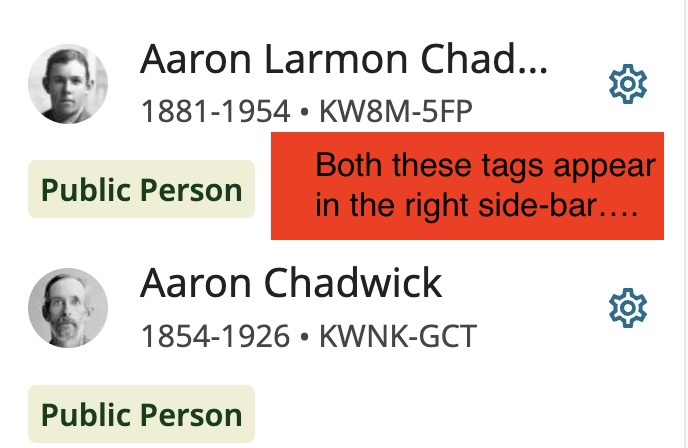
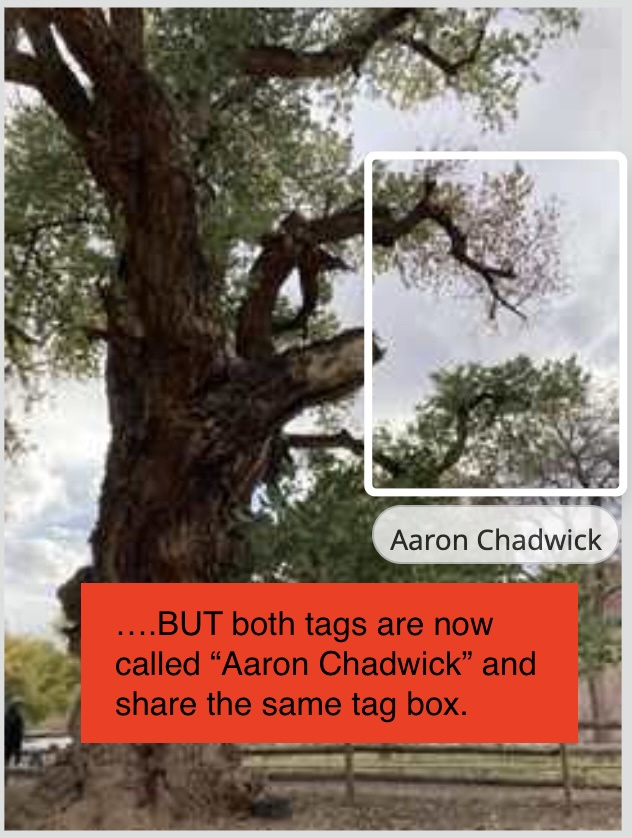
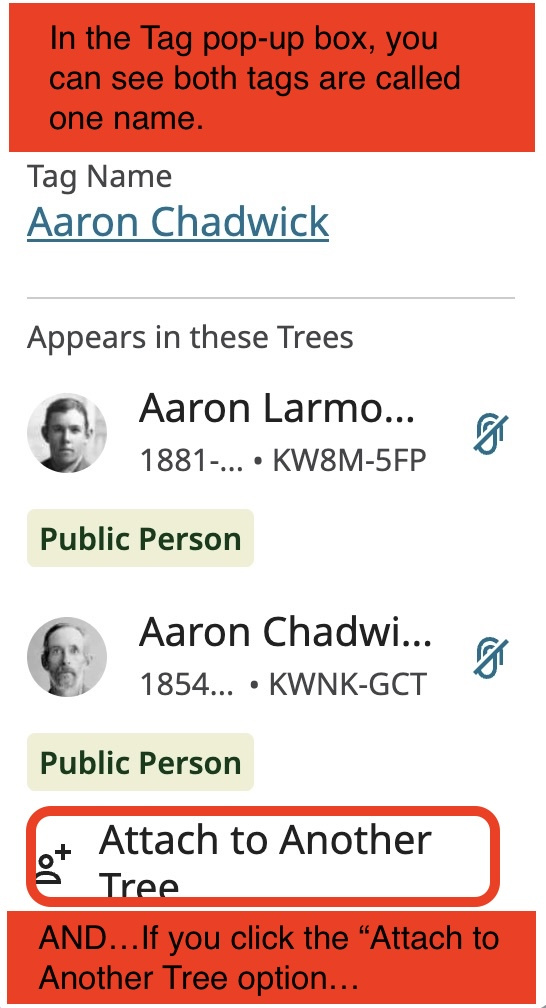
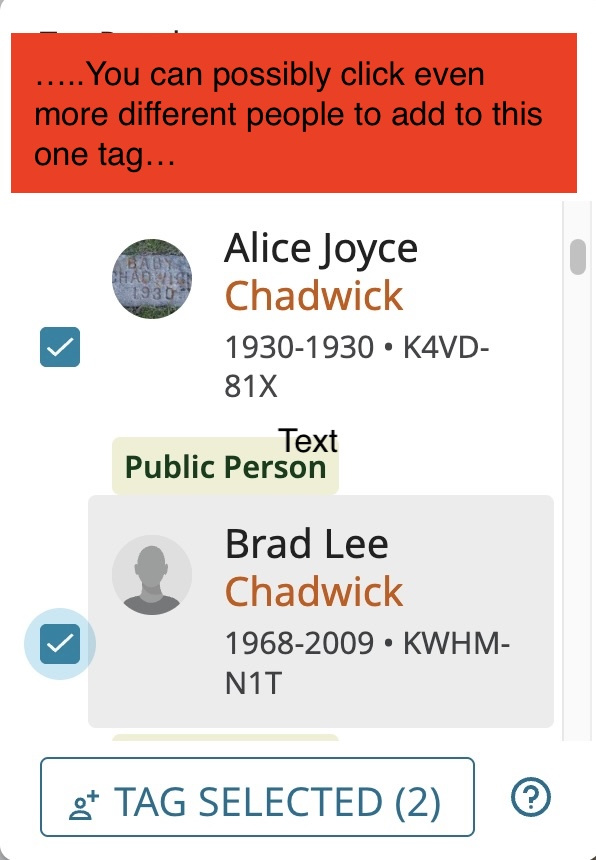
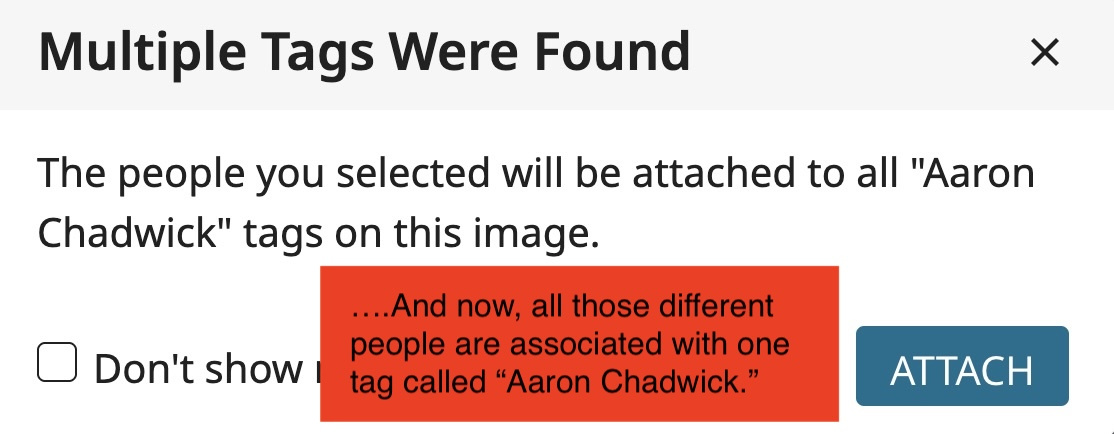
To summarize, by clicking multiple different people under one tag, the computer thinks they are the same person. And unfortunately, when you delete that one tag, you will delete the tag for all those attached to that tag. As you see, this can make a very complex problem.
The Solution:
-When you create a tag, you should only click on one person. Each person should have their own individual tag.
-If you want to “Attach to Another Tree,” make sure you are only clicking on the same version of that person (ie, there are many versions of myself in the Tree: my Private Person, and then additional versions because I have several Family Group Trees.) – I would only want to select those same versions of me when using “Attach to Another Tree.”
-In your case, and Engineer will try to pull apart all these different variations of tags. They all need to be deleted/changed. And then one tag given per person.
I see that in your case, you are already working to manage this. The engineer will just check it over to make sure the names and tags aren’t giving you further trouble.
Best wishes on your work!
0
