
I now have 52 private people that I didn't create
Apparently they were all created when I uploaded my GEDCOM, but I didn't notice them until now.
These are not the people in my CET. I do have all of the same people in my CET, but these people that I didn't create are in the FamilySearch tree's list of private people. They all have different ID numbers than the other copy and (unlike the CET people) none of them are connected to anyone else.
Edit: Make that 51 private people that I didn't create. I deleted one as a test. It appears that I can fix this, but it's strange (and kind of annoying) that I have to.
Comments
-
@Ryan8,489 As always, thank you for your patience and assistance with testing early access CET and offering feedback. Will you please list the steps you took and attach screenshots for review? Please provide the PID for some of the persons that are DECEASED. Thank you
0 -
@mynameistk
I'm afraid I don't have screenshots of uploading the file.
The steps that produced this were that I clicked the UPLOAD GEDCOM button, selected the GEDCOM file, and then waited for the upload to finish.
Since they're all LONG dead, here's a screenshot of all but two of the people that I didn't create. (For some reason, I can't get a screenshot that includes all 50 people that are on the page (but that's a screenshot issue, not a FamilySearch problem) and one of them is on the next page along with the living people that I did create.)
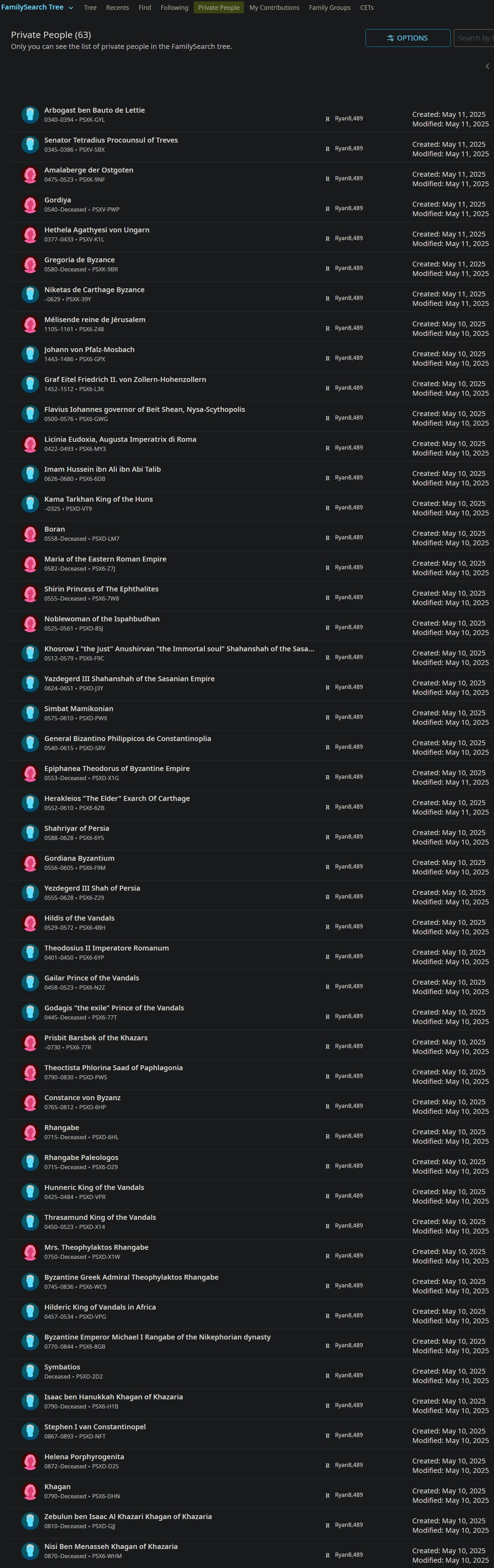
Judging by the creation dates, every single one of them was created by the CET upload (which I started on the 10th and finished sometime after midnight).
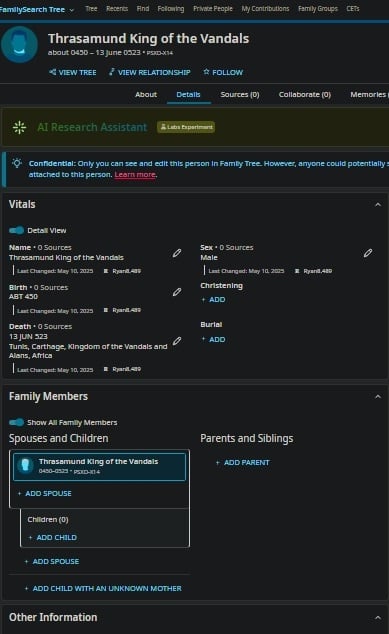
Here's one of the people chosen at random:
The corresponding person in my CET:
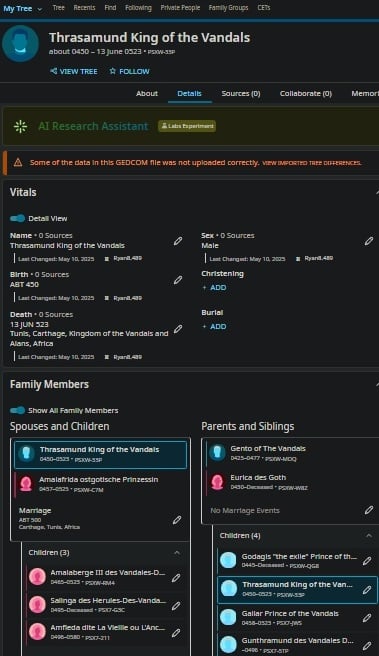
(Sorry about the size and resolution. I had to zoom way out in order to get the entire page without any glitches in the screencap.) But the only differences are the ID numbers and the complete lack of connection to other profiles in the one that isn't in my CET, the one that shouldn't have been created.
To save you the trouble of copying them from the screenshot, here's the ID number of every one of the profiles:
PSXK-GYL
PSXV-5BX
PSXK-9NF
PSXV-PWP
PSXV-K1L
PSXK-9BR
PSXK-39Y
PSX6-Z48
PSX6-GPX
PSX6-L3K
PSX6-GWG
PSX6-MY3
PSX6-6DB
PSXD-VT9
PSXD-LM7
PSX6-Z7J
PSX6-7W8
PSXD-8SJ
PSX6-F9C
PSXD-J3Y
PSXD-PWX
PSXD-5RV
PSXD-X1G
PSX6-6ZB
PSX6-6Y5
PSX6-F9M
PSX6-Z29
PSX6-4BH
PSX6-6YP
PSX6-N2Z
PSX6-77T
PSX6-77R
PSXD-PWS
PSXD-6HP
PSXD-6HL
PSX6-DZ9
PSXD-VPR
PSXD-X14
PSXD-X1W
PSX6-WC9
PSXD-VPG
PSX6-8GB
PSXD-2D2
PSX6-H1B
PSXD-NFT
PSXD-D25
PSX6-DHN
PSXD-GJJ
PSX6-WHM
PSX6-W57
PSXD-C160 -
@Ryan8,489 Thank you for the additional information and for the screenshots. I have logged this for the engineering team to review.
1 -
@Ryan8,489,
The problem you encountered may have been quite different from what it appeared. We had a poorly named menu that has been fixed. In other trees, like the large shared Family Tree, the "Private People" menu shows only your tree persons who are truly private (usually because they are living). In CETs this menu showed every person in the CET. Some of these may indeed be private to just the members of the tree, but most of them will be deceased who are visible to all users on FamilySearch (IOW: They are not private).
The name of the menu has been changed to Person List and it still shows you all the people in your CET. It can be used as a quick way to jump to any person you wish to work on by typing a portion of their name.0

