
Link from <- Search Results links back to the full digital library, not the Search Results

I sent this to the catalog department and also via feedback. Haven't heard from anyone yet, so it may be in the queue. On a different question someone suggested I join this group for the catalog feedback, so here I am. Hope I can post images!
The <- Search Results on a results page (top left in the picture below) takes me back to the full digital library, NOT the Catalog Search results.
This is the current page this is happening from:https://www.familysearch.org/library/books/records/item/199047-cemetery-records-of-clay-county-indiana-vol-7-part-a

I got to it from here (the red link below):https://www.familysearch.org/en/search/catalog/results?count=20&q.availability=Online&q.place=Clay%2C%20Indiana%2C%20United%20States

I'll leave this one and post separately about another problem found.
Commenti
-
@JanW2 Thank you for reporting the problems you are having with search. I applogize that no one has reponded before now. This is where you will get direct feedback on your issues.
Thank you for the screen shots and the URL's that helps narrow down the issues quickly. If I understand you question correctly you are unable to look at the record from the first screen shot that you sent at this URL: https://www.familysearch.org/library/books/records/item/199047-cemetery-records-of-clay-county-indiana-vol-7-part-a
However, if you use the secord URL that you provided you can then access that record. https://www.familysearch.org/en/search/catalog/829096
Please let me know if I am understanding the issue properly.
0 -
https://community.familysearch.org/en/discussion/comment/589215#Comment_589215
Not quite.
I should have put them in order. I replicated the experience to make better sense - I hope!
First was the search results page:

Then there is an interim page linked from the results, which is the page you posted, which appears to be the catalog pagehttps://www.familysearch.org/en/search/catalog/829096
On that page is this:

That leads to this item, which by the way is NOT viewable as described once I got there on the resulting page which says "Due to copyright restrictions, this book cannot be viewed online.", but that's another issue not related to the order of events in this report.
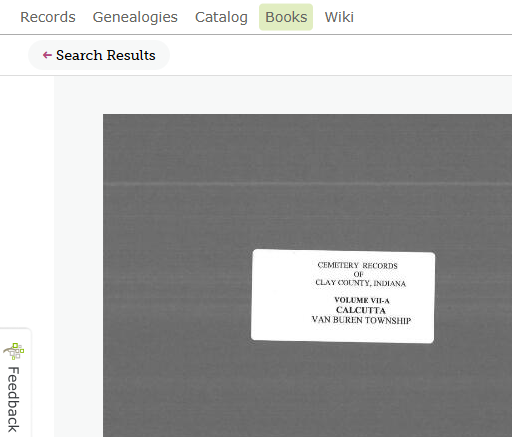
Note <Search Results at the top left.
That used to take me back to the search results in the second screen shot that I started from. That is no longer the case. Instead, it went to the new full digital book library as if I hadn't used any search terms.

And I think I figured out what is happening. Because of the interim catalog entry page and my linking to a sublink item on it (the link to Volume 7 etc.), the search results page is 'lost' so I'm taken back to the books search page instead.
I'm not sure how this would be solved. Perhaps it's not worth pursuing, but it was unexpected since it says search results. There appears to be distinction of where the search results are originally generated and where that link points. Maybe that's always been there and I had just not experienced it before. And maybe once the entire system is fully integrated, this will be moot.
Thanks for considering though.
0 -
Thanks for answering. I haven't kept an eye on the community, so just now saw your reply.
It's still happening, as of yesterday. It's very strange. I click the link in a catalog item page that says near the top that there is a digital version of xx item at this xx link. The page for the item either comes up and then goes to the full digital library page of many thousands of items, or the page loads, I click the item to view it and it goes to the full digital library page. It's like a box of chocolates. I never know what I'm going to get.
Then I back arrow the webpage and the catalog page is there and I go to the digital item again. It often works the second time.
Not sure what else I can share to identify this strange behaviour. I'm using Vivaldi, a Chrome-based browser. I must admit I haven't tried other browsers to see if I get the same result.
0 -
@JanW2 - thanks for your reply. I have a feeling it is your browser which does not appear to be supported. Is it possible to switch to a supported browser while using FamilySearch? I have copied some info below that may be helpful. Please try this and let us know so we can identify it as an issue.
Which internet browsers and operating systems are compatible?Supported Browsers
For optimal performance and security on the FamilySearch website, use the current version (or the version that came out just before the current version) of the following browsers:
- Apple Safari
- Google Chrome
- Microsoft Edge
- Mozilla Firefox
These browsers typically self-update, but manual updates can be done via the browser’s website if needed.
Troubleshooting tips for browsers
- Refresh the page. (Ctrl+F5 on Windows, Cmd+R or Apple+R on Mac)
- Clear browser cookies: https://www.familysearch.org/cookies
- Use a different supported browser.
- If issues persist, check for browser updates, as they can improve performance.
- Safari users on Mac should update their operating system to get the latest browser version, as Safari can’t be updated separately.
- The Samsung browser is not compatible with FamilySearch.
- For proper display of FamilySearch Community groups on an iPad, use Chrome in desktop view.
Supported operating systems
The FamilySearch website supports the current Windows and Mac operating system (OS) versions and one version back. If you’re unable to update your Mac OS, consider using another supported browser.
For additional help:
- Identify your browser at What's My Browser.
- Visit the FamilySearch browser upgrade page for more information and links.
Related articles
What operating systems do the FamilySearch mobile apps require?
How do I delete all of the cookies and temporary files stored by my internet browser?
What browsers and devices work for indexing?
Troubleshooting help for the FamilySearch.org website and Family Tree appSupport Instructions
Older information helpful for Support to know:
As of February 1, 2018, the FamilySearch website no longer supports any version of Microsoft Internet Explorer. If you are using Internet Explorer, we encourage you to upgrade to a supported browser. Please see the browser upgrade page for more assistance.
A January 2019 update to Microsoft Edge often brings up this error message, "Record information is not available. Please try again later." If you get this message on Edge, please try downloading the newest Edge browser. You can also use Chrome or Firefox.
As of August 2021, the FamilySearch website no longer supports TLS (Transport Layer Security) version 1.0 and 1.1. FamilySearch supports the current industry standard and one major release prior. For now, we support TLS 1.3 and 1.2. Upgrade your device as needed in order to use a more current version of TLS.
0 -
I think you're right. I tried the same catalog steps in actual Google Chrome and the reader rendered straightaway.
While I have your attention, I have another question about the home landing page that is different in Australia than it is in the US. The reason I'm asking is because the webinars that are done both from Family Search and BYU of course use the US home page. But since they are different the rest of the session is misleading.
Here's a current example. The new US home page has a general search box on the right side (as shown in a webinar this week). I didn't realise it was a search everything service. Extremely useful! However, the Australian home page doesn't have it. We do have an entry point for name/place, but the results page is completely different from the US version. I tried to post 2 jpgs of them but they didn't seem to load. I've tried attach instead. I can't see them on the screen to know if anything happened to them. Hopefully you'll see them somehow here. Maybe I'll try in Chrome and it will work!
At any rate, my point is that when I'm suggesting to others to use Family Search and the platforms vary like this, it makes my 'job' more difficult. Thoughts? (I'll go to the other browser now and see if I can add to this comment. I did test the entry access and they are the same in either browser). Thx
0 -
Am in Chrome browser now. Will try the image inclusion first. Nope. At least I can't see it.
Attach next. Nope. At least I can't see it. Both are to be showing the Australian opening page. I live in Australia and do NOT see the US landing page home any longer at all. Years ago I did.
0 -
Sorry I didn't respond earlier. I don't check in here often.
I now am seeing changes on the Australian landing page! They've added the link to the Lab, which will make my advice to new people MUCH easier, and I'm now getting the AI generated relationship suggestions. Woohoo!!
I spent about an hour last weekend showing some folks in my local family history centre how they can use the full text search for finding documents other than people. I've been working on a project involving a certain land treaty and finding books/histories/deeds related to it from the late 1600s in New York. They're working on people histories in a local town in Australia and found fulltext to expose documents of use to their projects as well.
Thanks MTW!
0
