Full name review- multiple people on records, irrelevant names highlighted

I am reviewing Guatemalan birth records in which there are multiple entries on the page and often the names of officials, witnesses, places, or random words are highlighted by mistake. The desired names are entered giving the child's given name followed by the full name of both parents.
The surname should contain father's last name followed by the mother's last name. The only fields initially available are multiple "Given Name" fields which, as information is entered, should be in the same successive order as the highlights on the page. Since I'm supposed to review the full name I have to add a "surname" field but I can't highlight two names for one field so I add the "patronymic name" and "matronymic name" fields and fill appropriately.
This throws all the highlighting off and since there are multiple entries on the page there are highlighted names that aren't part of an individual's record. I completed the entry for one individual and just deleted all the irrelevant fields but the next record I had to review was the facing page to the record I had just completed. When I tried to repeat the process on that page there were multiple highlights that were not needed and there were prefilled fields that didn't contain the names I needed and had fields from the previous record.
The only way to get rid of the irrelevant names would be to say that that field didn't represent a person. The individual's actual name hadn't been indexed at all and I couldn't add a field when nothing was highlighted. When I tried to add a highlight and a new name it brought up a bunch of extra prefilled fields which I was supposed to connect to the record I was trying to establish. I could not find a way to enter multiple birth records correctly, and I didn't see any way to add the parents names other than just listing the last names as part of the surname of the child in their record. There wasn't a way to remove highlights and names or words that had nothing to do with the record.
I have this same issue when trying to attach sources to my own tree when records have been indexed incorrectly and the names I need to attach either aren't indexed at all or random people have been identified as parents. These birth records often list not only the baby's name but also the parents and grandparents. Marriage records are the same listing parents and grandparents on both sides so I could add 8 to 12 names to someone's tree if it weren't so difficult to enter.
I can't enter multiple names at one time because if I do I always get "unable to complete at this time, try again later" or something to that effect. Is there a tutorial or something somewhere? There are often hints telling you how to do something or other on the site but more often than not the procedure listed doesn't actually work. I often just give up and move on but it really bother's me to leave it when it could be so helpful to someone. If it's my tree I just add the information to it manually but if it's not in my tree I can't do it because it makes me connect the record to a person already in my tree. Help. 😕
Answers
-
Below are a number of links to Help Articles that will hopefully answer a few of the questions you have raised.
Help with Full Name Review • FamilySearch
Full Name Review: Help Others Find Their Ancestors
How to add missing names to an indexed record • FamilySearch
Record hints in Family Tree that are "not a match" • FamilySearch
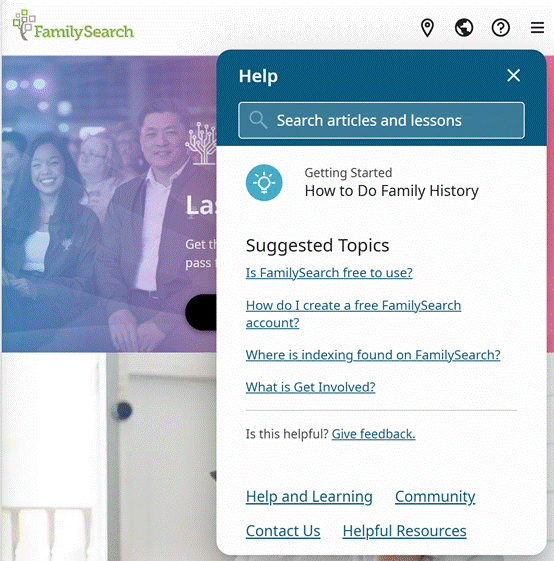
If not, you can access additional information by clicking on the question mark ICON in a circle in the upper right-hand corner of the screen when on the FamilySearch home page. A drop down screen will appear titled “Help”. You can then enter your questions and receive an additional list of Help Articles for each question asked. Try and be specific on the questions you ask. It may take asking several specific questions to reach the answers from the listed Help Articles to get the answers you need. Good luck and let us know if these Help Articles proved useful.
 0
0
