Vanilla losing image content

Comments
-
When is this issue of Vanilla losing image content (when a comment is edited) going to be fixed?
2 -
@JulianBrown38 Can you clarify the problem you are having with image content? If the original post has a picture, and then it is updated, Vanilla puts it through the image moderator again. That can make the image a blue box until it is finished with the review. Is this what you are seeing, or is it something else?
0 -
The question made more sense in the thread where it was originally posted.
0 -
@ShelleWells said
"If the original post has a picture, and then it is updated, Vanilla puts it through the image moderator again. That can make the image a blue box until it is finished with the review. ..."
I've not had a problem with images myself recently as I'd pretty much given up on them, because of these issues, so call me a bystander here. But something seems a little missing from the explanation that Vanilla puts it through the image moderation again. I don't recollect images being blue boxes when the post is created, suggesting that the moderation can be pretty much in real time. But images being blue boxes on update seems frequent. If I'm right then there appears to be a difference in reaction time between an initial image creation on the one hand, and image update on the other. Which seems odd (and probably nothing to do with any FS software?) but maybe significant, which I why I'm suggesting it.
Am I right to say that the issue occurs primarily with image updates? Or is it something to do with my perspective because I see more updates?
2 -
I share @JulianBrown38 's concern that the engineers (Vanilla or FamilySearch?) still appear unable to fix this long-ongoing issue.
For example, I have pasted a screenshot with my comments, clicked on Post Comment, then found a typo I wish to edit. Problem is, once one goes back to edit, you see something like this and the screenshot then needs to be removed and re-pasted.
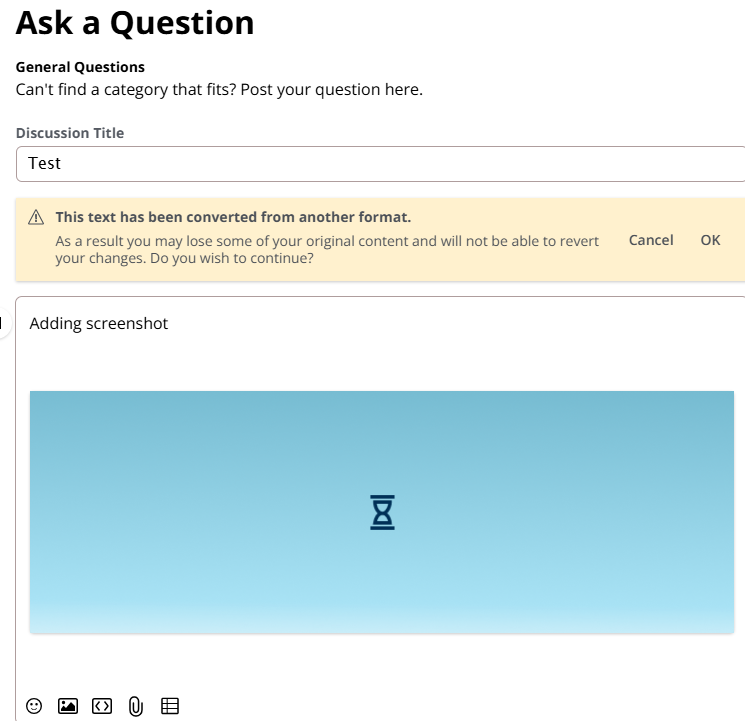
There are also issues in posting URLs. I'm sure everything was working fine for a brief period, but for quite some time we have been encountering problems when needing to go back to edit, whilst I no longer have any problems in making a screenshot stick if I get the wording right first time!
1 -
Hi Paul Looks like adding a screenshot worked fine for you. I take my screenshots with the snipping tool, add any highlights and then paste. Do you use a different technique.
Apprecoate all your great answer to everyone here on community.0 -
Sorry, but I intended to remove this post straight away, but obviously was not quick enough!
I was merely using it to illustrate the issue raised at
Vanilla losing image content — FamilySearch Community
Nevertheless, thank you for such a prompt response and your useful replies within Community!
1 -
@Paul W I will be adding some detail to the discussion you mentioned soon. Heads up - the issue does involve posting a comment containing an image, and later editing the comment.
[" rel="nofollow noopener ugc" target="_blank">" alt="placeholder image">](<img src=)
0 -
So, now I edited my previous comment and added a screenshot; now I see a blue rectangle with an hourglass.
Edited it again and got a message "This text has been converted from another format.
As a result you may lose some of your original content and will not be able to revert your changes. Do you wish to continue?" The image is till visible.Edited it again: at that point the image had been replaced with the text "[" rel="nofollow noopener ugc" target="_blank">" alt="placeholder image">](<img src=)
Now, I'll wait until tomorrow and see if the image reappears.
3 -
I'm seeing the "Build Your Family Tree" image at the moment.
0 -
@ShelleWells Yes, I had added a screenshot when I started the original discussion. To the best of my recollection, this is what happened. It was all done with one browser window that I kept open for several hours:
- I started the discussion on January 23 at 6:08PM. (These timestamps would be in my time zone which is UTC+13:00.)
- Later, I edited it to correct the collection name in the discussion title. The image was still visible, even after I saved the edit.
- Then I refreshed the browser window and edited it again to add another place error that I had just found (Awanui). This was just a few minutes before the 4-hour edit would have closed (about 9:40PM). At that time, I got the error "This text has been converted from another format…". As I still had the image on my clipboard, I saved the textual content and saved the edited post anyway. At that point, the image had gone and been replaced by some placeholder text [" rel="nofollow noopener ugc" target="_blank">" alt="placeholder image">](<img src=).
- I think that I refreshed the window at that point and got another full-screen message to the effect that the discussion would reappear after moderation. Then I gave up for the day.
- The next day, when I looked at the post, the image had returned. Now, I see that the initial post that contained the image was edited by user "Image Moderator" on January 23 at 11:43PM. That's about an hour and a half after I had made the last change.
On January 24 at 11:56PM (my time), user @Paul W started another discussion Image Test to try to reproduce this. I latched on to that by adding a comment with an image and then editing my comment. In that case, the result was similar except that the image has not yet returned there.
0 -
I think I can clear up the confusion. There is an independent Image Modator (IM) that reviews every image posted. It isn't associated with the Vanilla platform. It is additional coding enabling us to have images reviewed. Unfortunately, in this world there are many people who just want to cause trouble, be mean, or shock and awe an audience. And yes, they target FamilySearch.
The image moderator (IM) is a system and not a person so it has its limitations. IM looks for inappropriate images that you would expect but it also looks for copyright issues. That is usually the issue the IM uses to reject images in the community.
Most of the images you guys post are either documents or screenshots and both may appear to the IM as having a possible copyright issue. To be clear, the IM doesn't know there is one, but thinks there may be one. Images are rejected out of abundant caution to make sure we don't violate copyright laws.
Images are pulled immediately for review and that's when you see the blue hourglass image or the funny looking placeholder path Julian showed above. If the images are accepted, they simply replace the placeholder path or hourglass image. If they are rejected you get a community message and email depending on your notification settings telling you the image was rejected. I also get notified.
I review what comes in every work day and look at them again with human eyes. If I feel like they are ok to add back to a discussion, I do that. I try to get to them quickly, so there isn't a huge gap in the post and seeing the image. Most often I add the images as an additional comment to the discussion but have occasionally added the image to the original post. This is why it may seems that images are appearing and disappearing.
Sam 😊
2