What are the exact steps to assign a Group Tree member as an Administrator

The steps outlined in the documentation are wrong:
Give administration rights in a family group • FamilySearch
I have asked for this document to be corrected three times but nothing has been done.
Please define exactly what the steps are please!
Answers
-
Charles, you would probably get better results posting in the dedicated Family Group Trees group here
0 -
I have sent this message in three different ways thus far.
This is an old issue from earlier this year that others have written about that the documentation is wrong without a solid resolution.Thank You!
0 -
I have raised this in the dedicated Group:
0 -
I don't understand what you are complaining about. I followed the steps in the linked help article in the section "Steps (website)". They were very clear and easy to follow, and when I followed them, I successfully added a group member as an administrator.
You haven't shared any details except to say that the steps are wrong. Could you please share what you think is lacking in the documentation?
1 -
@CharlesBlackwell3 The steps for the web browser are correct. Are you referring to the steps in the Mobile App? Those are correct for the Android app, I cannot vouch for the iPhone app. Make sure that you are clicking the three dots in the upper right hand corner, not the three dots next to the person's name (this is different from the web browser!)
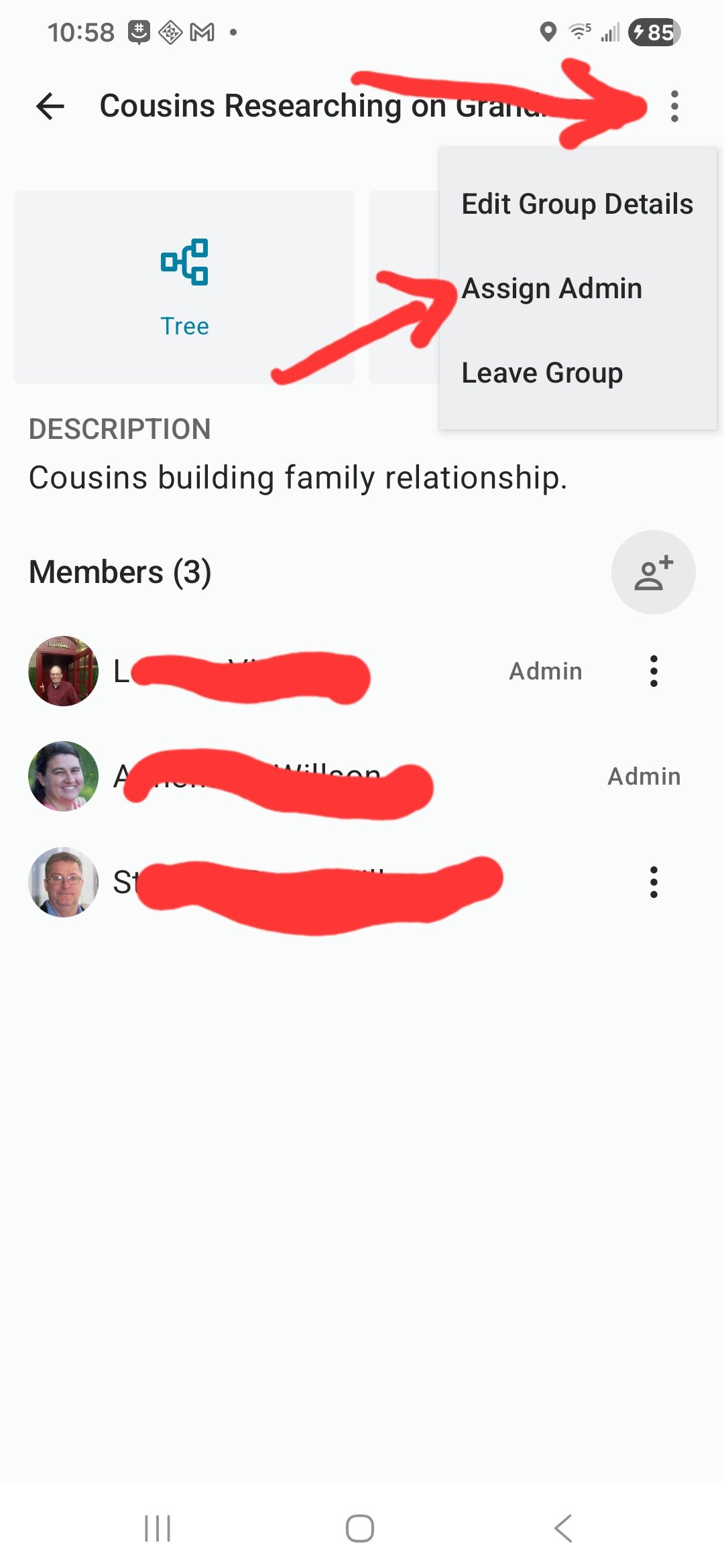
If you still are not getting the same process in either of these, could you please tell us specifically where the steps are not correct for you? If you could post screenshots of the steps you are taking and what operating system and browser you are using, it will help us to understand where things are causing difficulties for you.
0 -
I am not complaining but just stating the facts as they are. I did write an article showing where the problem is and also furnished a link to another group of people having the same issue that was never answered fully. By the way this is with a FamilyGroup Tree.
I will find the article I wrote and attach it here. I was just disappointed as no matter how I submitted this issue the feedback I received was to submit the issue a different way. This is just my third attempt. Be patient and I will provide the article I spoke of.
Thanks!0 -
@CharlesBlackwell3 Ok so let's start at the beginning. I have the message you sent in through the Suggest an Idea category and the picture where you indicated which steps were not working for you.
- What operating system and browser are you using?
- Please send a screenshot (full screen, please) of what you see when you click on the three dots next to the usernames of the group members. You can scribble over the usernames if you want. I just need to see what window you are on and where you were when you clicked on it. You can send that screenshot to me privately (click on my name and send me a message.) if you don't know how to scribble out the usernames.
1

