Duplicate Highlights

I've come across lots of duplicate overlapping highlights when doing Full Name Review and I'm wondering what the best practice is to correct it. I couldn't find any posts about this particular issue.
Answers
-
@mayimagpie here is an article on Full Name Review. Let me know if any information contained here helps to solve the problem. https://www.familysearch.org/en/help/helpcenter/article/help-with-full-name-review
0 -
@mayimagpie See the overlap in the initials in this screenshot:
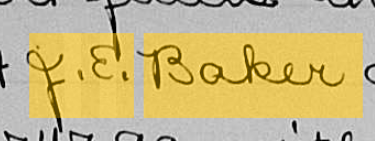
1. Click on "No" for is full name highlighted
2. Detach the center highlight on the initials
3. Adjust the partially highlighted E so that the highlight covers the entire E without overlapping the period after "J."
4. Click Next and the Given Name will appear as it should with a space between the initials. Then you can go to Correct the Spelling and click on Done.Best wishes, Mary
1
