Why are highlights sometimes hidden?

In Family Review, sometimes the names aren't highlighted, and the usual way of adding highlights doesn't work. I've been returning these, since I can't see which record on the page my corrections are attached to or even if the program is working
Answers
-
Are you writing about Full Name Review? I have tested the name highlighting numerous times today and can not seem to replicate the issue you are writing about. Does not mean the issue is occuring as you described by any means.
Some suggestions offered previously have been to make sure you are using eith Chrome or Edge as your browser.
Clear your Cache and cookies. This can be done by going to Clear FamilySearch cookies, or you can open your web browser and click control-shift-delete at rthe same time and it will bring up
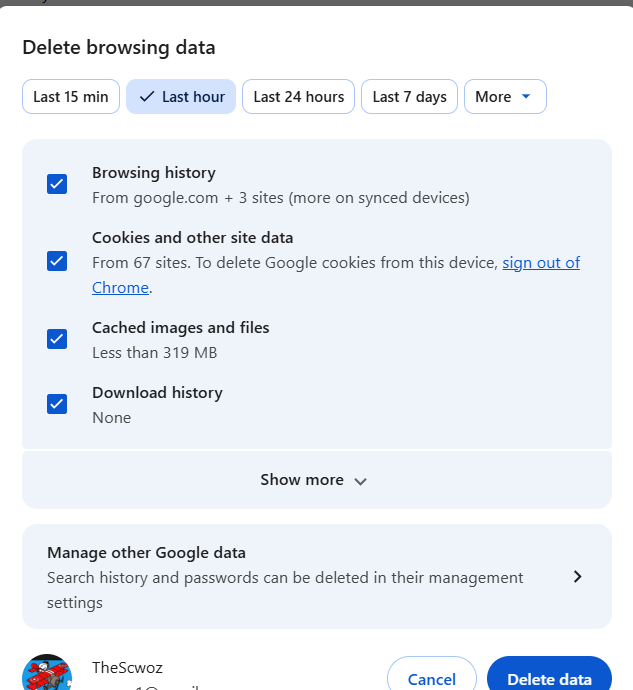
You can the choose what you want to delete. This works on eith browser.
If none of that works add to your discussion and we will see if others have ansers or if it may need to pushed up the line to be reviewed.
0 -
The issue is in Full Name Review that sometimes when the given name is not highlighted, one selects NO, and then attempts to select the given name the selection doesn't work. Other words on the page can be selected but not the wanted given name. I select some random word and make the correction after clicking NEXT.
1 -
I agree with AThayneGreen and would also add that if you're like me and not very tech saavy, you be very careful clearing cookies other than FS cookies
0 -
You really only need to clear your cache, so deselect all except for "Cached Images and Files," then exit out and reopen Chrome. An extra measure is to restart your device before reopening Chrome.
1

