Family Member having difficulty joining in our group to use the Together App

A son-in-law and granddaughter used the link to try and join our family group so we could use the Together app. I do not see them in the family group.
Using the together app on my phone, If I look view group is says "We were unable to find you in this group. Ask Admin for Help.
On a computer I can go to my family group and I see my son-in-law and granddaughter as able to add memories but not as members of my group.
They are not showing on any Together activities.
I want to use this even more grandchildren. How can I help these two be corrected? Are there specific steps to take so we have less issues?
Answers
-
I'm not sure what the issue is, but you could try giving them the link for the group on the FamilySearch website, so that they can try to join again. I haven't had issues with the link through the website. Usually when they use the link it will send a request to the group administrator, who will then approve or decline their membership in the group.
0 -
@JayneCorbett1 That is strange. My first thought is to ask if you have actually created a tree in that group? Have you copied living profiles from your FamilySearch Tree into the family group tree? If you have created a tree (not just turned on the ability to work in a tree), then you should have automatically been signed into the group and attached to your profile in the group tree. Your son-in-law and granddaughter both need to request join the group (which it sounds like they have done), then you need to accept them into the group. Have you done this? it works best on a computer. (See Step 7 on these instructions). After you have accepted their requests to join, they each need to sign in one more time and connect their own accounts to their profiles in the family group tree. If the system tells them "We were unable to find you in this group…" CANCEL that and click on the Starting Person link in the Group and Tree Settings box:
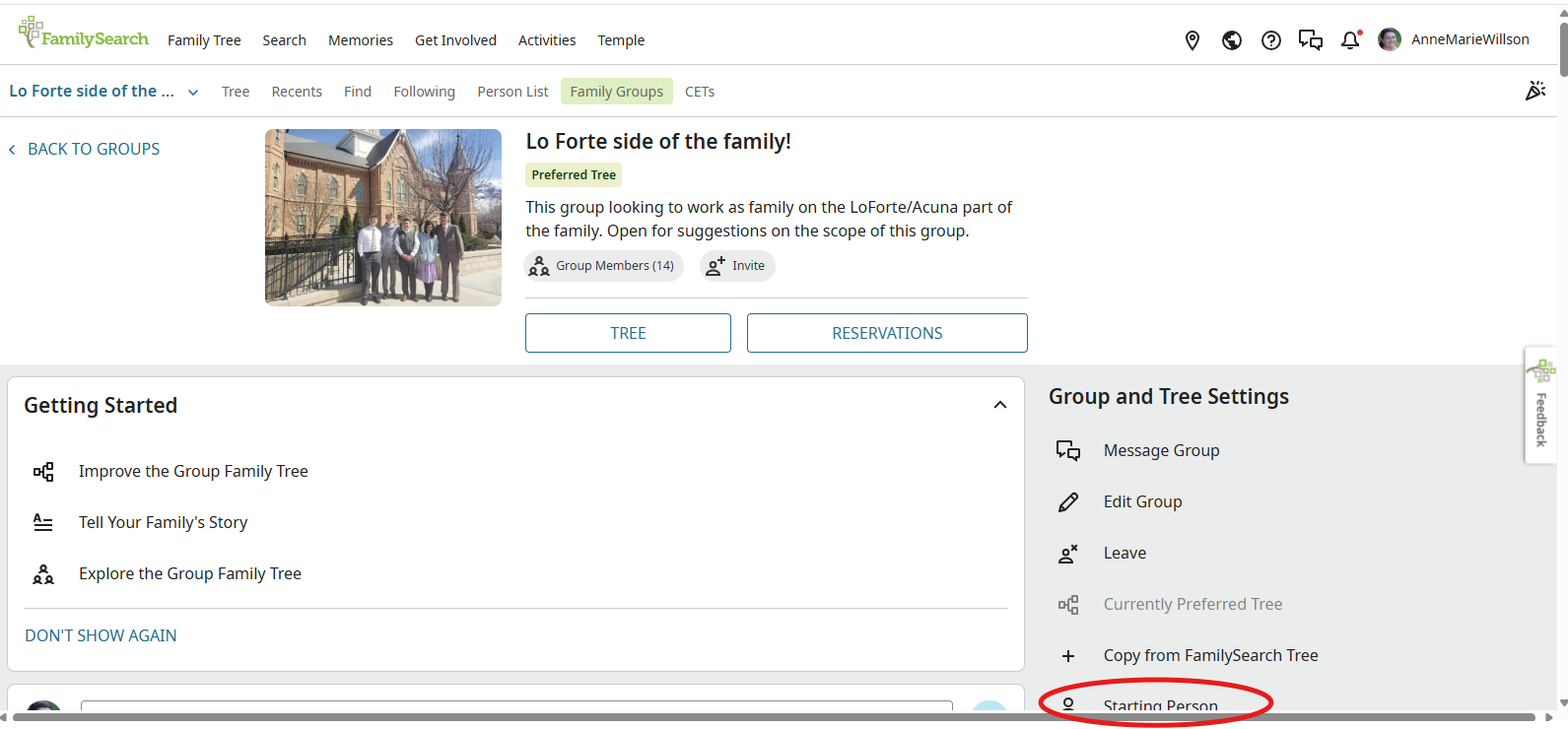
Then they should be able to scroll through the list of profiles and select their own profile in the tree.
You can only tell if they are linked to their profiles when you look on the computer. In the tree you will see a blue check next to members who have linked their FamilySearch Account to one of the family group tree profiles:
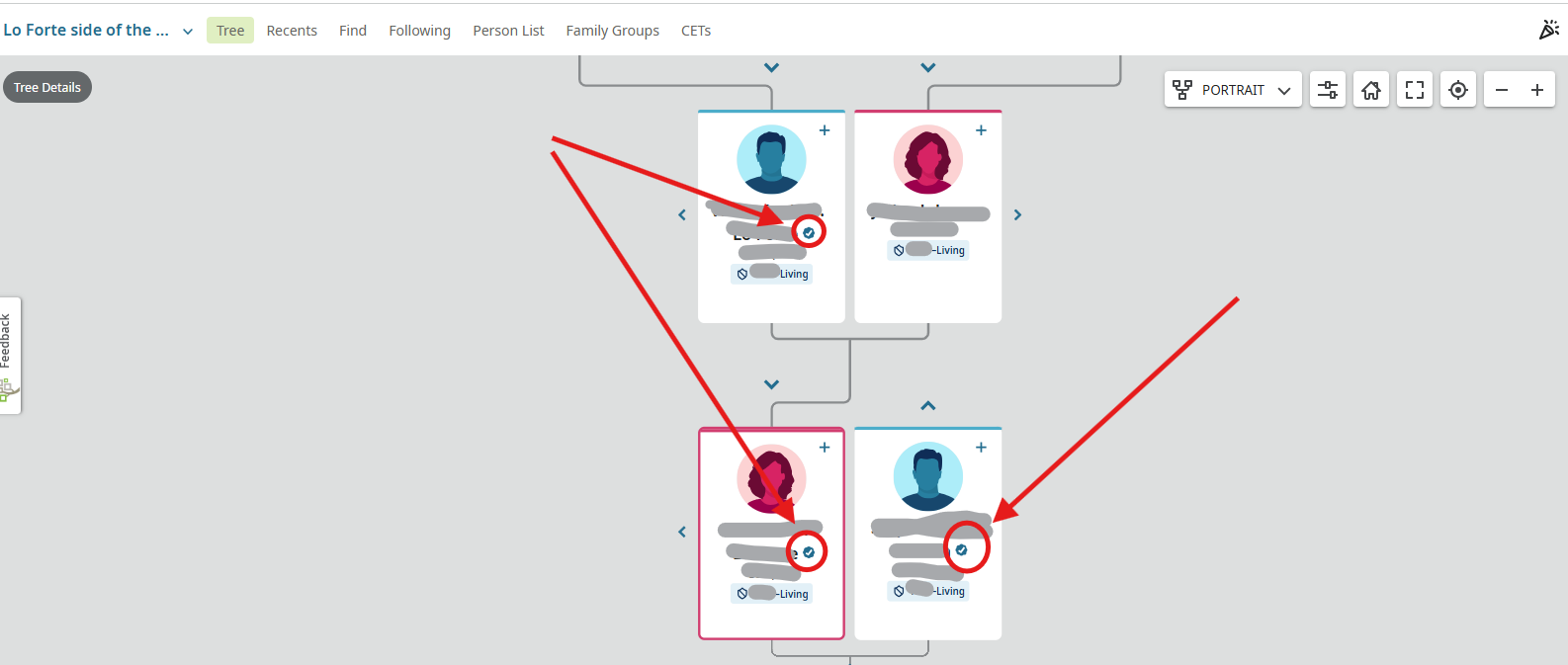
If you are still unable to get them signed in, please send a screenshot of where you click to 'View Group' and again with the error message "we were unable to find you in this group…" Also, tell me whether you are using iPhones or Android systems.
0 -
We also had a challenging time a few nights ago trying to add two of our grandchildren to our Family Group Tree. They are 11 and 12 years old. They have had their parent-approved FamilySearch accounts for a year or so. They do have cell phones, but one of them has Gabb protection on their phone. We tried inviting them by copy-pasting the link into a text to them, but that did not work. We finally had to send the invite link to them in an email account hooked to their FamilySearch account, which worked. We invited their parents to the group using a phone text, which worked just fine. Any suggestions for inviting the rest of our grandchildren 8-12 years old? We are FamilySearch missionaries in a FamilySearch Center and teach classes regularly; we want to teach the Together app but want to get the best procedure into our training.
0 -
You could send the link to mom and dad, and they can send to any/all of their children in whatever manner they would like. Remember that since the link is the same for everyone, that all people can click the same link from the same email/text message or any other messaging system. (My kids have a 'kidsie' group on Discord where they send messages to one another.)
I know that we all love our mobiles, but for something like this, it may just be easier to link up all the group members using a computer. Then when they log in to the apps with their mobile they will have the access to the family group.
So, you could sit one grandchild down at mom's computer and have that grandchild sign in to FamilySearch, click the link from the email or text or whatever and if an Admin is at the ready, the Admin can immediately accept them into the group. Then have the grandchild go right back to the group and link their FamilySearch Account with their profile in the family group tree. Once one grandchild is finished, sit the next one down and run through the process again for that grandchild's account.
0 -
Thanks so much! That's basically what we finally did.
0
