Children not indexed?

Even worse, the surname is wrong and the record is not editable to reflect correct spelling
This database set indexed only the couples and NOT their children.
Husband's name is Paul ALDRICH, not Moriah. It is very clear.
And the children? NOT attachable at all, "Attach to Tree" is DISABLED. (My relationship is 5th great grand uncle).
Here's the bad example
https://www.familysearch.org/ark:/61903/3:1:3Q9M-C91K-ZQCV-3?lang=en&i=47&cc=2366595
Answers
-
@W D Samuelsen contact me please
It took some moving around but if you right click on Image and open it in new tab and then go to your image # 48 and open the image it will take you to:
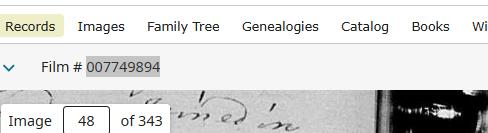
At this point you click on the names icon

Then you will see the names are editable at this point by clicking the pencil Icon.
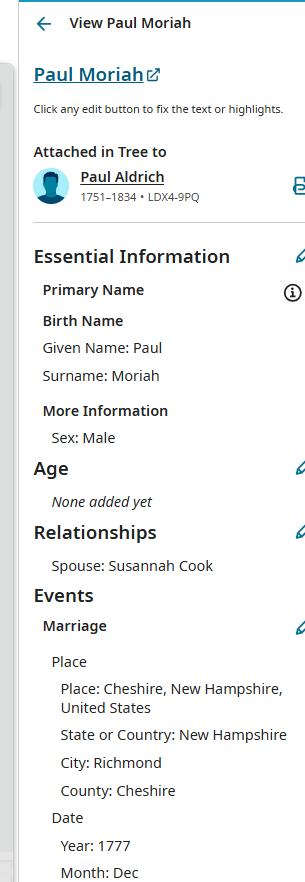
Hope it helps
0 -
Poor information - no information about ANOTHER WAY.
The link I provided, said "NO EDIT", period
You showed a way to edit surname but FAILED to show me a way to add those children? I had to dig around further and found the missing info link. Step by step to add children failed. Lumped son with husband as same person. Had to cancel immediately.
0 -
Took this matter to the FamilySearch Library and they had to escalate the issue.
0 -
Consultant in library suggested this to report the issue
https://www.familysearch.org/ark:/61903/3:1:3Q9M-C91K-ZQCV-3?lang=en&i=47&cc=2366595
has "Attach to Tree" disabled, preventing linking the children. The weird thing - the title of the database refers to Vital Records, nothing said about marriages only. That leave a lot of children out in the cold.
0 -
@W D Samuelsen contact me please The consultant in the library did not give you correct information. The link you provided is to the image in the old image viewer where editing is not possible. Not all collections have been migrated, but until then you can still edit and add missing people to the index by going through the new viewer. @sc woz did lead you correctly. Even though it appears the record is marked "No Edit", pay no attention and click on the image to go to the Shared Image Viewer.
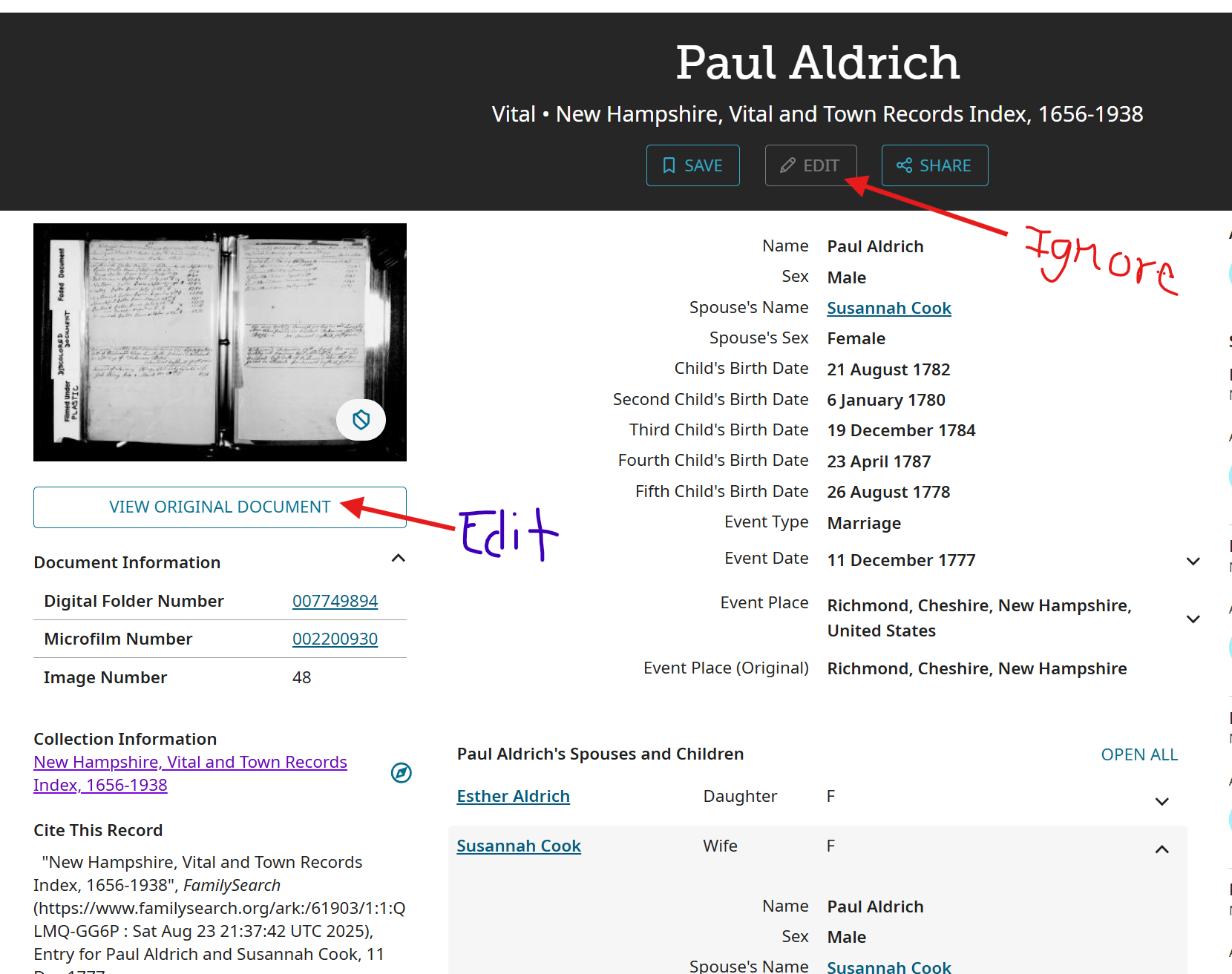
I noticed that you had added Peter. I went ahead and added the other children and they can now be attached. If you have questions about adding and/or creating family relationships just ask. We can walk you through the process.
1 -
SerraNola
You didn't leave me instructions and went ahead and added the children as there are other families in this database set related to me. And yountered one of sons with wrong spelling. It's Silvanus, not Sylvanus.
0 -
@W D Samuelsen contact me please Did you read my comment? I said I can walk you through the process. Just ask. I can easily remove what I did and let you do it, if that's what you prefer.
0 -
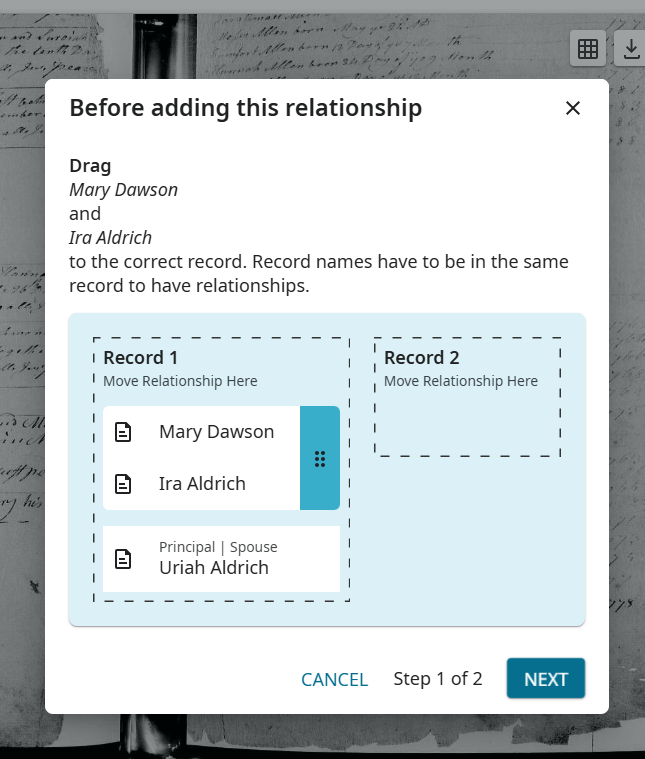
This is the step that is infuriating.
 0
0 -
Image 53 Uriah Aldrich and Mary Dawson, son Ira Aldrich.
0 -
@W D Samuelsen contact me please There are two records on the image for this family—one being the marriage of Uriah and Mary and the second being the birth of Ira. It's asking if you want to combine them into one record. I see this pop up also, when family members are linked and you try to add another relationship without first putting them in the family group. There is nothing to do here except click "Next" since all three are shown in the same record. You must have done that because all that is left now is to make Uriah and Ira, father and son. (Mary and Ira are already linked, as shown in your screenshot, and Mary is already a spouse to Uriah.)
Open Uriah's relationships by clicking on the pencil icon. Click "Add More Information" and add a "Child". Click in the "Child box" and add Ira.
Normally, I do not do things that users can do themselves, but we are still getting numerous complaints of issues with adding and editing. One of the most common is that the index details page will not open to enable attaching newly added people. I needed to ensure that this (or some other issue) was not the source of your frustration. I do apologize for not removing it and allowing you to learn the process.
0 -
I see "Add More Information" in red, clicked and I get not a mention of "Child"
All it showed:
- Most Common Name: Given Name, Surname, Patronymic Name, Matronymic Name
- Prefix and Suffix: Name Prefix, Surname Prefix, Name Suffix
No more, tried each, no showing of "Child"
0 -
Hunted for another and found this one - also cousin, and allied with the Aldrich family
Simeon Thayer and Zerviah (Ballou) children, left page
https://www.familysearch.org/ark:/61903/3:1:3Q9M-C91K-ZQCC-X?view=index&cc=2366595&lang=en&groupId=
Now how to add 7 children , I tried to add, child showed up but it kept saying it can not be left blank even after I entered first child. What was wrong?
0 -
@W D Samuelsen contact me please
I see "Add More Information" in red, clicked and I get not a mention of "Child"
Make sure you are clicking on the pencil icon for "Relationships" and not "Essential Information".
0 -
@W D Samuelsen contact me please You must "Add" all of the children to the index before you do anything else:
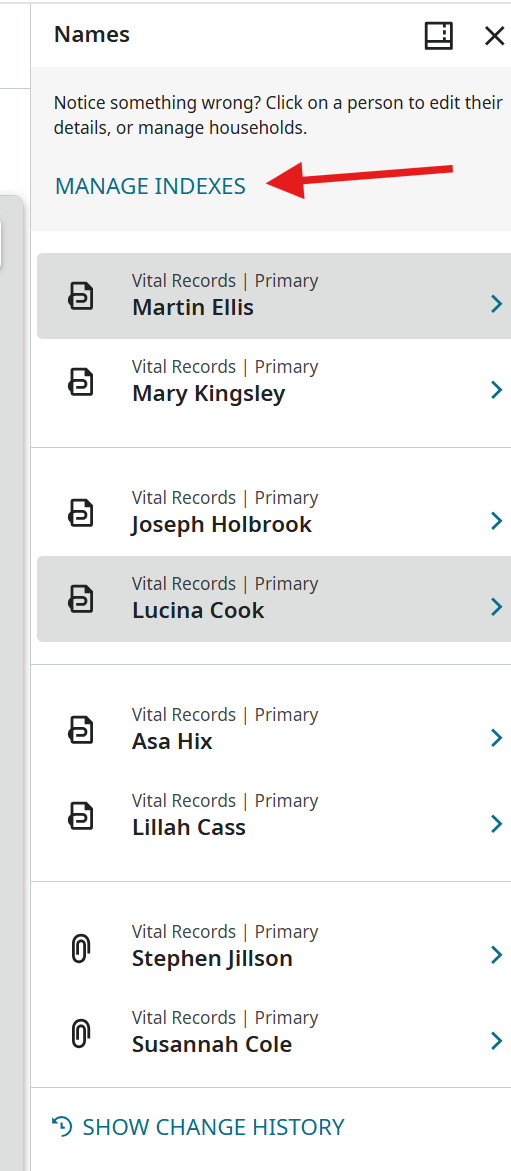
Open "Manage Indexes" and choose "Add".
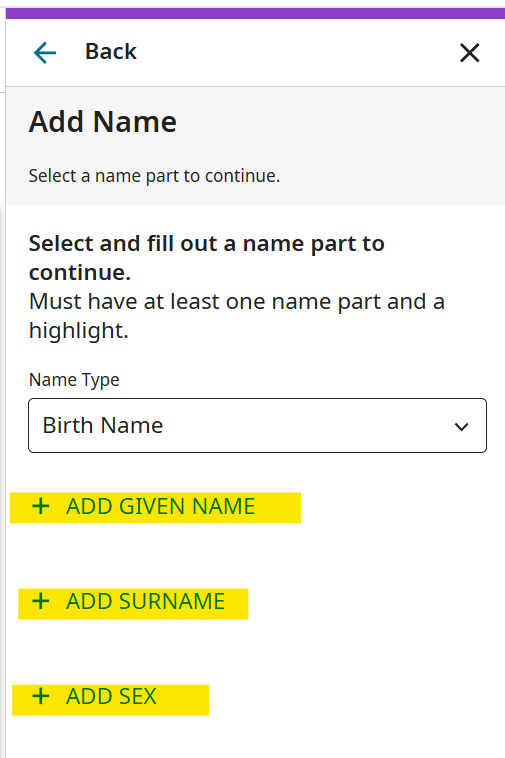
Add the given name, surname, and gender. Sometimes the system requires highlights and sometimes not, but I usually add them anyway. Then click "Next".
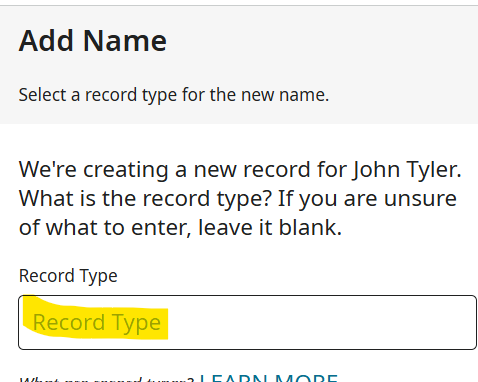
Add the Record Type, in this case, "Vital Records" and then click "Save". You will see the new persona at the bottom of the indexed list. You can continue to add all the children and then go back to add birth dates or you can add them as you go. Click on the new name to open his index page.
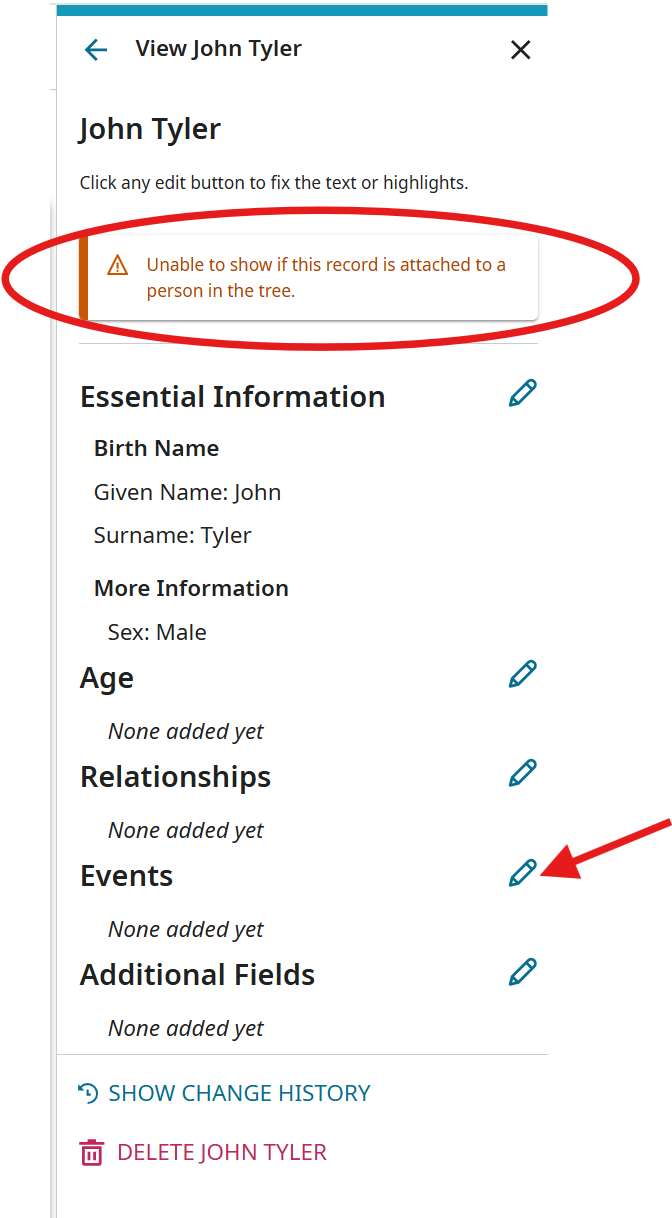
You will often see the "Unable to show this record…." message under the person's name. This is where we often see the error that I mentioned previously. While the message is there, the system is retrieving access rights for the new persona. This should take only a few minutes but it sometimes takes longer and the new persona can disappear if the access rights don't transfer properly. While this message is showing, there is no way to link to the index details page or be able to attach the person to the tree. You don't need to wait for it. Go ahead and click on the edit pencil next to "Events" to add "Birth" as a new event.
As I was about to get my next screenshot, I refreshed the page and "John Tyler" whom I just added, disappeared. So there's the bug!
You can try following the instructions and adding one of the children to your record. Let me know what happens. If it works, I can help you group the family and add relationships. In the meantime, I will take this AGAIN to engineering to work on a fix. 😒
BTW, John Tyler is on the previous image from the one with your family, so same collection, same DGS.
1 -
Added children just fine. Dates fine, place fine
Then this problem, where did the children have gone? They haven't been collected into a household.
And I may have made a single mistake, linking son's birthdate to his parents. I can't edit out the error. Looked all over and not a way.
0 -
@W D Samuelsen contact me please The John Tyler I added "reappeared" a little while ago. This is not unusual, as I've been tracking this problem for several months and have seen just about everything. The process to assign permissions to a newly indexed persona is designed to be near real-time to a few minutes. Obviously, there are still factors causing delays which engineering needs to identify and correct. I would suggest watching the page where you added the "disappeared" children and let me know if and when they come back.
I was not able to find the mistake you referenced, of linking the son's birthdate to his parents. Did you find a way to edit it?
0 -
@W D Samuelsen contact me please I was looking at the wrong couple. I do see the date error for Simon Thayer. This is part of a locked field. What was there before you changed it?
0 -
I went through my Ancestral Quest to the specific family and linked straight to the family and get the link
It's Simeon, not Simon. The birth date belongs to his son Eleazer.
0 -
@W D Samuelsen contact me please
FYI, I added children to this family and did not refresh the page. It took approximately one hour for permissions to clear. That is not acceptable, but knowing the limitations you can at least continue your work.
0 -
Did I succeed with a single family ? Found one step is to be ignored.
0 -
@W D Samuelsen contact me please Looks good with Ziba connected as child. Do you need help with grouping the rest of the family?
What step is to be ignored?
0