ERROR REPORT - URLs in Community posts

My original report has been closed
https://community.familysearch.org/en/discussion/170814/new-problems-with-urls-in-community-posts-or-comments
8 months have passed, and the "robots.txt" issue continues.
Any hope of a resolution?
@SerraNola I know this probably isn't your territory, but I don't seem to have gained any traction trying elsewhere.
Thanks.
Answers
-
@Áine Ní Donnghaile We haven't forgotten about this issue. It is still being worked on, but has turned out to be more complex than we originally thought.
As a workaround, the robots.txt error can be dismissed. You can also make the link workable by clicking on the link after you have added it, then choosing the small line.
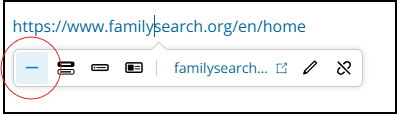
You will still see the robots.txt error, but the link is workable now.
We will continue working on this issue. Thanks for your patience!
1 -
Thank you, Ashlee, but even that workaround doesn't function much of the time.
1 -
Unless you were very quick you would have missed it, but I just edited out my comments at another post regarding a URL link that was not working. (I had tagged you in my comments.) Still, I've found the appropriate post (here) now.
I found the problem I had experienced was due to the fullstop (period) I'd inserted after the link being picked up. However, even after moving it along a space, then deleting it altogether, the period was still appearing in the URL bar on the resulting "Well this is unexpected…" page. For some reason, I had to delete that portion of my post and completely rewrite the sentence in which the link appeared. After that, I found the link does now work, even with a period inserted (albeit with a space after the pasted link).
To clarify, I had clicked on the "-" symbol, as per @Ashlee C. 's screenshot. However, my experience confirms your contention that the workaround can still leave us with problems, especially if we don't do things "perfectly" first time around!
Oh, and in spite of getting the link to work, the
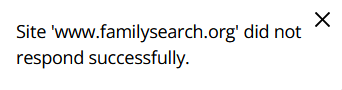
message is still appearing at the bottom of the page, confusingly implying there's still a problem.
2 -
For me, in Chrome, there is often no ability to click on any option in the bar from Ashlee's comment. This
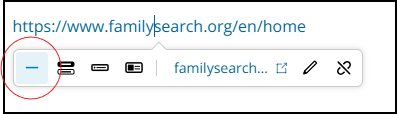
often will not stay open to allow selection of any of the options. The options bar will, usually, stay open in Firefox.
Some days, I just decide I won't try to answer/help, because it's just too much work with no results.
1

