
"404 Well, this is unexpected...When in "Following" and I click on a "Photo Attached

@James M Spencer has posted:
When in "Following" and I click on a "Photo Attached", I get the following message
"404 Well, this is unexpected...
"We can help you search literally billions of records, but we can't seem to find the page you're looking for."
This happens with every person I am following if there is a memory that has been at attached and I click on it.
Jim
Comments
-
I've had one of the Engineers test this….they say it is working for them.
Can you please let me know if you are still experiencing a problem with this. Thank you for your help!
0 -
Hi, this is what I still get, not working for me, this is on the following page when a photo has been attached and i click on it.
404
Well, this is unexpected...We can help you search literally billions of records, but we can't seem to find the page you're looking for.
What's NextReload the Page
0 -
@AmberML1 It's definitely still a problem, and has to do with the redirects on memories that were introduced a while ago.
I can't give you a specific case that you can reproduce, since each person's Following list is unique. But here is what I am seeing:
- On my Following list, I look for an example of a Photo Attached item
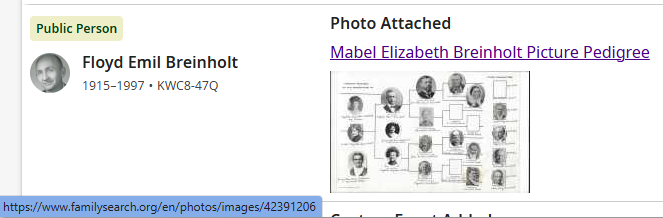
- When I hover over the title of that photo, I see that the associated URL is https://www.familysearch.org/en/photos/images/42391206
- When I click on that title link, I initially go to that address, but then it quickly redirects to https://www.familysearch.org/en/memories/en/photos/images/42391206
- Since that URL is clearly wrong (note the two instances of the "en" language path segment), you get a 404.
- I would guess that the correct redirect would have been to https://www.familysearch.org/en/memories/memory/42391206
So either the Following list needs to fix the URLs it uses for Photo Attached items, or the redirection needs to be fixed, or both. If the plan is to simply fix the redirection, then you can simply use the link I provided in step 2 as an example — you would have no need to know anything about my particular Following list.
Here's what the item in my Following list looks like (you can see the URL in the bottom left corner as I hover over the title):
 0
0 -

Carl Herman SellsMale1917–1998•GJX2-QX4
Photo Attached

July 16, 2025GGarrick7
Changes (9)
Hi, this is what I still get, not working for me, this is on the "Following" page when a photo has been attached and i click on it.
This is what I get:
"404
Well, this is unexpected...We can help you search literally billions of records, but we can't seem to find the page you're looking for"."What's Next"
"Reload the Page"
I am clicking where it says "Photo attached" on the photo and getting the 404 message in this example. Yes it did start after the memories were changed to the current way.
0 -
@Alan E. Brown @James M Spencer
Thank you both for the detailed reports. I will send them back to the Memories Team….but this actually might need to go to another team…so the fix might be delayed further.
I will keep you posted on any answers or updates I receive.
Thank you for your patience. And with help finding these problems!
0 -
Thanks for pinging me, Amber. The re-direction is definitely something Memories can fix, so I opened a bug report. It's odd that it isn't handling those URLs correctly.
Thank you to the Community for letting us know! You are correct that "https://www.familysearch.org/en/photos/images/42391206" should now be "https://www.familysearch.org/en/memories/memory/42391206".0
