gallery problem, flashing blanks for images taking a while to load

AmberML1
Having problems with new gallary layout, i keep getting flashing blank images when I access my gallery to look, add images to my albums, I hit refresh and sometimes i get a" Error code: RESULT_CODE_HUNG" message. at some point my images do show up but only album by album and not all the albums at once. I am not sure if i am being clear on this, I cannot send an example…i do not know if this is a bug or an on going problem, however it started when the new gallery was created.
Answers
-
Its blinking - while it takes the time to load your entire gallery into memory.
It used to be you could see the list of albums on the left - and then click on an album directly without having to wait for the gallery to fully load.
(this after a recent major upgrade as to how the gallery displays)
I wish the engineers would fix it so it would load one page of gallery items and display the list of albums on the left - and allow you to click on albums - without having to load the entire gallery before it gives back control.
How many items do you have in your gallery (Im guessing a very large number)0 -
now for any of us with many thousands of memories items - we are forced to see the pulsating - for as long as it takes to load all memories.
which could be for various seconds and even over a minute.
originally they loaded the list of albums so you could go DIRECTLY to an album before the full gallery load completed.
They now made it worse. . .
I dont know what they were thinking. . .
the list of albums is more important to load FIRST - and then allow the user to go directly to an album - while the gallery is still loading. now we cant do either.
and to add insult to injury - every time you do anything - the system thinks it needs to refresh the gallery - - so all the time we sit in front of the computer at Familysearch memories - we are forced to see the pulsating screen and cant accomplish anything.
This issues is faced by anyone with many thousands of memories items.0 -
Its coded so bad that the the familysearch code is taking near total control of the CPU and
the browser even detects the problem:
and even the OS becomes unstable.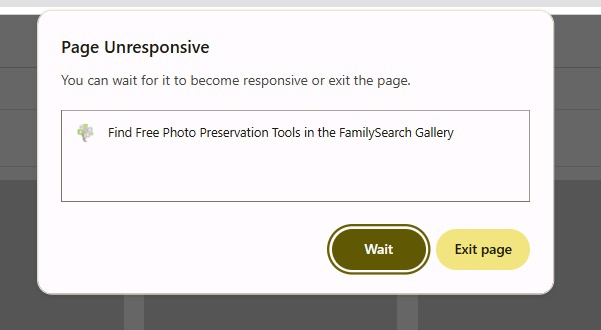 0
0 -
They are definitely aware of it James - - not sure why your comment (about whether engineers know of the issue) is now blank . . .
but I think the whole reason for the change was a forced change to the underlying architecture.
which means they cant just revert
they have to find ways to make the system work even with the new architecture.Things they may consider (from my experience in I.T. - though I am not a FS employee)
1) tuning the database performance to make it faster
2) allowing access to folders - even before the full gallery is completely loaded.
3) not loading the full gallery - unless the user really wants it to be fully loaded and even then maybe doing it in smaller portions. (maybe just initially loading the first 1000 items)
4) fixing the code so the load of the gallery doesnt so drastically affect the local CPU - and causes your entire computer to virtually hang
5) Not always forcing the gallery to refresh as often as it does currently.
But my opinion . . . don't hold your breath . . . . changes will come but not probably as fast as you are wishing they would be.
one little trick that I'm guessing many people are not aware of is
once you know the URL for a specific album/folder - you actually can access such folder - without waiting for the gallery to fully load - if you access the url directly and initially without first accessing the gallery.
and thats why I wish the engineers would list the albums on the left right way - and fix it so you could access just that album - independent of whether the gallery is fully loaded or not.
so if you created browser bookmarks of your oft used albums - you could actually access them quickly and directly - as a work around until this gets fixed.0 -
Dennis,
Thanks much for your explanation…I appreciate it.
Jim
0 -
@James M Spencer @Dennis J Yancey
Yes, I am sharing this information with the Memories Team. Thank you for sharing your concerns and your specifics.
We apologize that this isn't working in the most ideal fashion! We ask for patience with our free product. Thank you!
0 -
In the past few weeks, I know the Memory Team has been working hard to make improvements for large galleries of Memories…they are hoping to improve the load times.
I'm wondering if you can let me know if your experience has improved.
Are you still experiencing flashing boxes or error messages?
Can you check to see if your Grid View loads faster than the List View. Is there any notable difference in the load times?
Thank you for whatever information you can provide!
0 -
There is no change so far.
Still doing the same. the list view loads 1st , along with the flashing boxes and the reload message and so forth.
Nothing has changed …thank you for following up
0 -
There is no change so far.
Still doing the same. the list view loads 1st , along with the flashing boxes and the reload message and so forth.
Nothing has changed …thank you for following up
0 -
Yeh - they have not yet resolved this issue.
but - tell me - how many items did you have in your gallery . . . any ideas?
and are most of your items in albums?
anything above like 10 thousand items and you could be waiting a long time for it to fully display.
even in the old world - before this major change - it took quite a bit of time for a large gallery to display.
BUT in the old world - one could go directly to a subfolder (album) with ease even if the gallery had not completed display - where as now this is no longer possible.
dont know what to tell you - my impression is they are not close to a solution yet . . .0 -
Over 10,000 and all are in albums and the old version of the Gallery I did not have a problem loading…right one could go to a sub folder (album) with ease…not now.
0 -
but your gallery - does eventually display - correct - after about 60-90 seconds or so??
one tip: if you create a document (outside of FS) with the URL's of all your albums
(like in a word processor etc. - with the url clickable as a hyperlink)
you actually can access any album directly - without having to wait for your entire gallery to display.
for example
this is one of my albums:
https://www.familysearch.org/en/memories/gallery/album/1429126
(you may have to mouse select, copy and paste url to your web browser address and hit enter)
the same way you can click on this album and go to it directly and quickly
you can also have a hyperlink for one of your albums and go to it directly without having to wait for your entire gallery to load.
so if you create some sort of list of hyperlinks
(either as bookmarks in your browser - or as links in a Word document etc.)
you can get around the issue of not being able to access an album without your gallery first completing display.0 -
as an example see:
https://yanceyfamilygenealogy.org/albumlist.htm0 -
@Family Bible @James M Spencer
Thank you again, both of you, for providing all these important details about loading times. I am sharing this information with the Engineers.
0 -
Thanks
I do very much hope the engineers decide to load the album list/count first before the gallery loads -
so that it works the way it used to in allowing us direct quick access to our albums
whether or not the Gallery is fully loaded.
and I wish refreshes of galleries could be kept to a minimum - or be done (or not) at the will of the user.
Currently the refreshing almost constantly of the gallery - when you have 20,000 items in your gallery is extremely painful!!0