Siblings not visible in group tree

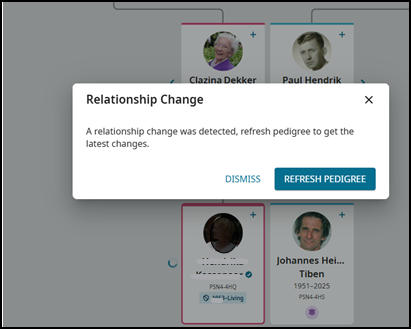
I’ve created a family group, copied living person from my private tree, and invited my two sisters to join the group. When they go to the group tree they see themselves but not not their siblings. When they hit the siblings caret an error message pops up: “A relationship change was detected, refresh pedigree to get the latest changes.” But hitting the REFRESH PEDIGREE button in the error window does not help. What’s wrong?

Answers
-
Have you created copies of the records for the siblings within the family group tree?
0 -
I have not created copies of the siblings in the group tree within the group tree. I only copied them from my private tree. All siblings have different ID numbers in the group tree and private trees. My sisters only have themselves in their private trees.
0 -
Today I had the same issue (error message i.s.o. siblings) in my private tree after changing the visibility of the memories of my sisters from public to private. But the issue was gone after a switch from my private tree to the group tree and back again.
0 -
Good morning. Is this issue still a problem? If so can send the ancestor ID involved to look further into it. Hopefully all is back to normal already.
0 -
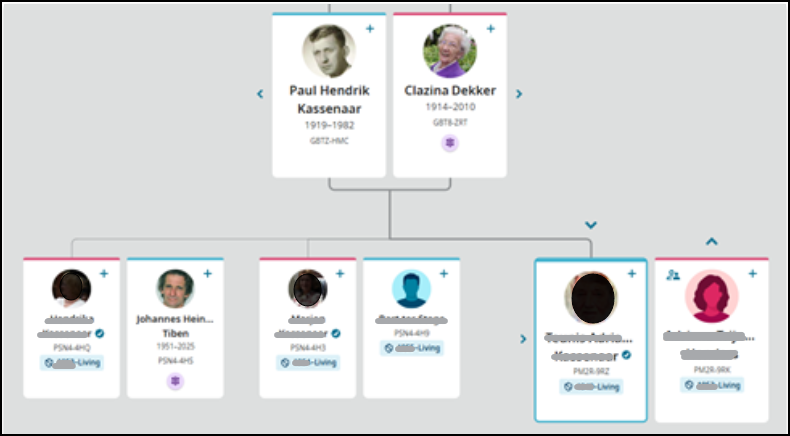
The problem is still there. No siblings pop up when my sisterts click on their siblings caret in the Brands-Kassenaar-Dekker family tree. They get a warning instead. Clicking on REFRESH PEDIGREE doesn’t help.
 0
0 -
@Tom Kassenaar Mod note: Because Community is a public online forum, your post was edited to maintain the privacy of living people. Please see the Community Code of Conduct for more details. Because the living people are in a private space in FamilySearch, their PIDs have been left for the engineers.
0 -
I have this issue. I checked the person's details and fixed some duplicates, but it still won't show siblings when selecting the side arrow in the family tree view. The siblings are listed in the detail page, however, under the parents. Help?
0 -
Hi @Tom Kassenaar and @MatthewAlvarado Is this still happening in your family group trees?
The problem is the Parent1/Parent2 order. If you added yourself to your parents when you were on your father's profile page, then he is listed as Parent1 for you and mom is Parent2. Then if you add your siblings while on your mother's profile page, she is listed as Parent1 and your father is Parent2 for those siblings. So the system sends that message to show that the parent order needs to flip.
You can see the flip in the two screenshots that Tom added earlier in this thread. The one with the relationship change message shows your mother on the left and your father on the right, but the image just below shows mother on the right and father on the left.
Usually, you can fix this by going into the parents' marriage and clicking on Switch Spouse Position. (read the article, the video is about a different issue.) This should reorganize the family so everyone has the same Parent1/Parent2 relationships.
Respond back if this doesn't fix your issues.
0 -
Thank you sooo much Anne. I did go into the parents marriage and selected switch positions and then it showed his siblings. I guess the father has to be on the left and the the mother on the right in order to see the siblings of their children on the family tree screen.
0 -
Yes! The problem is solved! Thank you Anne.
0 -
So glad to be able to help you both! @MatthewAlvarado it isn't really about father on left and mother on right…it is just having all the children have their parents in the same parent1/parent2 order. Just a quirk that we never used to have when we considered father/mother as the only parental relationships.
0 -
Dear Anne, thank you very much for solving the problem. Switching the parents was the solution.
0 -
@Tom Kassenaar So glad that it is fixed for you!
0


