On the website the language changes after a merge to English

Usually I have the familyserach.org website in German and usually it stays in German.
However, after I merged/combined two people together, because they were duplicates, the language automatically changes to English.
If I change in the URL the /en/ to /de/ then it is back to German.
However, if I change the language with "Country and language option" link right at the bottom, I loose the person I'm working on.
Answers
-
I have the opposite: I'm also in Germany, but working in english. In my case the website-ui changes from english to german after a merge. This behaviour has defintely changed as it used the stay in the chosen language.
0 -
could it be, that it reverts to the language of the Windows. That is English for me.
yes before, lets say a few month ago, the language stayed.0 -
Good morning
I found this information on FamilySearch, not sure if it is what you are experiencing but may be of help.
To solve the “Problem with Name Language” data problem, you need to edit the person’s name. Then make sure the language template matches the scripts used, that each script is in the correct field, and that each script is in a separate field.
This data problem cannot be dismissed.
How do I resolve the data problem, "Problem with Name Language- Sign in to FamilySearch, click Family Tree, and then click Tree.
- Find the person that you want to edit. Open the person page.
- Click the pencil icon that is with the person's name.
- Select the correct language template for the name. The Language Template field is above the Title field.
- Use your computer's cut and paste feature to move each part of the name to the correct field for that set of characters. The warning message disappears when the correct characters are in the correct fields.
- Scroll down to the Reason This Information Is Correct field. Enter an explanation for your changes.
- Click Save.
Tip: By default Family Tree displays names from nonromanized languages such as Chinese, Japanese, and Korean in their native scripts. In your account settings, you can choose to display all names in a romanized (Latin) script.
0 -
@sc woz nope, the language setting for the name has nothing to do with this problem. I only have western names in my part of the tree. The language setting for the name are therefore only western (mostly English, Dutch or German) or "other".
The change of the gui language from english to german (in my case) is consistent after every merge: familysearch.org/en/ becomes familysearch.org/de/
And it only happens when working with a browser. It doesn't happen when using the Android App.
@SerraNola Can the techs look into this please?
0 -
@Lars van Ravenzwaaij @abrogle I was not able to replicate this bug. I completed a merge with a German language setting and it remained in German after the merge. I then completed a merge in a German family with the language set to English and it remained in English. Can you think what might be different in how the process worked for you?
0 -
@SerraNola I'll do documentation with the next merge. I do see some strange things displayed with this language change. Thanks for now.
0 -
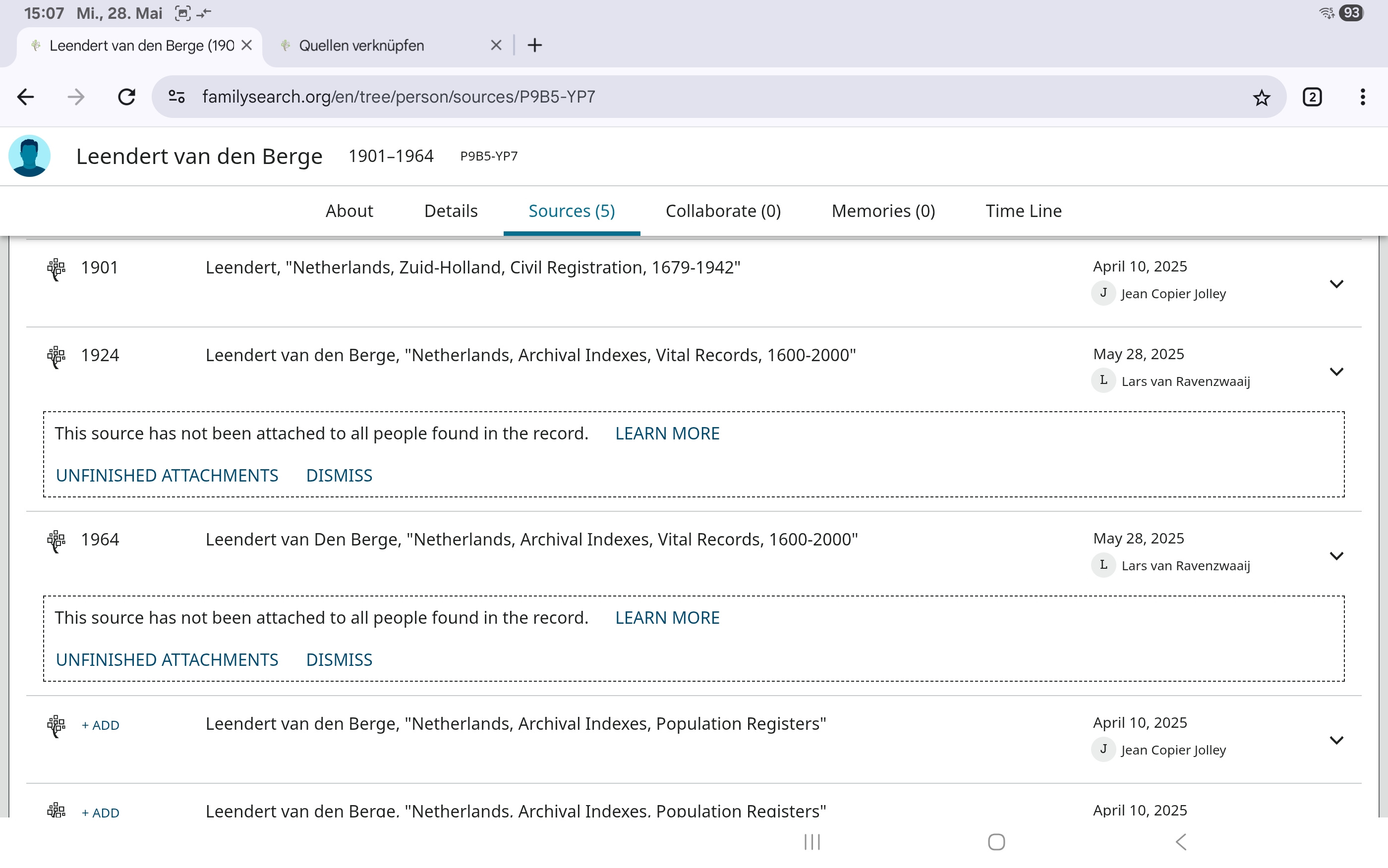
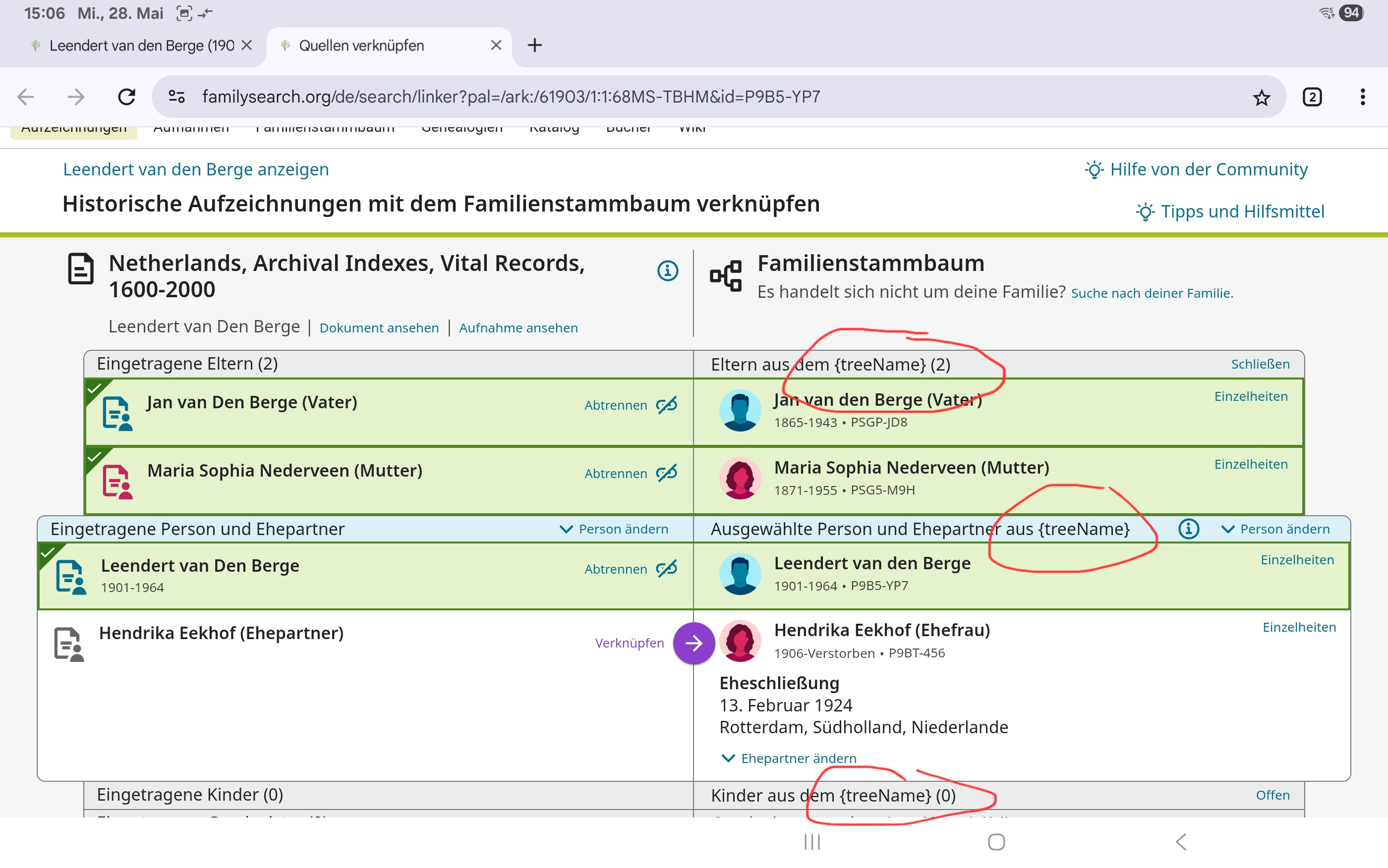
@SerraNola This time it happened not with a merge but with "unfinished attachements". I was working on my Android Tablet with Chrome Browser.
In screenshot #1 you can see I'm coming from the web-ui in English (familysearch.org/en/).
It then changes to German (familysearch.org/de/). Take special notice for {TreeName} which also shows in these cases everytime with the language switch.
 0
0 -
@Lars van Ravenzwaaij @abrogle Do you have a FamilyGroup Tree or a CET or do you only use the collaborative FamilySearch Tree?
0 -
I have just used the collaborative family tree, when it happened.
In the mean time i had a may be related thing.While the site was all in German, when I entered a birth place the location came up in English. I could then override it by hand to German. I entered Wittnau and Wittnau, Aargau, Switzerland came up and I had to override Switzland with Schweiz. Other times this worked fine. To be honest, I can‘t remember if I did a merge before hand, it took a few people until I noticed it, because it worked hundreds of times before.
0 -
@mynameistk Yes, I'm testing CET. The screenshots however are from the collaborative FS tree.
But this allready happened a few times before I got the possibilty of using CET. Said that, after me starting to test CET, this phenonemon is occuring more and more.
BTW, tonight I experienced it on my Win11 PC with Edge-Browser also a few times. But it seems to be random. And those persons are not in my CET.
0 -
@Lars van Ravenzwaaij thank you for the additional information.
0 -
@Lars van Ravenzwaaij The screenshot is great to illustrate what is happening. In previous occurrences what other record collections were involved? If we can determine if the problem is tied to specific collections it will save engineering some time in diagnosing the problem.
0 -
@SerraNola As can be seen in the first sreenshot (unfinished attachments), that is a collection which shows this. BTW, this is the same collection with the massive place name problems.
If other collections are involved, I can't tell for sure. I'll keep an eye on that and let you know if other collections are involved.0 -
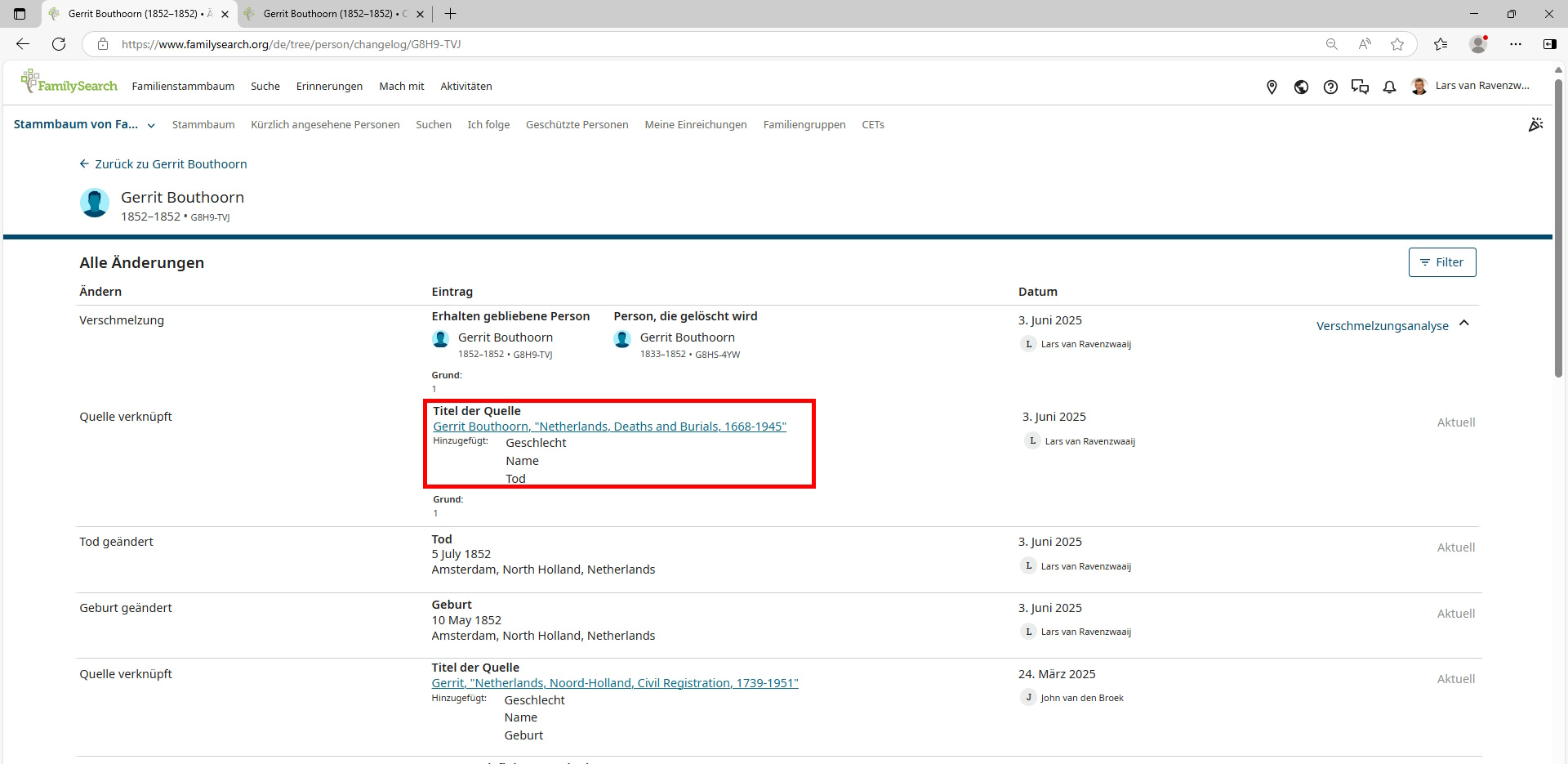
@SerraNola I just happenend again, this time with a merge. The collection on the deleted person was different this time. Screenshot of the changelog after the merge (in German because of the language change).
 0
0 -
@Lars van Ravenzwaaij If it were being triggering by the collection it seems like it would be switching to Dutch, not German. Have you deleted cache and cookies, just to rule that out?
0 -
@SerraNola Of course I've deleted cache and cookies (the first thing I allways try). The effect is there on 5 different devices with different OS and browser and 3 different networks.
I don't think the collection is the real problem. I think my physical location might be the related cause. As stated earlier, I'm living in Germany but working in english. That was never a problem in the past however.
To seek evidence I wil try working in Dutch and see if the same happens.
BTW look at the original statement of @abrogle there the problem shows the other way around.
0 -
@Lars van Ravenzwaaij I went back to your original post to see how I missed the fact that you were living in Germany. I often hear people say they are "in Germany" and know they mean "I'm working on a German line." Sorry I made a quick wrong assumption in your case, but that does clarify the problem. If a user has their location as Germany in their FamilySearch profile, they should be able to work in English. I would like to know how or if this applies to @abrogle.
I will show your screen shot to engineers and get back to you.
0 -
@SerraNola Don't mind your mistake about my physical location. I probably should have made that clearer in the first place.
After some experimenting I can confirm that, when working with the dutch website-ui (in stead of english), it also ramdonely changes to the german website. But I still can't tell for sure on which occasions this happens.
0