Edit Vital Information

Comments
-
My Dads information is incorrect, not sure who entered it but his birthdate is wrong and his name is spelled incorrectly.
0 -
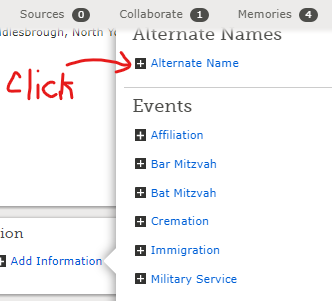
Hello, @ElaineAllshouse thank you for reaching out to Community. We understand that you would like to see your dad's vital information in the family tree be amended. You will be happy to know that you can make these changes by following the instructions in the article below. You can go ahead while on your dad's page/record, edit his birthdate and his legal name, accordingly. If you know he used alternate names in his lifetime, you can add such names to the alternate name section by first clicking other names, just below the vital section. Give a short reason for your change, prior to saving. If possible attach sources where possible to validate such changes. We hope this will be helpful as you

How do I change vital information in Family Tree?
Article Id: 1138
April 20, 2020
In Family Tree, you can correct the name, sex, or event information for a person, regardless of whether you added it.
Family Tree is an open, collaborative environment. Your change shows in a change history, along with your user ID and a means to contact you. Any user, including you, can reverse changes if you make a mistake.
Before you start
- Focus on accuracy. Your change should make the information about a person more correct.
- Be prepared to explain your changes, and, when possible, attach sources.
- Consider contacting the user who made the last change before you make a correction. To find contact information, click Detail View. Then click the name showing in the "Last Changed" details.
- Be aware that other Family Tree users could be watching this record. (You can see how many are watching when you make your correction.) They receive an email notification if you change the record. They might contact you to discuss your change.
Steps (Website)
- In Family Tree, display the person page of the individual whose information you want to correct.
- If you do not see Vitals near the top of the screen, click Details.
- For the information you need to correct, click Edit.
- Review the sources and reason statement. Continue only if your change makes the information more accurate.
- When editing a name, choose the appropriate language in the field above the name fields.
- Make your changes.
- If the option is available to delete information, you can click Delete in the bottom right corner of the box.
- If you change a date or place, select a standardized date or place. If no matching standard is available, click None of the Above.
- Enter a reason statement to explain why the information is correct. If the existing reasoning is applicable, leave the existing explanation, and add your own comments.
- Click Save.
Note: We recommend that you refresh the web page after you save changes.
Steps (Mobile App)
- Navigate to the Person page of the individual whose information you want to correct.
- Tap Details.
- In the Vitals section, tap the information that you want to change.
- Tap Edit.
- Review the sources and reason statement. Continue only if your change makes the information more accurate.
- Edit the information, and press Continue.
- If you are able to delete the information, you see a Delete option at the bottom.
- Enter a reason statement to explain why the information is correct. If the existing reasoning is applicable, leave the existing explanation, and add your own comments.
- Tap Save.
Steps (Family Tree Lite)
- On the Family screen, tap the name of the person whose information you want to correct.
- Tap the information that you want to change, and tap Edit.
- Review the reason statement. Continue only if your change makes the information more accurate.
- Edit the information.
- If you are able to delete the information, you see a Delete option at the bottom.
- Enter a reason statement to explain why the information is correct. If the existing reasoning is applicable, leave the existing explanation, and add your own comments.
- Tap Save.
After you finish
Whenever possible, attach sources to show where you found your information.
Related articles
A person in Family Tree has the wrong spouse
How do I correct parent-child relationships in Family Tree?
0 -
Hello @ElaineAllshouse,
You can search in the Help Center for this process and print it out if you wish. Click on the question mark in the upper right of your screen and then Help Center at the bottom of the pop-up widow. Type "edit vitals" into the search bar. Several options will appear. The first one on my list is the one you will want:
Best Wishes!
1 -
At the top of the page for my ancestor it says: Johanna Condron 6 March 1893 – 27 May 1901 • GXZQ-ZND
But the correct birth date as given in the list below is 1883. How do I correct this?
0 -
@MadeleineEnnis, the "culprit" is an associated standardized date that wasn't updated/changed when the birthdate was corrected:

I left it unchanged so that you can see how to fix it (learning by doing). Go to Johanna's detail page, click Edit next to her birth, click the little triangle at the right of the "Standardized Event Date", and click the 1883 entry in the drop-down. Then click Save.
0 -
Many thanks Julia! All sorted now.
0



