Home› Ask a Question› Get Involved

how do i rotate the page

SimsBarbaraStevens
SimsBarbaraStevens ✭
December 2, 2021 edited August 18, 2024 in Get Involved

the page is rotated 90 degrees and difficult to read

0

Answers

  • Susan Ann Mullen Pelton
    Susan Ann Mullen Pelton ✭✭✭✭✭
    December 2, 2021 edited December 2, 2021

    Hope this helps! https://www.familysearch.org/en/help/helpcenter/article/how-do-i-rotate-an-image-while-indexing

    To rotate an image, do the following:

    Steps

    1. In the top corner of the image window, in the vertical toolbar, click the icon for Adjust Image: 


    1. In the pop-up window, click either Left  or Right to rotate the image 90 degrees in that direction: 

    2. To rotate the image more than 90 degrees, repeat the above steps for each 90 degrees of rotation.
    rotate-image-icon.png


    adjust-image-icon.png


    0
  • Melissa S Himes
    Melissa S Himes ✭✭✭✭✭
    December 2, 2021 edited December 2, 2021


    Screen Shot 2021-12-02 at 3.52.03 PM.png

    Click on the third icon down in the vertical toolbar (Tools) in the image window. The arrows will pop up to allow you to rotate the image.

    0
  • Susan Ann Mullen Pelton
    Susan Ann Mullen Pelton ✭✭✭✭✭
    December 2, 2021 edited December 2, 2021

    Here is a screenshot to show you where that is.
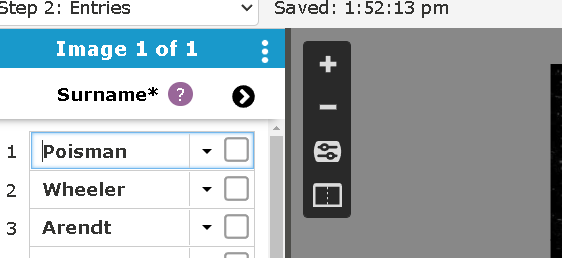
    image.png


    0
This discussion has been closed.
Clear
No Groups Found

Categories

  • All Categories
  • 44.8K Ask a Question
  • 3.6K General Questions
  • 599 FamilySearch Center
  • 6.9K Get Involved
  • 678 FamilySearch Account
  • 7K Family Tree
  • 5.5K Search
  • 1.1K Memories
  • 505 Other Languages
  • 66 Community News
  • Groups