
CET GEDCOM uploads stuck in “processing” + “error trying to show the members of this group”

Hi, I’m testing Controlled Edit Trees and I think something is stuck on the backend.
What I’m seeing
- Page: CET Trees at
https://www.familysearch.org/en/groups/research-tree - Date/time: 15–16 November 2025, approx. late evening to next morning (UTC-7)
- Browser/OS: Chrome 142 on Windows 10
- CET Trees involved (from my list):
- Robertson McRae Family Tree
- McRae Robertson Family Tree
- My Genealogy
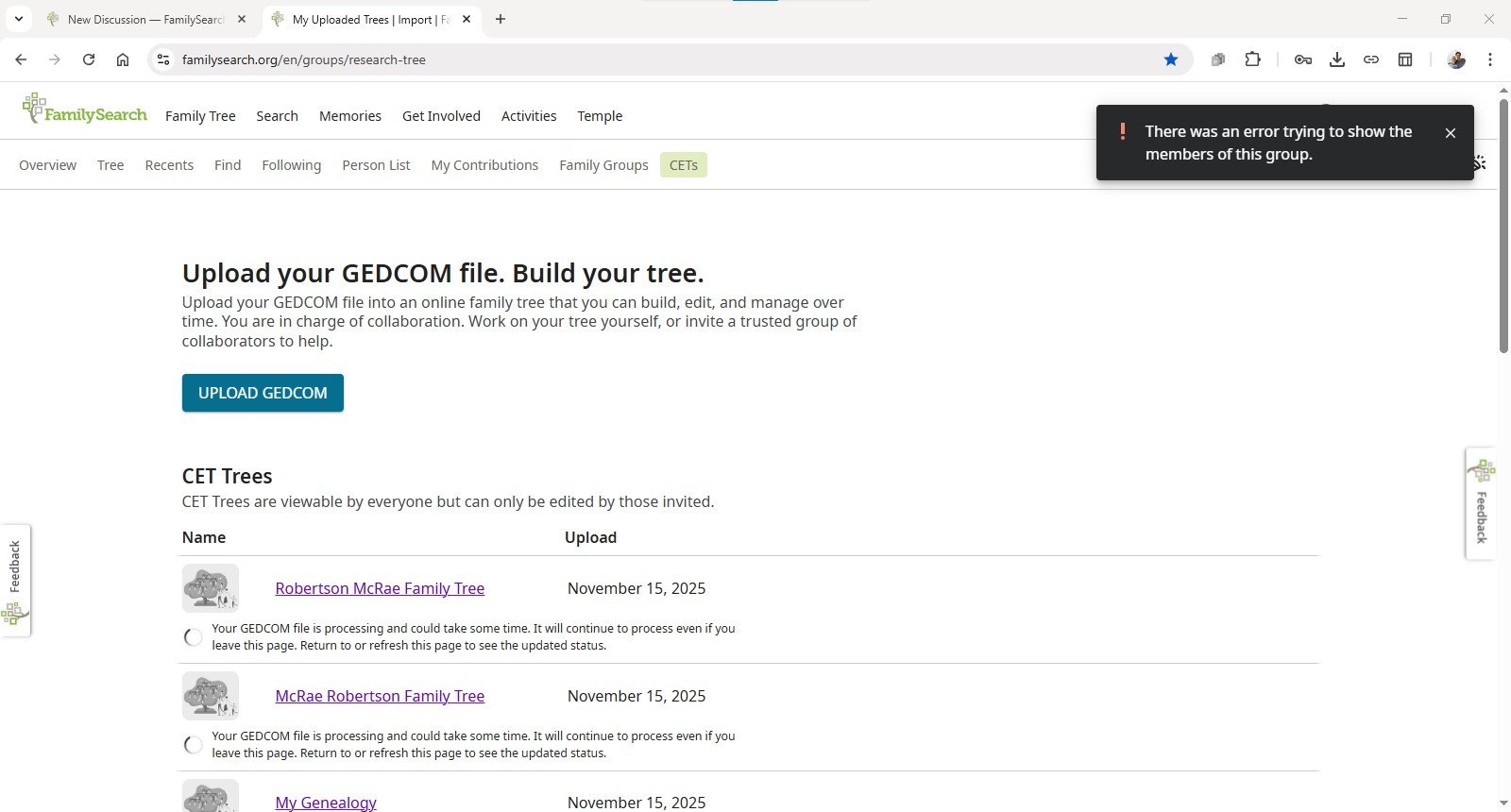
Each of these shows the same status message:
“Your GEDCOM file is processing and could take some time. It will continue to process even if you leave this page. Return to or refresh this page to see the updated status.”
The spinner has been showing like this for many hours and never completes.
If I click on the name of the CET Tree the message in the top-right corner comes up saying:
“There was an error trying to show the members of this group.”
I’ve attached a screenshot that shows both the stuck CET processing message and the error toast.
What I already tried
- Logged out of FamilySearch and back in.
- Cleared cookies/cache for FamilySearch.
- Tried uploading three different GEDCOM files (with different data). All of them behave the same way and just sit in “processing.”
- Refreshed the page multiple times over several hours.
So far, none of the GEDCOM uploads ever move past “processing,”.
What I’m hoping for
- To get into and work on my tree
Happy to provide more details (file sizes, exact timestamps, etc.) or run tests in another browser if that helps.
Thanks!
Comments
-
@April McRae Robertson thank you for testing early access CET and providing feedback. Will you please tell me how large each gedcom file is; how many persons are in each file; and the name of each gedcom file?
0 -
april_cet_start.ged 1kb. 1 person.
Robertson-McRae.ged 21kb. 3 people. (Rootsmagic)
my genealogy.ged 26kb. 7 people. (Rootsmagic)
FamilyTree.ged 50kb. (Ancestry Import) 46 people.
I tried different gedcoms from different sources cause I thought maybe that was the problem.
0 -
@April McRae Robertson Thank you for reporting this and providing additional information. We are investigating it.
1 -
@April McRae Robertson looks like your Robertson-McRae.ged finally processed through. However, it looks like your others have been deleted so you will need to re-upload those files if you still wish to have them. If you still need assistance, please let us know.
0 -
Thank you for bringing this to our attention. We’re committed to resolving as many issues as possible, and we’re closing this discussion for now. If you or others encounter this issue again, please start a new discussion and include relevant information such as your operating system, browser, URLs, and screenshots if available.
We appreciate your support and engagement. Please don’t hesitate to reach out with any future questions or concerns.
0
