
This person's sex does not match the information in this source

For John Little ID: MNJQ-3Z2 the marriage banns indeed do not include the sex of the individuals and the indexed data is right to say sex: U.
I think the wording would be more accurate if it said that the source does not provide evidence for the sex of this person. His sex is evidenced by other sources so the correct action imo would be to remove the source not change the sex. (I do not know why this source is attached as evidence to the entry for Sex) The warning message could prompt removing this source for Sex, rather than raising a question about his sex, which it does with this wording.
Having said that, the usual way of entering information about a couple at that time in England would put the man first, and **** marriage was not allowed, so one could argue that it is implicit in the entry as written. (This would require verification from the image, which in this case is not directly possible—unless you have access via other channels.)
Comments
-
The data quality score looks at all the attached sources, not just to the ones tagged to a piece of data so I doubt removing the tag would make any change. Removing the source altogether just leaves it in the system for someone else to re-attach it correctly to him or incorrectly to someone else or to create a duplicate profile out of.
Looking at his record, I would think the source where he is shown as female is the issue, not one where he is listed as U:
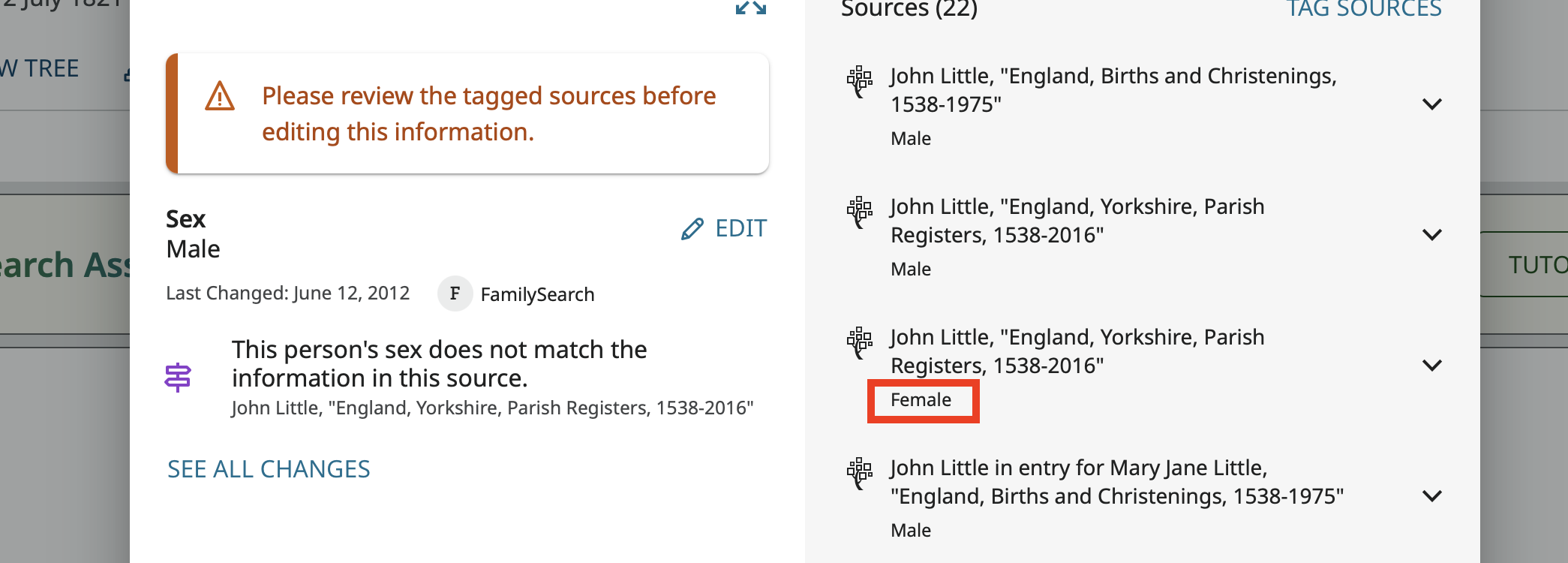
The options are to either dismiss the flag as an indexing error or go to the source, open the source index editor, and correct the index for both him and for his wife Margarete who was indexed as male.
1 -
AH, thanks for looking at this Gordon. Right you are, I missed that obvious problem.
Unfortunately, the Edit button is grey for me on that source, so that's not an option for me in any case. (And that's true for more indexed sources where I can verify the correction from an image obtained outside of FamilySearch (usually via one of the commercial platforms).
[To be clear: I have the image of the parish record in front of me as I write this. The index is simply in error. John Little is noted as Bachelor; Margaret Hedley as Spinster. There's no doubt about this at all.]
0 -
It has come up on these boards before, and I don't know the reason for it, that some indexes can be edited if you come at them from one direction but cannot be edited if you get to them from another. I wonder why? In any event, when I look at the source I referred to: https://www.familysearch.org/ark:/61903/1:1:66G4-MDCJ?lang=en the Edit button is active and clicking it brings me to here: https://www.familysearch.org/ark:/61903/3:1:33SQ-GY83-6JV?view=index&personArk=%2Fark%3A%2F61903%2F1%3A1%3A66G4-MDCJ&action=view&lang=en&groupId=M986-LD4 where I can click the pencil next to Essential Information and edit the record just fine.
I won't though. I'll leave it for you to test out and practice on.
0 -
Thanks for taking the trouble to look at this, Gordon. I cannot click Edit (on the first link you gave; it is grey) and following the second link gives me a page with the following text (on a very nicely laid out page):
Image 19 of 90. Image Restricted. The images are viewable if you are in an affiliated library, in a FamilySearch Center or a member of supporting organizations.
Learn More.
and a large number of padlock icons. 😐️
I have a paid subscription to Findmypast.co.uk and can access the image of the banns and the marriage itself, however, they do not designate the sex of the individuals concerned in their own index transcription and I therefore cannot make the relevant change via that route.
I'll have to leave this and see if I can get it to work next time I'm over in London and logged in via the Society of Genealogists or The National Archives. However, if it is account-specific that's unlikely to help. TBC.
0 -
That's too bad. Would you like me to go ahead and fix it?
0 -
Yes, that'd be good, if you don't mind.
0 -
But it would be helpful if we had a clear explanation of why this happens. What makes the difference? One's own login profile? Where you login from? ,,,,? Crowd-sourcing (which this is effectively) only works well when you trust people to do good things with their access…
0 -
That comment does explain the problem. Since you "are [not currently] in an affiliated library, in a FamilySearch Center or a member of supporting organizations," you cannot see the image. These setting of who can see what images are generally based on contracts FamilySearch has with the people who actually own the records. (See: And if we can't see an image we can't correct an index because we have no way to see what the index really should be.
I corrected John to be male and Margaret to be female and that data quality flag is now gone.
0 -
@Gordon Collett Thank you for correcting the mistake in the index!
The issue is, as you say: "And if we can't see an image we can't correct an index because we have no way to see what the index really should be. "
But as I said: "I have a paid subscription to Findmypast.co.uk and can access the image of the banns and the marriage itself …".
So I can see the same image as I would be able to see at an FSC or Affiliate Library (hopefully; that's not quite as clear-cut as it seems; that too depends on agreements between parties).
1