
I prefer the Temple ordinances to NOT be on my homepage

I prefer the Temple ordinance information to NOT be on my homepage. I am the only member in my family, and I open up Family Search to talk with other family members about our family history. It would cause contention if temple ordinances were on my home page when I opened it in front of non-LDS relatives.
Comments
-
I will pass this information on. Thankyou for your concern. I am wondering if it is possible for you to create another login not associated with your membership record. You would be able to use this login for engaging with your family. Or you could have them create their own account and the temple information would not be there.
0 -
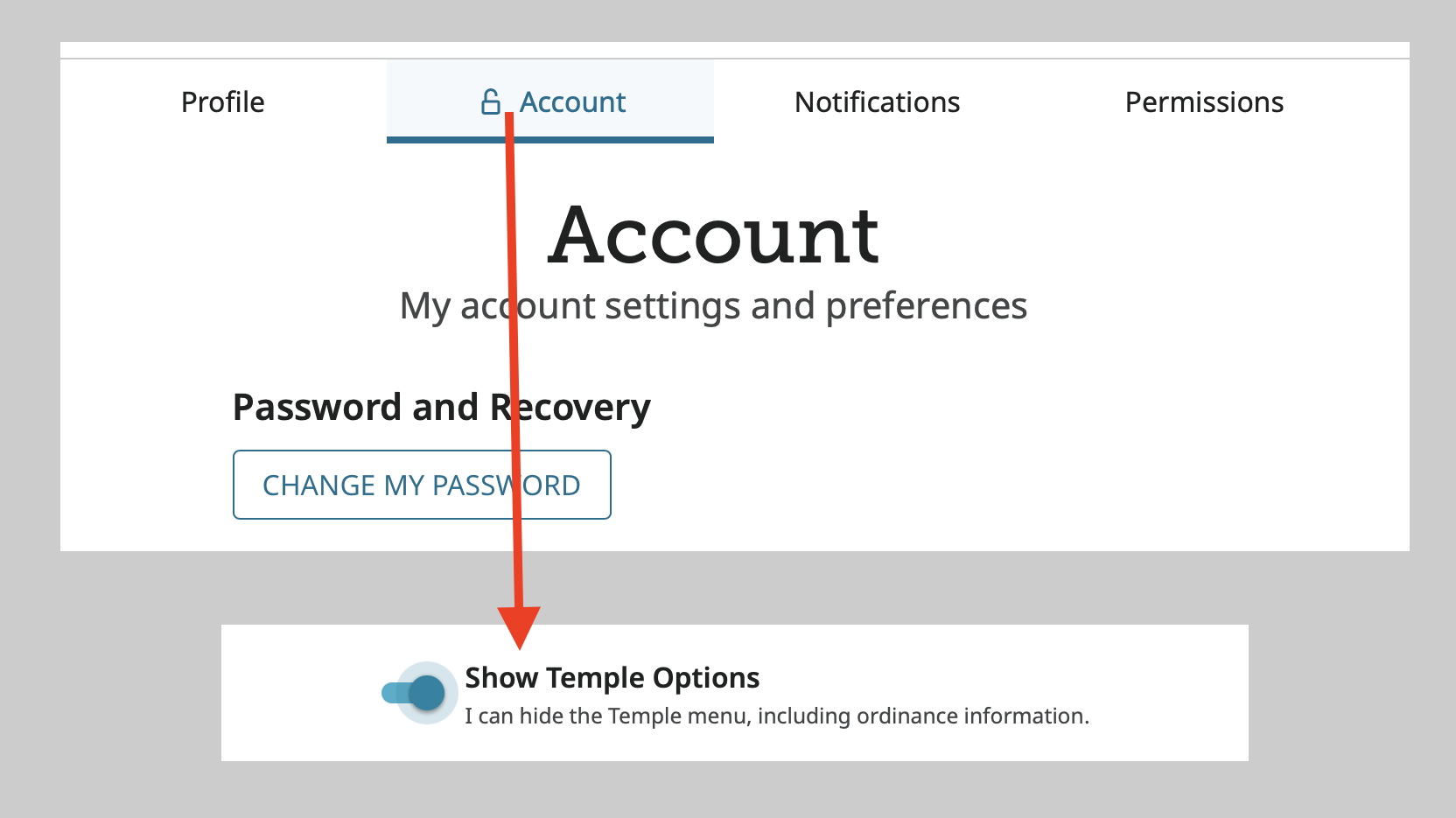
@CarolGP , go to your settings by clicking on your name in the upper right hand corner of any FamilySearch page and clicking on Settings. Click the Account tab and sign in again. Scroll to the very bottom and turn off "Show Temple Options."
This will remove the Temple link in the main menu, the display of Ordinances Ready on the home page, the list of Temple hints on the home page, and the Ordinances tab on every profile page.
Whenever you need those items, just go back to Settings and turn it on again. Just get in the habit of turning that setting off when done so that the next time you open FamilySearch those items won't show when you don't want them to.
 1
1 -
@Gordon Collett Thank you Gordon. Excellent directions with the right details.
0