
How do I reconcile a "Conflict Free Data Issue"?

My great grandmother had only one daughter who was named after her mother. Both women have the same name. The daughter was married after her mother passed away. Apparently FamilySearch thinks the mother was married after she died. How can I reconcile the event entry by noting that it was the daughter who was married after her mother passed away? I'm unable to find any way to clear the "Conflict Free Data Issue". I'd just like to note that there is no conflict. Thanks.
Best Answer
-
You are correct that the error flag "married after death" cannot be dismissed because the likelihood of such an event is as close to zero as you can get. However, the routine is probably functioning properly and is pointing out an error on your great-grandmother's profile page.
Since you did not post a profile ID, I can only guess but most likely there is marriage data on your grandmother that is incorrect which may have been put there when someone attached an incorrect source to her.
To check this, click on the marriage information edit pencil icon for your great-grandmother to open the couple event editing box:
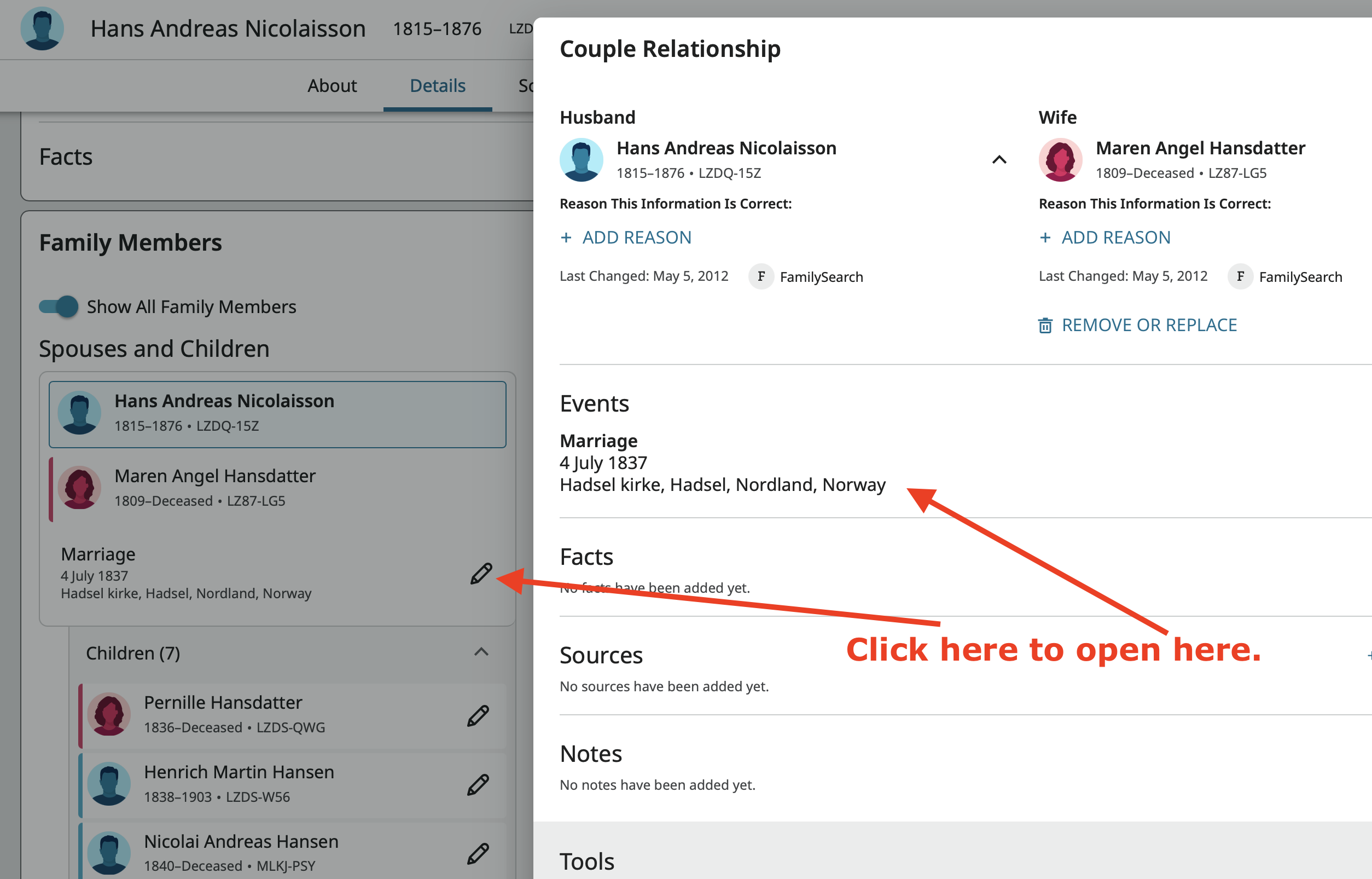
I think there is a pretty good chance you will see at least two marriage events here which will be your great-grandmother's marriage and her daughter's marriage. Only the earliest marriage date appears on the profile page. All other events can be seen only on the Couple Relationship popup. If this is the case, simply delete the daughter's marriage information and the flag will clear.
You will likely see a source for the daughter's marriage in the same popup under Sources. Click on it expand the source, then click View Attachments, and fix any incorrect source attachments.
Then be sure and go to your great-grandmother's sources page where you will likely find a source for her daughter's marriage with incorrect attachments. Fix those attachments.
If this is not the reason for what you are seeing, you are going to need to post the profile ID for your great-grandmother for anyone to find the problem for you.
What you have run across is the Data Quality Checker doing exactly what it is supposed to do which is to help us find errors on a profile that otherwise can be rather hard to find.
1
Answers
-
Thank you, that worked. The second marriage listed there was for her husband who was married again after she passed away. That second marriage had nothing to do with my great grandmother. Anyway, it's straightened out now and there is no more conflict. I really appreciate your response.
1 -
Good to hear you fixed it. If you check through the change log, you should be able to determine which user accidentally added that marriage information. Don't be too surprised to find you did it yourself several years ago! We all do that kind of stuff!
1