
Combine Living and Deceased in My Family Group Tree

Is there anyway to combine both living and deceased relatives in a group tree? I'd like to have a private group showing a deceased ancestor and all descendants from that ancestor, both living and deceased. The point being to show relationships of living cousins and how we are related through common ancestors.
Comments
-
Deceased people are always in the main, public section of Family Tree. As soon as any living person in a Family Group tree is marked as deceased, that profile becomes public.
If you would like to have a group tree that is limited to just one descendancy line and limited as to who can do any editing in the tree on all profiles in that tree, living or deceased, you might want to check into setting up a CET tree. See: https://www.familysearch.org/en/labs/docs/CETsLearnMore
0 -
Once you add a parent from the FamilySearch Tree to one of the living ancestors (elders) in your Family Group Tree, you will be linked up to the entire public tree. Viewing from the Family Group Tree will be seamless back to the top of the FamilySearch Tree.
0 -
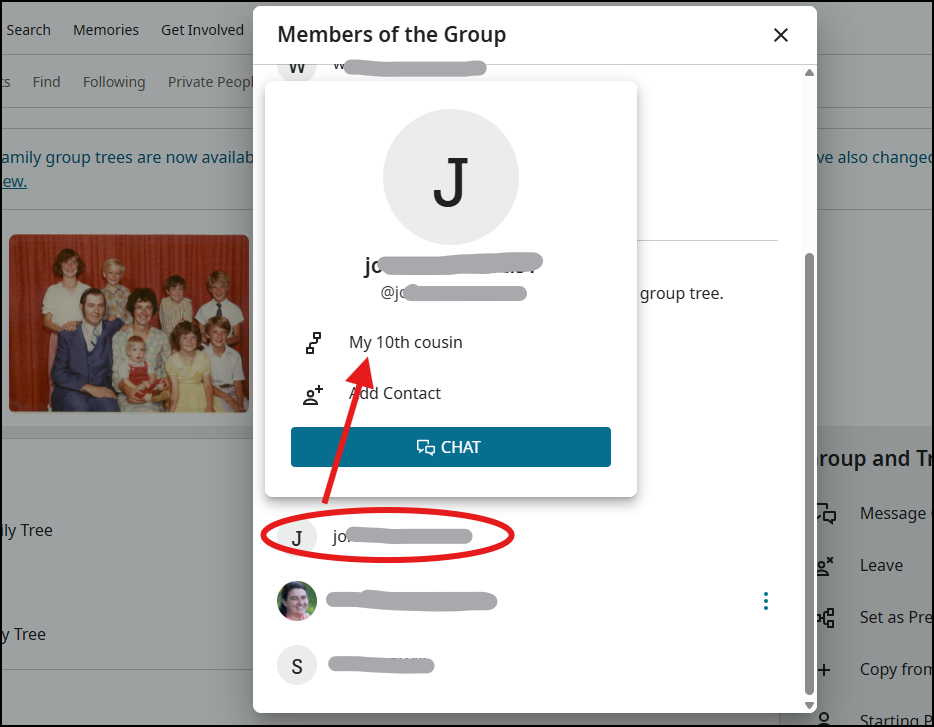
@tom clark As explained above, your living people profiles in the family group tree can be linked to the deceased people profiles in the FamilySearch Tree. While you cannot set a single ancestor as the starting person for everyone in your family group tree, anywhere that you see a group member's name, you can click on it to pop up their contact card and see how you are related:
 0
0
