
I am a Family Group admin but cannot connect my wife to our tree despite setting her Ancestor ID

Like several other users, I am so far unable to connect my wife (a new FS user) to our Family Group tree. She has set her Ancestor ID correctly in her Settings, which are saved and confirmed. FS even recognizes her full exact name as she appears in the Family Group tree that I can view. But even after signing out and back in, when she tries to view the tree (by clicking TREE) she gets the error "We couldn't find you in the tree". There is no ambiguity about maiden vs married names (she has only one anyway) because I am using her Ancestor ID to connect her. But it's not working. Please help, thanks in advance.
Comments
-
What do you mean by her 'Ancestor ID'? Would you be able to post screenshots of what you see when you go into the family group tree?
0 -
Sorry for the confusion: I was trying to be extra clear by using the term 'Ancestor ID', see below, but just confused things instead. I just mean the ID.
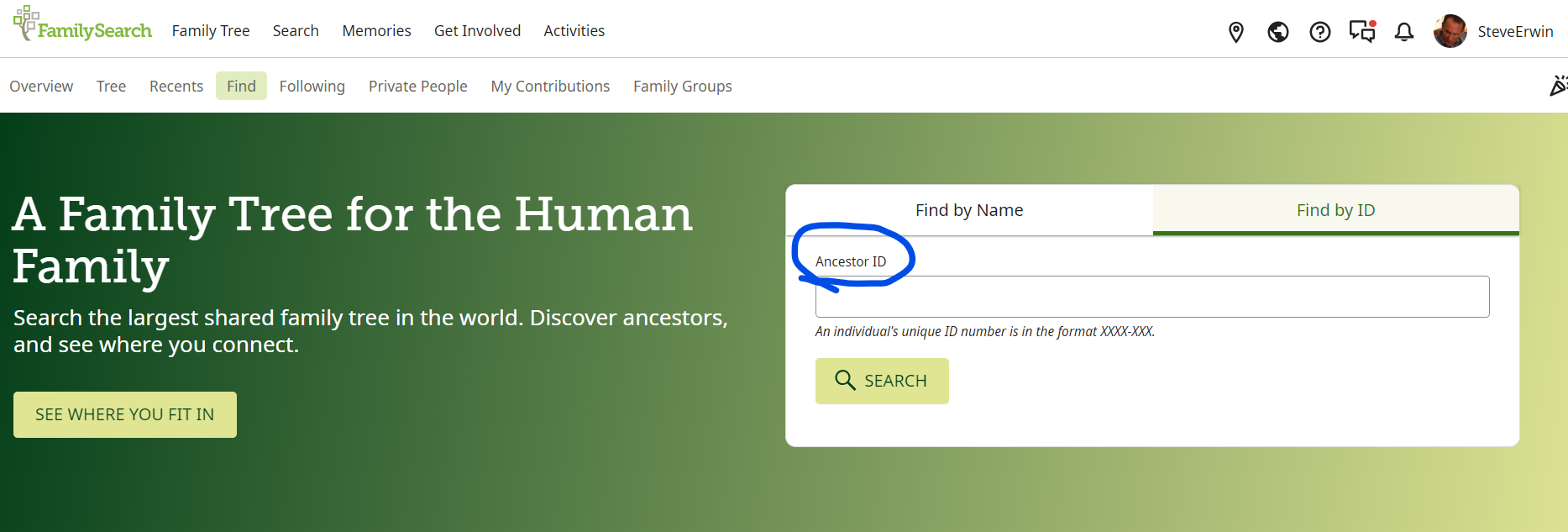
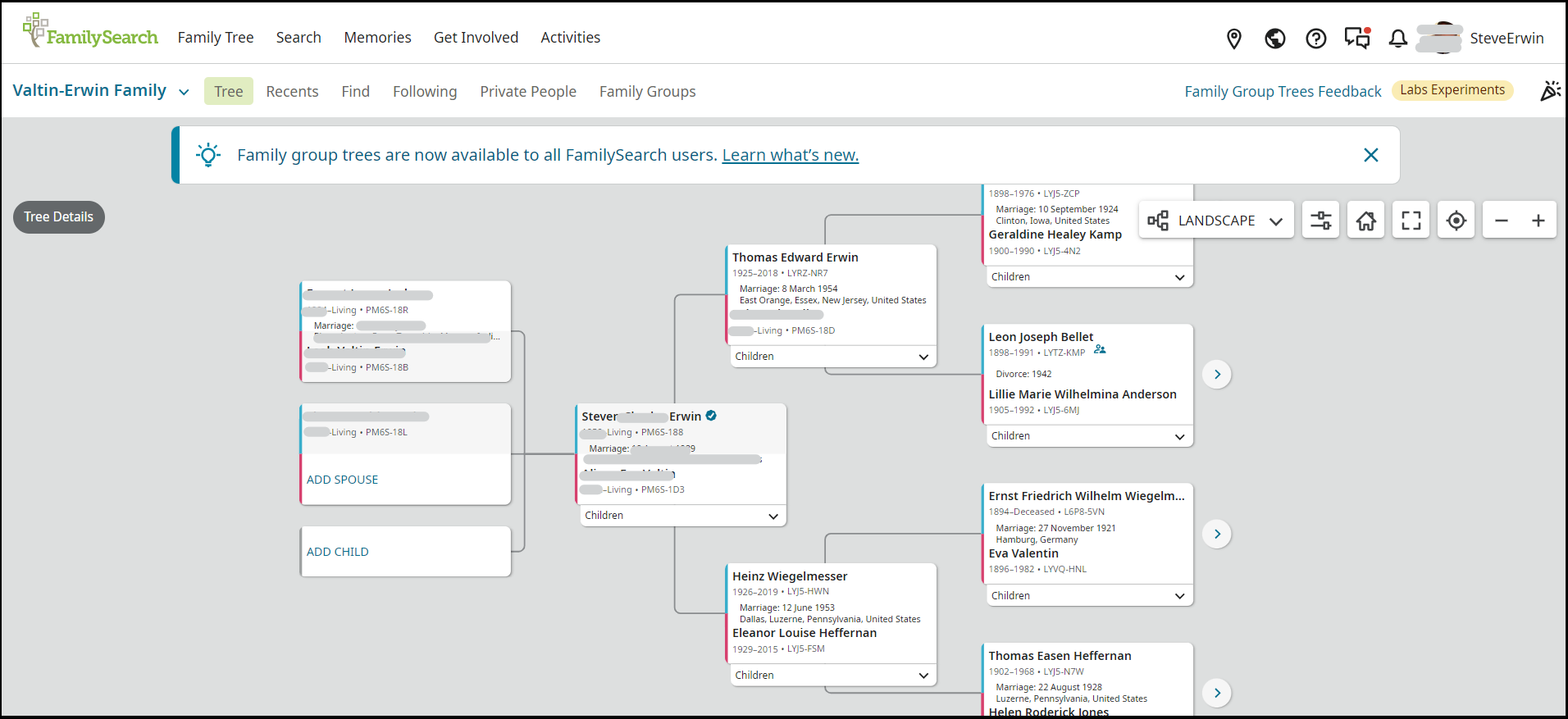
First, here is the "Valtin-Erwin Family" Family Groups tree I see from my account. It shows me (Steven Erwin) and my wife (name removed) at the center.
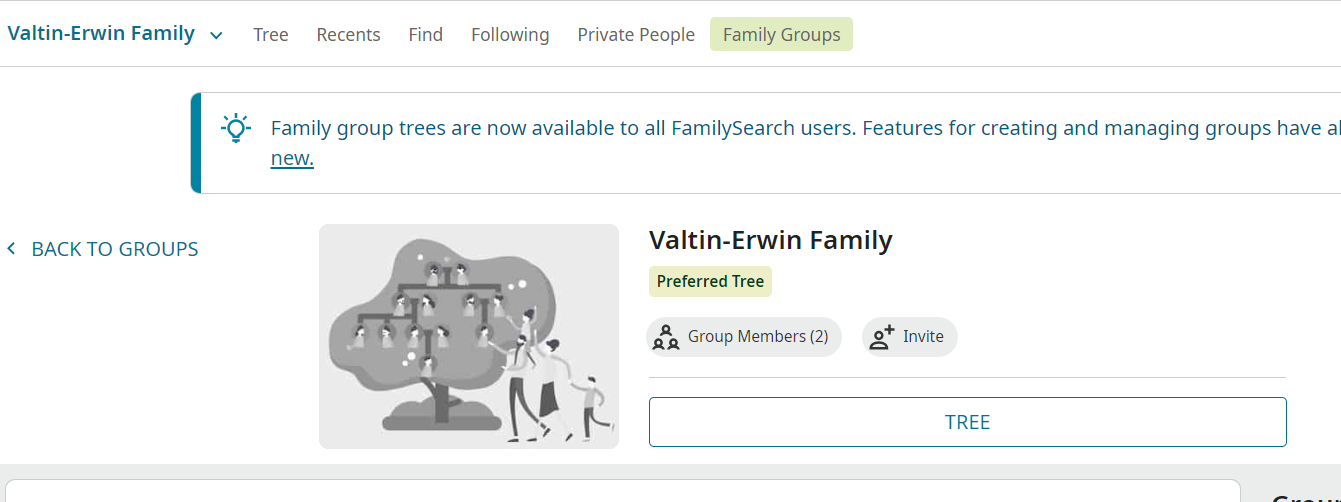
Backing out of the tree one level (to here is what I see, which looks perfectly normal and correct:
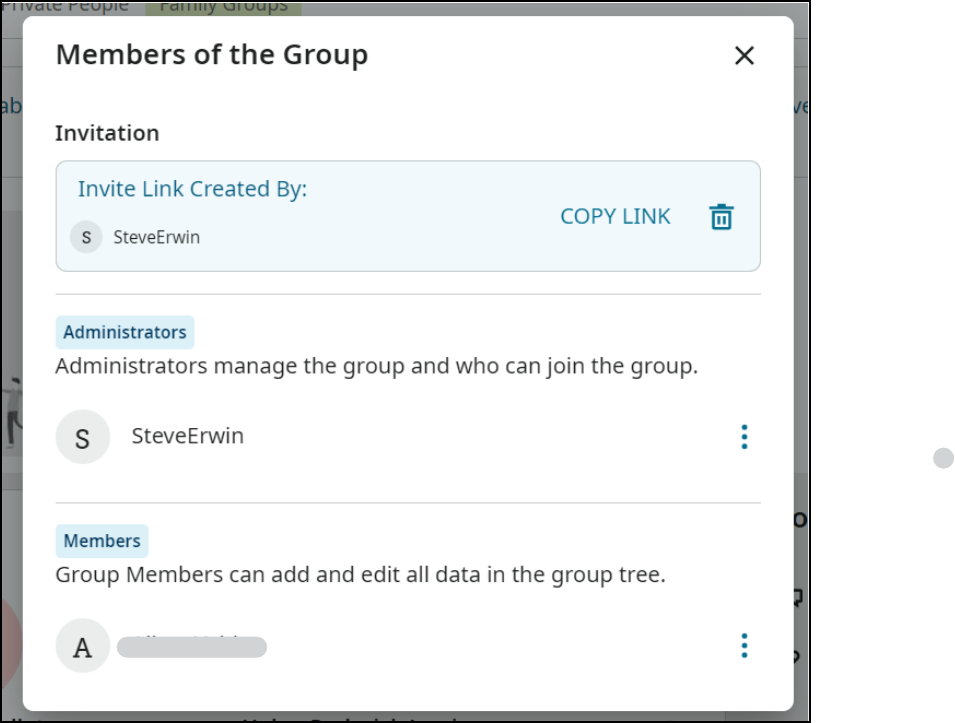
After clicking "Group Members (2)" we see me (SteveErwin) as the Administrator and my wife (name removed) as a Member:
Clicking her name brings up the box below. I don't know what exactly is pending: her request to join (that doesn't make sense because she is clearly a Member) or something else. Nor is it clear what I or she should to resolve this pending status.
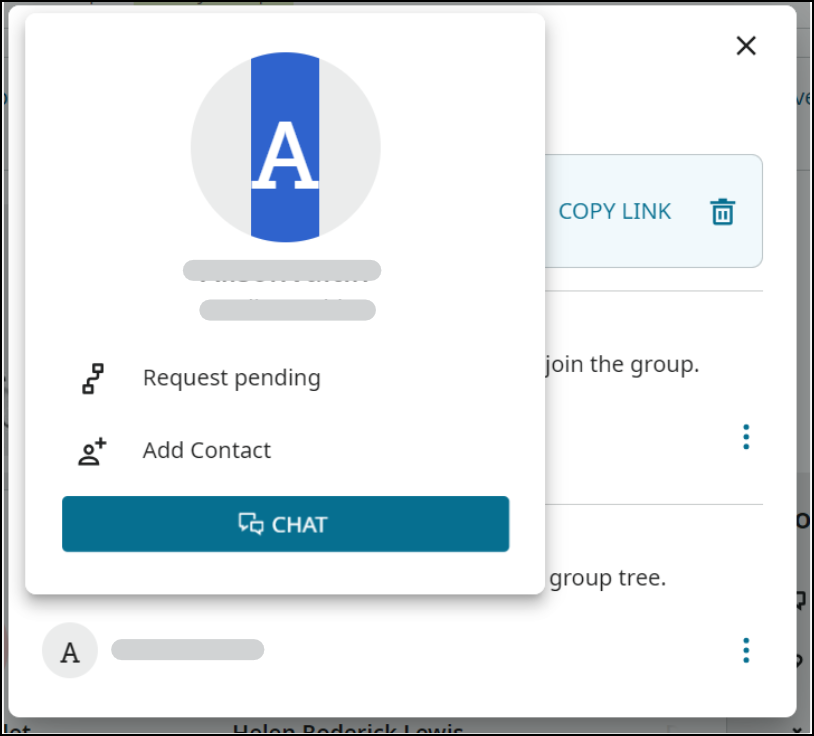
Now let's go to my wife's own separate account. Under her Settings/Account, she has set her ID to PM6S-1D3 and indeed she has been correctly connected to the existing person (name removed); I know this because never entered her middle name when creating her account, so FamilySearch clearly picked this up from her existing ID. She is a Member of Family Groups; I know this because the "Family Groups" menu item appears on the "Family Tree" menu (it would not if she were not a Member).
When she clicks the "Family Tree" menu item she indeed see the "Valtin-Erwin Family" Family Group and "Members (2)". But when she clicks this Family Group, an error message appears: "Need Help / We couldn't find you in the tree. This may be because no one has added you. Ask the administrator to help add you to the tree. ADMINISTRATOR HELP." By clicking the help button, she can send me a message, and I can read it. But I cannot think of anything further to do in order to add her.
Sorry for all the detail. Better too much than too little!
Thanks in advance.0 -
@SteveErwin Because Community is an online public forum, it can be seen be anyone anywhere. Your post was edited to protect the privacy of living people. Please see the Community Code of Conduct for more details.
1 -
Ok, thanks.
0 -
@SteveErwin Thank you! Your explanation and screenshots help immensely.
Can you clarify this statement for me?
Now let's go to my wife's own separate account. Under her Settings/Account, she has set her ID to PM6S-1D3
Are you stating that in her Account settings she has put in that ID as her Family Tree Starting Person?
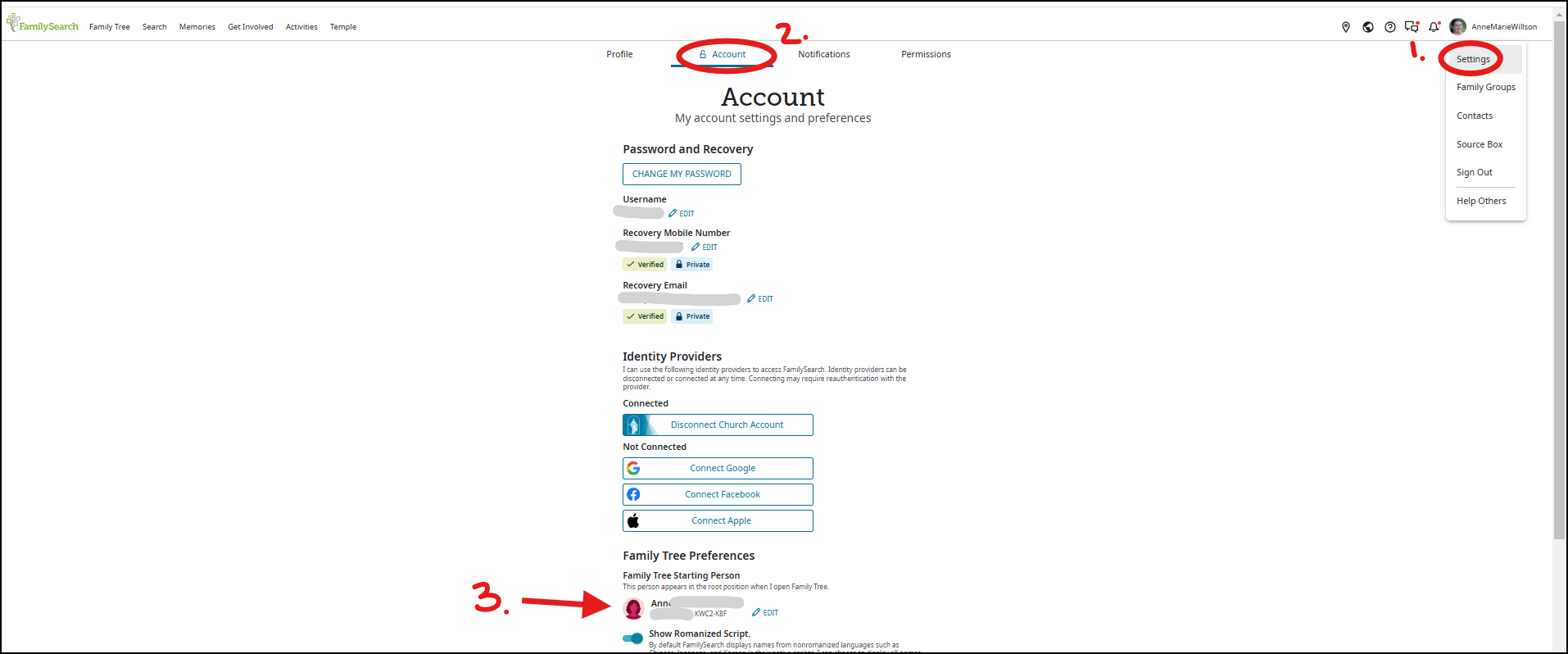
That is a very interesting action. I didn't even realize that you could set an ID from a family group tree in that location. Would you try something? On your wife's account, go to the FamilySearch Family Tree and see what her ID is there and put that ID in this Family Tree Starting Person place. Then go back to the Family Group and see if the system can match her to her profile in your Valtin-Erwin Family Group tree.
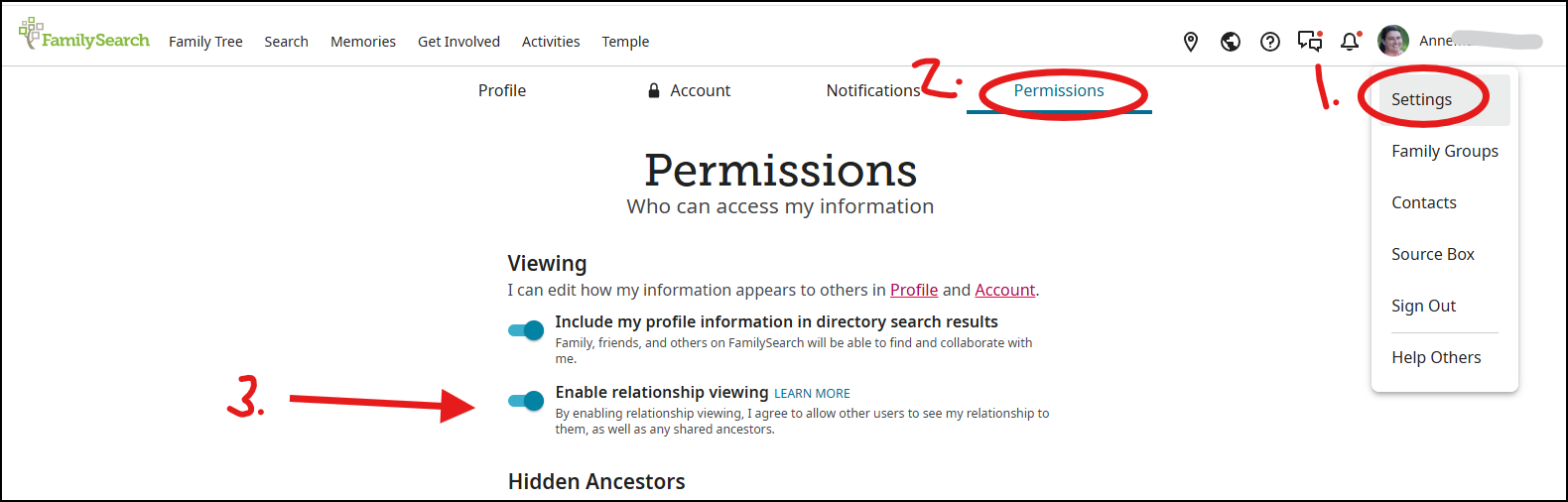
And regarding the 'Pending' that shows up on her popup card, that means you have requested that she allow you to see how she is related to you but she has not yet turned on that option in her account. You can turn on that option in Account > Permissions:
 0
0 -
Thanks for helping. I didn't mean to suggest that I 'set [my wife's] ID from a family group tree'. Rather, she (with my help) went into her Account/Settings and put her ID in as the Family Tree Starting Person place, just as you suggested. Then she went back to Family Groups and tried to access the group. The same error always results: "We couldn't find you in the tree."
What information does the system use to find a living person in the tree created by another person, which that person has copied to a tree in a Family Group in which the first person is a Member? Her full name (first, middle, last) and exact birthdate do not seem to be sufficient. Her name and birthdate appear in my private tree (and copied to the Family Group tree) agree exactly with the ones she entered in her new account. I do not know what else to try.
Any further help you can help will be greatly appreciated!
0 -
Success, finally! Here's what happened.
I noticed that there were two small and seemingly minor discrepancies between my wife's record in my private tree and the account she created for herself: in my private tree only her birth year was listed, and in her new account she didn't include her middle name. I don't understand why one or both of these defeated FS's matching algorithm, but by fixing them she was finally connected to the right starting person.
Thanks for all your help, I really appreciate it!0 -
There are multiple points of confusion. I'll try to straighten them out one by one.
"Request Pending" when you click your wife's Contact ID: As AnneLoForteWillson explained, this has to do with the setting for enabling relationship viewing. It has nothing to do with your Family Group Tree (FGT).
Family Tree Starting Person: Each living person profile in a FGT can be connected to a user who participates in the associated Family Group. I'll explain that in my next section, but please note that this has almost nothing to do with the Family Tree Starting Person specified in Settings - Account (the FGT starting person is a default value for the Family Tree Starting Person, but otherwise has no connection at all). I cannot comprehend why FamilySearch chose to use the term "Starting Person" in both places; I have requested multiple times that the FGT term be changed (to something like "Connected Person" or "Associated Person"), but the confusion remains. Suffice it to say that nothing your wife does with this item in Settings will help get her connected to the FGT.
Starting Person (in FGT): This is what your wife needs to set, and which still has not been set correctly. We know this from your reports of her experience, but also because in your tree view, you have a check mark to the right of your name, but your wife does not. This is the all-important connection between your wife's user (her account on FamilySearch) and the person profile for her in the FGT.
Since your wife is already in the Family Group, she can set this as follows:
- Go to her Family Group by clicking on her name in the upper right corner, then choosing Family Groups.
- Then click on the particular family group (Valtin-Erwin Group).
- This will show the dialog that says: "Need Help: We couldn't find you in the tree. This may be because no one has added you. Ask the administrator to help add you to the tree." Just close that dialog (click the X).
- On the right hand side of the screen is a section with title "Group and Tree Settings"; she needs to choose the Starting Person option in that section.

- That will pop up a Starting Person dialog. Click SELECT.

- She will then see a list of all the living females in your FGT. She can select the one that represents her.
- She will then be connected and can start using the FGT.
Just a side note for the future: If you want to invite other people to join your Family Group and your FGT at the same time, you just need to do the following:
- From your Family Group page, click the Invite button. That will remind you that you previously need to add to the FGT anyone you invite. They might be a child or sibling or parent of yours — they just need to be in the actual FGT (not just in the Family Group).
- Copy the link
- Paste the link into any convenient communication method (email, SMS, WhatsApp, etc.) and send the invitation link to the person you want to join.
- When they click on the link, they'll need to sign in to FamilySearch, then Join the group.
- As a group administrator, you then need to accept them into the group.
- Then they would go through the steps above to connect themselves to the FGT.
0 -
@SteveErwin Glad you were able to connect your wife's account to her family group tree profile.
@Alan E. Brown Thanks for that workaround. It is one that I haven't thought of. And regarding the confusing 'Starting person' in both locations…we have submitted a request to use different terminology to the product team. Waiting to see what their decision is.
0 -
The setting to make you a starting person as a new invitee to see the family group tree is really dificult and cumbersome for a person that is computer illiterate. I invited my brothers/sisters, still living, to a family group, I approved them and they could not see the tree until I went through the difficult process of making them the starting person. It should just work after I approve and it doesn't.
1

