Date and place standardization (person pages)

Comments
-
As noted above, I have already tried the incognito mode on various browsers (Chrome, Firefox, and Edge).
Now other issues have arisen -1. Date and place standardization (person pages)
When I edit a date or place, the dropdown box that offers the standardized version is no longer clickable. Selecting a standardized date does not change my entry to the standard format, and the same is true for places. As a result, I can’t correct entries to the standardized forms.2. Memories page: Improve Tag
On the Memories page, when I choose Improve Tag, the tagging box can no longer be moved. I can’t drag it over the correct person’s face or area, so I can’t tag the appropriate person.0 -
@JBAncestry Thank you we split your Date and Place Standardization questions from the original Search thread.
We like to keep things tidy here and have one thread per topic. Please start a new thread in Memories to have someone help you with issue #2
0 -
Hello - any updates on the date and place standardization drop boxes not working? This issue continues. I am able to work in incognito mode and it works there. I have tried various platforms and have cleared cookies, so that does not appear to be the issue. Thank you for any help you can provide!
0 -
@JBAncestry I'm not seeing any change in the way that standardization drop boxes work. Here's what I'm seeing (how it has worked for a long time):
A standardized place can be shown like this (there is a second possibility, which I'll get to later):
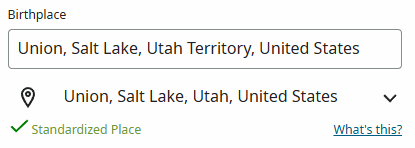
I can click in either the upper box or the dropdown below, and they do two different things. First, you should click in the upper box if you want to change the displayed place to match a standard place. When you do that, you see something like this:
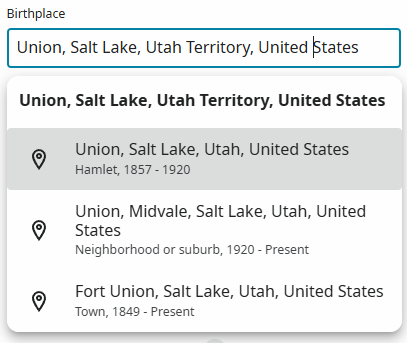
If you select a place from that list, then the displayed place (in the box) will match the selected standardized place, and it will now look like this:
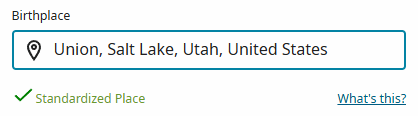
Notice that the separate dropdown is now gone — it is not needed, since the displayed place matches the standardized place exactly.
Going back to my first screen shot, the second option is to click in the dropdown for the standardized place. This should be your choice if you want to keep the different displayed place in the box, but choose a new standardized place. That looks like this:
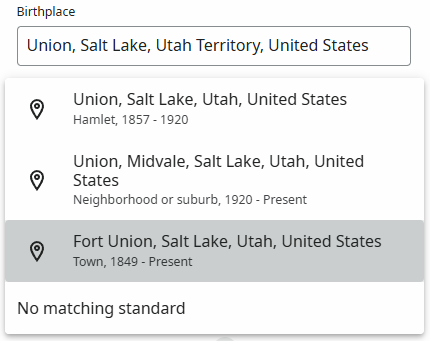
When I have selected a different standard from the dropdown, the displayed place remains unchanged, but now I see a new standardized place:
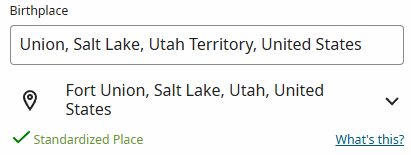
The second possibility of what you'll see when you edit a place is something like this:
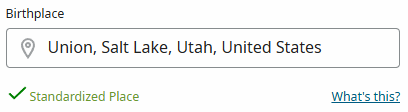
That's what happens when the displayed place already matches the standardized place. You can't click on the Standardized Place, and that is how it has always worked. If you want to change the displayed place, you need to click in the box and then type a new place or edit the existing place. Then you'll have options to choose a standard.
If you're seeing something different from this, please provide screenshots and/or detailed steps so that we can understand what you're seeing. It would be helpful to get a particular person ID and event (something like "the birthplace for KWCC-V7L").
2