I need help correcting a person-tag display problem.

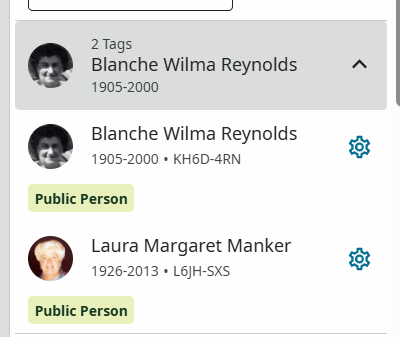
Two different people, Blanche Wilma Reynolds (KH6D-4RN) and Laura Margaret Manker (L6JH-SXS), are tagged correctly in their memories, but the displayed tag name has become the same for both people.
I think I accidentally changed a tag name somehow, and it appears to have affected the saved tag name for both people. I deleted both tags and recreated them, including tagging the photos from each person's page, but it didn't fix the problem.
I need help separating the saved person-tag names so that they display correctly for each person.
Answers
-
@VickiLCarter I've heard of this before. Is there a particular photo you're referring to? But generally, this will help.
Here’s the method that usually corrects the problem:
- Go to each person’s Tree page
- Click Edit on their name
- Make a tiny temporary change (add a space or punctuation), then save
- Go back to the photo and remove the incorrect tag
- Re‑tag the person from their own person page
- Refresh your browser
This forces FamilySearch to regenerate a fresh display name for each tag, and it separates the two names again.
Sharing this in case it helps you or anyone else who runs into the same issue. If you this doesn't fix the problem, please reach back out and we will investigate further, but is should.
0
