United States Obituary Collection - record hints

The contents of this third party collection of source hints are all Canadian obituaries extracted from Canadian newspapers so I'm not sure why its called United States Obituary Collection. It has been my opinion that family search strives to provide accurate source materials to its users, I find these records tend to create wrongful information in its AI generated transcriptions. Place names in the location of a DEATH or BURIAL are changed from places in CANADA to a place of the same name in the UNITED STATES - As an example: London, Ontario, Canada gets changed to London,Ohio, London Arkansas, London, Kentucky. In many cases the death dates are also incorrect. This displaces a persons death place and burial far away from the actual location. I feel that this is something that needs to be addressed by family search by keeping the death and burial locations within the boundaries of Canada where they belong so researchers add correct info.
Answers
-
There are at least two issues here.
The first issue is the known problem with inaccurate standardised places output by FS' algorithms. This doesn't just apply to this collection. Please post URLs when you find such erroneous place interpretations, and tag the relevant moderator @SerraNola who can (and successfully does) escalate them.
The second issue is the accuracy (or lack of it) of both the transcripts and (largely consequently) the indexing of this collection. You will find that this has been discussed in many threads here on Community.
I personally am also very nervous about the recent information in this collection for privacy reasons - many living people appear in the transcripts who may or may not be happy for their details to appear not just in a local newspaper back issue but also for public view and search on a high-volume global website. I do know, however, that this is a grey area.
3 -
I am getting to the point where I no longer wish to contribute to family search. There is no easy way to advise them of problems they should be looking in to. I do not add the united States Obituary Records because of errors and privacy concerns for families. They also fill in the hints column so many times on a persons ID page whenever their name is mentioned on an obit of another family member. There are more errors in each obit which makes things even more confusing.
2 -
When this collection was first made available, if you viewed the source record, a warning message was displayed that stated that the record had been created by a computer and might contain errors. There was also a button that could be used to report such errors. It was only a short time thereafter that both of these features disappeared. I can only assume that, whatever the mechanism was that dealt with such reports, it must have been overwhelmed with reports. I know that I reported dozens of records with date, place and personal name errors during the short time window when that was possible.
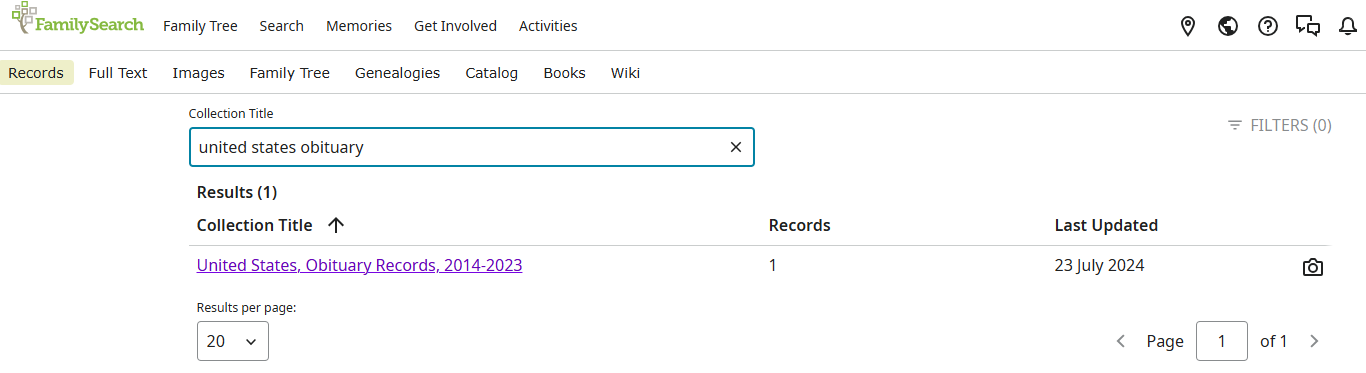
My confidence in that collection is not improved by looking at the collection information that is displayed when I Search » Records » BROWSE ALL COLLECTIONS and enter the collection name into the Collection Title box. According to that information, the collection contains a grand total of one record.
 1
1 -
This obituary collection has received much criticism for frequent errors, including false information about living individuals. While some changes were made last year, it was determined that the records' value outweighs their drawbacks.
The title and date range are being updated to reflect broader geographic and date coverage. Place name errors that come up in Search are also well documented—there are NO obituaries from Zambia in this collection. All other errors, including death dates originate from the third party creators of the index and usually can be edited.
@Janedsmith I do hope you will continue to contribute to FamilySearch and know that your voice is heard in Community. All community posts are monitored and problems relayed to engineers, though addressing these issues can be delayed due to heavy workloads.
Thank you for your feedback!
1 -
it's a shame that people have to jump through hoops to report errors. Obituary Suggestions have absolutely no Limitations on Privacy and Protection for the Living. Obituaries are meant to be Local News for Communities. Also Country Location Wrong.
FYI if the Living knows this is going on for world wide, there can be Issues. No excuses, just plain Respect and Common Sense needs to be used. The programmers of Python better get it to gether. Websites and companies cannot use obituaries for commercial purposes without permission, and families can take legal action against unauthorized commercial use. So in Attached Source's Dismiss the unfinished attachment, that Non Family Searchers have Attached. Non Related Searchers that Knit Pick and delete information is that Fair.
The Site has messed up since February of 2025. The list can go on and on. Users it's not your devices fault, it's the software language between F.S And your device communicating Error.
Record Images with Family Members Highlighted, and Find A Grave Headstones or any type of Markers Not Allowed. Ancestors history says so much, but gets deleted, not by Family. Mmmm. Memories Profiles Headstone or Footstone Image Identification in Profile Image helps to keep families correct, that gets deleted by F.S ( Why ) Census Records same Thing Deleted.
0 -
@KenK-Family the majority of posters here are ordinary users. If input from FS staff is wanted, it's suggested that we flag the post/comment for moderator assistance.
0 -
@KenK-Family They do monitor Community threads, but they wouldn't necessarily intervene. If your problem needs attention specifically from FS staff, especially within a short time period (e.g. when reporting urgent matters such as serious website problems or serious bugs) you are best using the flagging mechanism.
1 -
Moderator Note: Multiple replies to this discussion were removed for violations of the Code of Conduct.
2 -
Interesting Read and Explanation on Code of Conduct. Google A.I Information On Obituaries
Key principles of a code of conduct for truth in ancestry
Prioritize accuracy:
Do not publish or publicize information you know to be false, doubtful, or unproved.
Fully and accurately cite all sources and refrain from withholding, suppressing, or knowingly misquoting data.
Respect the living:
Be sensitive to the feelings of living relatives and avoid causing unnecessary hurt by publishing negative or sensitive information without a strong justification and, ideally, consent.
Obtain written consent before sharing personal or genealogical information about living individuals, respecting any conditions they may impose.
Never share personal identifying information about living people (like addresses) unless they have expressly agreed to it.
Be truthful and professional:
Honestly advertise your services and credentials.
Clearly explain all fees, charges, and payment structures.0 -
Your Absolutely spot on Janedsmith. When attaching there should be an EDIT Button to remove the Living people names and Correct Locations. Unfortunately the only answer is Algorithm.
These codes emphasize ethical research practices, data privacy, honesty in reporting, and avoiding misrepresentation of results. Main goal for Searchers is to identify their Family Connections for Correctness and Respect. But don't identify them by their Profile Image.
Thank you Google for research information.
1 -
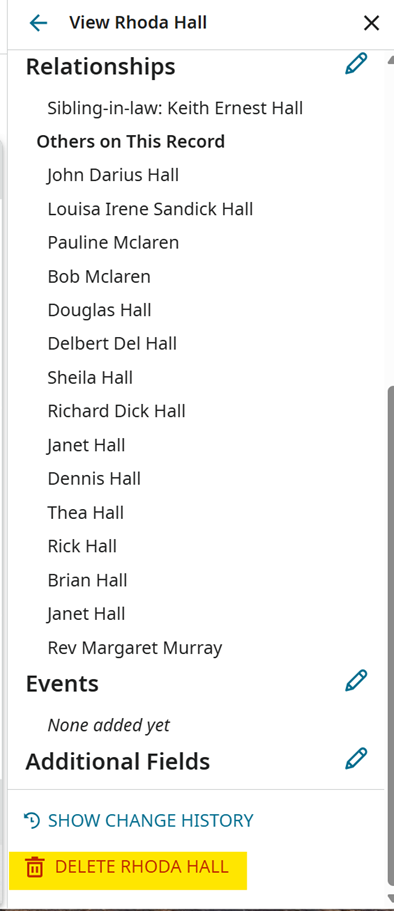
@KenK-Family As I mentioned in my previous post, these records can be edited. There is no edit button on the record details page because the index comes from a third party, so you need to go to the image to edit. Correct all names, dates, places and DELETE any names you do not want indexed.
1 -
Well Serra Followed your advice. No Luck. The edit button Disabled. Only buttons available are Save and Share. Here's the link to my Cousins 'brother's obituary source page. ( Woodstock, ON, CAN) | Date of Publication: 11 Jun 2021 Obituary for Keith Hall ) Very Apparent Correct Information on Location at top of source Image. So help me Understand when the suggested source is already attached, and if and when it can be Edited for Correctness and Respect and Privacy, will it change in the attached source automatically for all its attached to. This is information is also for the Original Poster. Out of Courtesy will other Searchers be notified How to do it All so.
https://www.familysearch.org/ark:/61903/1:1:XM4P-49FJ?lang=en
0 -
Here is a bit more detail of how to edit this index. As @SerraNola says, you need to edit from the image, not from the Record. This particular image is a bit harder to access than usual because there is (as far as I can see, anyway) no direct link to it from the Record.
(I tried to add more screenshots but they would not behave - let me know if you need any more.)
First, find the Document Information on the record and click the down arrow to see the image details:
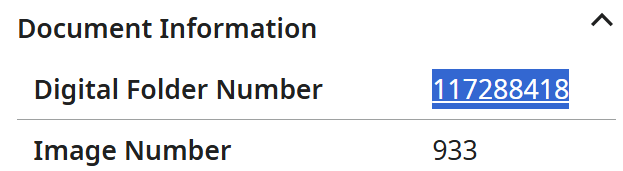
Now, access the digital folder via this URL (note that I have inserted the 117288418 Digital Folder Number from the Document Information at the end):
https://www.familysearch.org/en/records/images/search-results?imageGroupNumbers=117288418
Click on the
Change the number in the 'Image' box from 1 to the correct Image Number of 933,

and press Enter.
Click into the image.
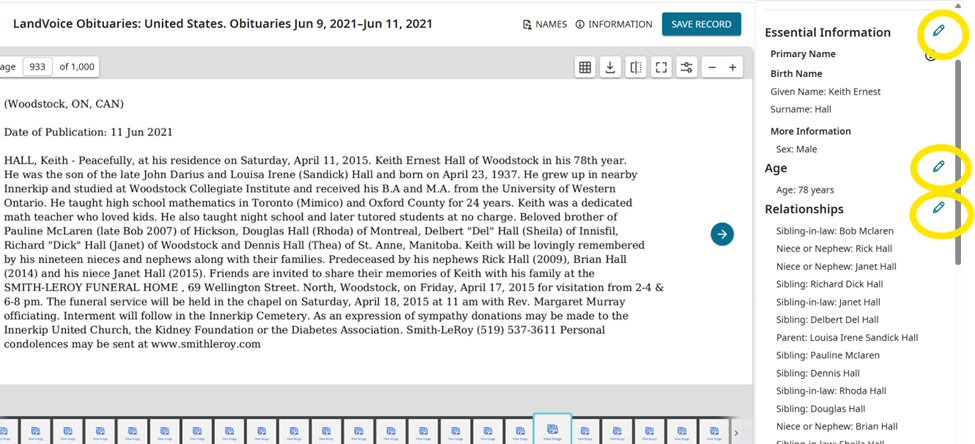
Click on the NAMES button to view and edit the index.
0 -
(Apologies for the awful formatting of the above - Vanilla 1, Mandy nil.)
0 -
Followed your suggestion. I clicked on Digital Folder number and it gives searches Page informatioon on multiple people. No Editing options. Could be because its from a 3rd party site. No Source of Originated information from. Ive done alot of poke ( click ) and play. Back to the 70's Hoola Hoops.
Document Information
Digital Folder Number
117288418
Image Number
933
Originating System
CAI:SFT0 -
Sorry if I was unclear but I didn't say to click on the Digital Folder Number on the Record display, I know that gives you an unhelpful list of Record search results.
You instead need to click on this URL (which I got by searching Images for this Digital Folder Number instead of Records):
https://www.familysearch.org/en/records/images/search-results?imageGroupNumbers=117288418
and click into the single result you'll get there, then change the image number to 933, then click into the image, and finally click NAMES.
1 -
No you were clear. All I get is a blank screen. No connection, even with your link. I Think I'm Restricted from using that Option. It's happened in other Areas also to make corrections to other Records incorrect transcribed. FYI I'm not the only Canadian wanting Records Changed for Correctness and Respect and Accurately describing the Family Members. I've made alot of friendships in helping with family I've never meet. Even with typing this message the page won't show up. I don't think there's hope for the change. The identification of were the record was obtained from is hidden ( 3rd Party ). So thank you for assistance. Regards Ken
0 -
There's a bug in Image search which may be causing the blank screen. Try maximising your browser window and zooming it out a couple of steps, that works for me.
This isn't the most usable collection, which is where this thread started, and the third party indexing does mean you have to edit from the image not the record, but when all's said and done this is a free service and realistically it's a lot better than nothing.
To propose changes, the Community Suggest an Idea page is where we are asked to go.
0 -
@KenK-Family Mandy’s instructions for opening an image are accurate, except in this case where FamilySearch doesn’t provide actual newspaper article images—only OCR transcriptions from a third party. There is no bug.
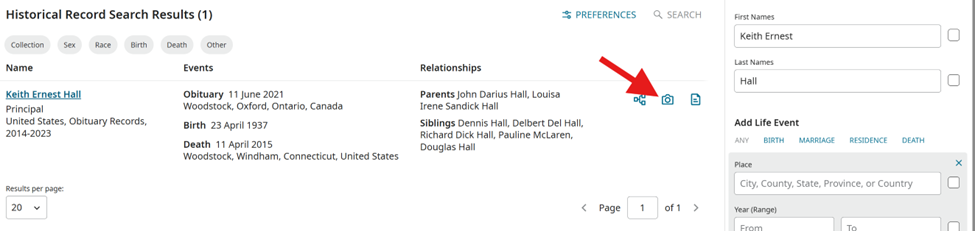
You can still edit from the image page, and the simplest way to get there is to follow Mandy’s steps but click on the DGS number from the Record Details page. When you said you clicked the Digital Folder number and saw Page information for multiple people, that’s exactly the right place. Type "Keith Ernest Hall" in the search box and search:
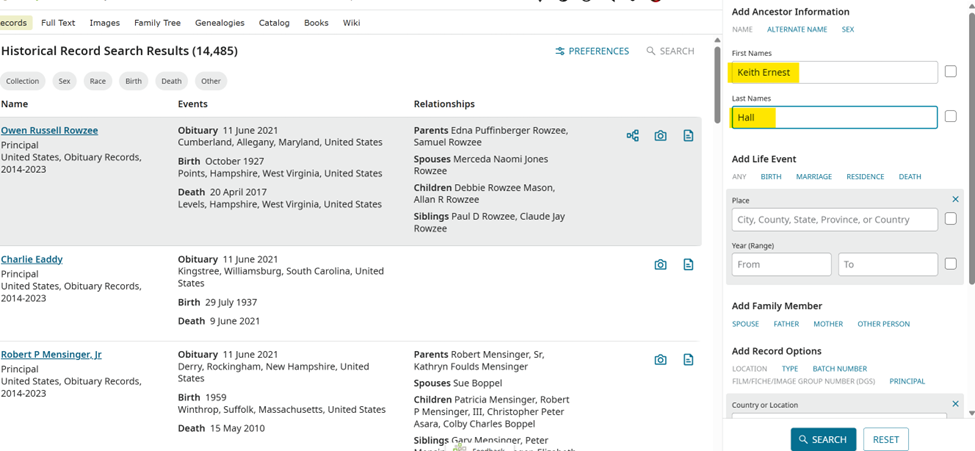
Click on the camera icon:
Edit by clicking on pencil icons:
Delete button is on the bottom for each persona in the index:
 1
1 -
Also, no worries about records already attached. When opened, your edited version will be displayed. Please keep in mind that we are experiencing system-wide errors with our editing function. There have been improvements in the last few days, but we are still monitoring. Any issues you encounter will not be specific to this collection.
0 -
Thanks @SerraNola, I suspected I'd missed something obvious!
0 -
Thank You for the image. So with me editing the source file already attached to one person, won't change it for the other family members Source's attached. Unfortunately the other Searchers with the same Concerns will not know this. For Privacy the Living shouldn't be listed, that's the concern from pervious posts that got deleted. Software issues is easy to fix Understand the program language Python. So have a nice
0 -
Oooops forgot to ask, other Searchers having problems with Memories being deleted, is that also a software issue. Or is that called storage cleaning.
0 -
@KenK-Family Just to be clear, any reference in any profile's sources to the specific Record whose index information you have edited will reflect the up to date version of the index information when that Record is displayed (each Record has only one associated set of index information covering all the people aka personas mentioned on it).
As I mentioned above, Suggest an Idea is the place to go if you want to propose more 'strategic' changes to FamilySearch.
I don't know which programming languages are used within FamilySearch, but it's important to take into account that many of the problems we encounter here are in the data and/or in the ever changing rules that apply to our access to it - not in the software.
1